Configuring the WAPT server with Kerberos without requiring authentication

Questions about WAPT Server / Requests and help related to the WAPT server
Forum Rules
Community Forum Rules
* English support on www.reddit.com/r/wapt
* French community support is available on this forum
* Please prefix the topic title with [RESOLVED] if it is resolved.
* Please do not edit a topic that is tagged [RESOLVED]. Open a new topic referencing the old one.
* Specify the installed WAPT version, full version, and build number (2.2.1.11957 / 2.2.2.12337 / etc.) as well as the Enterprise/Discovery edition.
* Versions 1.8.2 and earlier are no longer supported. The only questions accepted regarding version 1.8.2 are related to upgrading to a supported version (2.1, 2.2, etc.).
* Specify the server OS (Linux/Windows) and version (Debian Buster/Bullseye - CentOS 7 - Windows Server 2012/2016/2019).
* Specify the OS of the administration/package creation machine and the machine with the problematic agent, if applicable (Windows 7/10/11/Debian 11/etc.).
* Avoid asking multiple questions when opening a topic, otherwise it may be ignored. If there are multiple topics, open separate topics, preferably one after the other and not all at the same time (i.e., do not spam the forum).
* Include code snippets, screenshots, and other images directly in the post. Links to Pastebin, Bitly, and other third-party sites will be systematically removed.
* As with any community forum, support is provided voluntarily by members. If you require commercial support, you can contact Tranquil IT's sales department at 02.40.97.57.55
RebeccaS
Messages: 10
Registration: January 31, 2020 - 09:47

January 31, 2020 - 11:12

WAPT Server version: 1.8.0
WAPT Agent version: 1.8.0.6641
WAPT Setup version: 1.8.0.6641
WAPT Deploy version: 1.8.0.6641
Database status: OK (1.8.0.0)

Server OS: Linux/Debian 10.2
Operating system of the administration/package creation machine: Windows 10

Good morning,

We are currently in the testing phase of the WAPT community version solution before migrating to the Enterprise version.

I followed the following configuration:

https://www.wapt.fr/fr/doc/wapt-securit ... 20machines

in order to authenticate machines via Kerberos before they are registered.

The setup went well, but I would like to know if there is a way to set up this configuration without having to enter the admin ID to register the machine.

auth_wapt.png
auth_wapt.png (14 KB) Viewed 9658 times

Should the credentials be put in the server configuration file or the client configuration file?

I tried modifying the server configuration file /opt/wapt/conf/waptserver.ini by setting the value allow_unauthenticated_registration = True

[options]
waptwua_folder = /var/www/waptwua
server_uuid = xxxxxxxx-xxxx-xxxx-xxxxx-xxxxxxxxxxxx
clients_signing_key = /opt/wapt/conf/ca-xxxxxxxxxxxxxx.lan.pem
clients_signing_certificate = /opt/wapt/conf/ca-xxxxxxxxxxxxx.lan.crt
wapt_password = xxxxxxxxxxxxxxxxxxxxxxxxxxxxxxxxxxxxxxxxxxxxxxxxxxxxxxxxxxxxxxxxxxxxxxxxxxxxxxxxxxxxxxx
use_kerberos = True
allow_unauthenticated_connect = False
allow_unauthenticated_registration = True
secret_key = xxxxxxxxxxxxxxxxxxxxxxxxxxxxxxxxxxxxxxxxxxxxxxxxxxxxxxxxxxxxxxxxxx

When I launch the WAPT server in debug mode, I get this output:

2020-01-31 10:55:08,558 DEBUG Traceback (most recent call last):
File "/opt/wapt/waptserver/server.py", line 429, in register_host
valid_auth = auth_result and auth_result['auth_method'] in ['admin','passwd','ldap','kerb']
UnboundLocalError: local variable 'auth_result' referenced before assignment


Sincerely,

Rebecca
User avatar
sfonteneau
WAPT Expert
Messages: 2318
Registered: July 10, 2014 - 11:52 PM
Contact :

January 31, 2020 - 12:00

Good morning

If you want to enable Kerberos, you need to set the value

Code: Select all

use_kerberos=1
in the agent in wapt-get.ini

Next, to verify that the workstation is correctly negotiating a Kerberos ticket, you can run psexec:

Code: Select all

psexec -s cmd
wapt-get register
klist
If no ticket mentions wapt, it means your wapt server registration in AD did not go well (probably an SPN problem).

The username and password are only requested if Kerberos authentication fails
RebeccaS
Messages: 10
Registration: January 31, 2020 - 09:47

January 31, 2020 - 2:28 PM

Here is the wapt-get.ini configuration

[overall]
repo_url=https://wapt-server/wapt
send_usage_report=1
use_hostpackages=1
wapt_server=https:///wapt-server.lan
use_kerberos=1
check_certificates_validity=1
verify_cert=0
use_repo_rules=0
dnsdomain=
max_gpo_script_wait=180
pre_shutdown_timeout=180
hiberboot_enabled=0
[wapt-templates]
repo_url=https://store.wapt.fr/wapt
verify_cert=1

After running the commands, here is the result:
wapt_client.png
wapt_client.png (51.27 KB) Viewed 9647 times
User avatar
sfonteneau
WAPT Expert
Messages: 2318
Registered: July 10, 2014 - 11:52 PM
Contact :

January 31, 2020 - 2:42 PM

It seems there's a problem with Wapt.

Could you test with this version:

https://wapt.tranquil.it/wapt/nightly/w ... -acfedbd8/
RebeccaS
Messages: 10
Registration: January 31, 2020 - 09:47

January 31, 2020 - 4:20 PM

In other words, instead of using https://wapt.tranquil.it/debian/wapt-1.8/ ?

Or just a specific file?
User avatar
dcardon
WAPT Expert
Messages: 1929
Registration: June 18, 2014 - 09:58
Location: Saint Sébastien sur Loire
Contact :

February 14, 2020 - 12:32

Hello RebeccaS,

there was a regression in the Kerberos registration section in WAPT version 1.8.0. This has been fixed in version 1.8.1. If you can upgrade, it should resolve your issue.

Regards,

Denis
Denis Cardon - Tranquil IT
Share your experiences on WAPT! Send us your blog and article URLs in the "Your Opinion of the forum, and we'll feature them on the WAPT
RebeccaS
Messages: 10
Registration: January 31, 2020 - 09:47

February 18, 2020 - 12:43

Hello,

I just retested the new version, but I still have the same problem...

And the problem appears as soon as the management console is installed...

Best regards,

Rebecca.
Attachments
2020-02-18 12_41_13-Installation - WAPTSetup Community 1.8.1.6742.png
2020-02-18 12_41_13-Installation - WAPTSetup Community 1.8.1.6742.png (14.19 KB) Viewed 9525 times
User avatar
dcardon
WAPT Expert
Messages: 1929
Registration: June 18, 2014 - 09:58
Location: Saint Sébastien sur Loire
Contact :

February 20, 2020 - 10:18

Difficult to diagnose with the limited information available.
* Client logs (%WAPT_HOME%\log\waptservice.log)
* Server logs (/var/log/waptserver.log or /var/log/daemon.log)
* Test with `wapt-get register -l debug` in `psexec -i -s cmd.exe` using the new version 1.8.1.
Regards,
Denis
Denis Cardon - Tranquil IT
Share your experiences on WAPT! Send us your blog and article URLs in the "Your Opinion of the forum, and we'll feature them on the WAPT
RebeccaS
Messages: 10
Registration: January 31, 2020 - 09:47

February 24, 2020 - 4:26 PM

Good morning,

Here is the information you requested:
* client logs (%WAPT_HOME%\log\waptservice.log)

Serving on http://client:8088
2020-02-24 15:45:26,707 [waptws ] WARNING Websocket connect params: Unable to get auth token: Error on server:
EWaptAuthenticationFailure(u'Unknown host UUID xxxxxxx-xxxxxxxxxxxxx-xxxxxxxxxxxx-xxxxx-xx. Please register first.',)
Get packages index
u'2 packet(s) in the d\xe9p\xf4t\nThe system is \xe0 day'
2020-02-24 15:45:38,444 [waptcore ] WARNING Host on the server is not known or not known under this FQDN name (known as None). Trying to register the computer...
System Power Controls
2020-02-24 15:47:26,846 [waptws ] WARNING Websocket connect params: Unable to get auth token: Error on server:
EWaptAuthenticationFailure(u'Unknown host UUID xxxxxxx-xxxxxxxxxxxxx-xxxxxxxxxxxx-xxxxx-xx. Please register first.',)
2020-02-24 15:49:26,976 [waptws ] WARNING Websocket connect params: Unable to get auth token: Error on server:
EWaptAuthenticationFailure(u'Unknown host UUID xxxxxxx-xxxxxxxxxxxxx-xxxxxxxxxxxx-xxxxx-xx. Please register first.',)
2020-02-24 15:51:27,138 [waptws ] WARNING Websocket connect params: Unable to get auth token: Error on server:
EWaptAuthenticationFailure(u'Unknown host UUID xxxxxxx-xxxxxxxxxxxxx-xxxxxxxxxxxx-xxxxx-xx. Please register first.',)
2020-02-24 15:53:27,269 [waptws ] WARNING Websocket connect params: Unable to get auth token: Error on server:
EWaptAuthenticationFailure(u'Unknown host UUID xxxxxxx-xxxxxxxxxxxxx-xxxxxxxxxxxx-xxxxx-xx. Please register first.',)
2020-02-24 15:55:27,414 [waptws ] WARNING Websocket connect params: Unable to get auth token: Error on server:
EWaptAuthenticationFailure(u'Unknown host UUID xxxxxxx-xxxxxxxxxxxxx-xxxxxxxxxxxx-xxxxx-xx. Please register first.',)
2020-02-24 15:57:27,540 [waptws ] WARNING Websocket connect params: Unable to get auth token: Error on server:
EWaptAuthenticationFailure(u'Unknown host UUID xxxxxxx-xxxxxxxxxxxxx-xxxxxxxxxxxx-xxxxx-xx. Please register first.',)
2020-02-24 15:59:27,690 [waptws ] WARNING Websocket connect params: Unable to get auth token: Error on server:
EWaptAuthenticationFailure(u'Unknown host UUID xxxxxxx-xxxxxxxxxxxxx-xxxxxxxxxxxx-xxxxx-xx. Please register first.',)
2020-02-24 16:01:27,819 [waptws ] WARNING Websocket connect params: Unable to get auth token: Error on server:
EWaptAuthenticationFailure(u'Unknown host UUID xxxxxxx-xxxxxxxxxxxxx-xxxxxxxxxxxx-xxxxx-xx. Please register first.',)

* Server logs (/var/log/waptserver.log or /var/log/daemon.log)

Feb 24 16:01:24 waptserver python[2598]: 2020-02-24 16:01:24,331 [waptserver ] CRITICAL Get_websocket_auth_token failed EWaptAuthenticationFailure(u'Unknown host UUID xxxxxxx-xxxxxxxx-xxxxxxxx-xxxxx. Please register first.',)
Feb 24 16:01:24 waptserver python[2598]: 2020-02-24 16:01:24,378 [waptws ] WARNING SocketIO connection refused for uuid xxxxxxx-xxxxxxxx-xxxxxxxx-xxxxx, sid xxxxxxxxxxxxxxxxx: SocketIO connection not authorized, invalid token: 400 Bad Request: The browser (or proxy) sends a request that this server could not understand., instance

* Test a `wapt-get register -l debug` command in a `psexec -i -s cmd.exe` with the new version 1.8.1
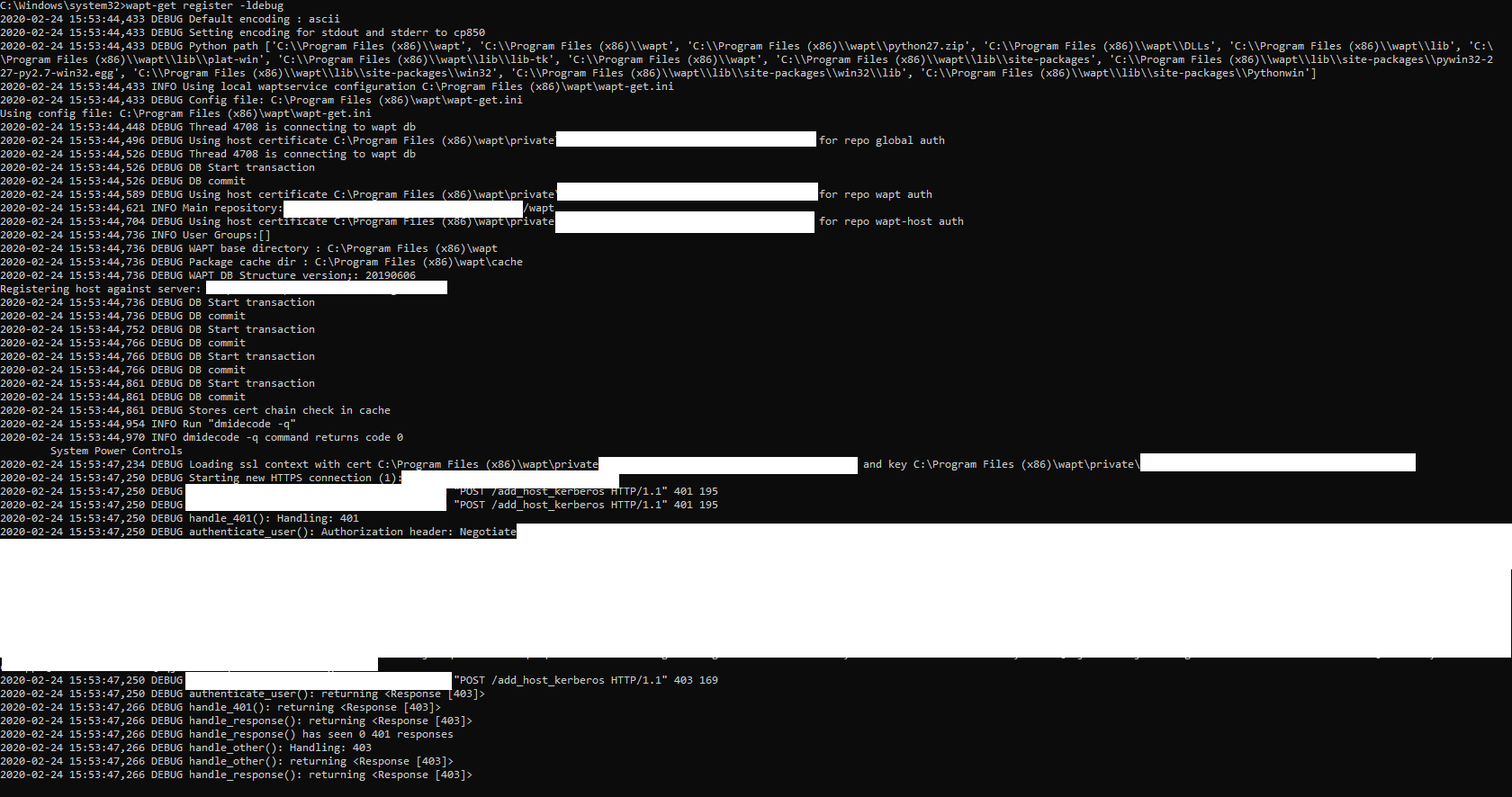
waptgerregister.png
waptgerregister.png (112.83 KB) Viewed 9480 times

For your information:

wapt-get.ini (Client)

[overall]
repo_url=https://waptserver/wapt
send_usage_report=1
use_hostpackages=1
wapt_server=https://waptserver
use_kerberos=1
check_certificates_validity=1
verify_cert=0
use_repo_rules=0
dnsdomain=
max_gpo_script_wait=180
pre_shutdown_timeout=180
hiberboot_enabled=0
[wapt-templates]
repo_url=https://store.wapt.fr/wapt
verify_cert=1

/etc/nginx/nginx.conf

location /add_host_kerberos {
auth_gss on;
auth_gss_keytab /etc/nginx/http-krb5.keytab;
proxy_pass http://127.0.0.1:8080;
}


/opt/wapt/conf/waptserver.ini

[options]
waptwua_folder = /var/www/waptwua
server_uuid = xxxxxxxxx-xxxxxxxx--xxxxxxxx-xxxxxx
clients_signing_key = /opt/wapt/conf/ca-waptserver.pem
clients_signing_certificate = /opt/wapt/conf/ca-waptserver.crt
wapt_password = $xxxxxxXXXXXXXXXXXXXXxxxxxxxxxxxxxxxxxxxxxxxxxxxxxxxxxxxxxxx
use_kerberos = True
allow_unauthenticated_connect = False
secret_key = xxxxxxxxxxxxxxXXXXXXXXXXXXXXXXXXXXXXXXXXxxxx


Sincerely,

Rebecca.
User avatar
sfonteneau
WAPT Expert
Messages: 2318
Registered: July 10, 2014 - 11:52 PM
Contact :

February 25, 2020 - 12:01 AM

Code: Select all

#2>     Client : mypc$ @ DOMAIN.LAN
        Serveur : HTTP/srvwapt.domain.lan @ DOMAIN.LAN
        Type de chiffrement KerbTicket : AES-256-CTS-HMAC-SHA1-96
        Indicateurs de tickets 0x40a80000 -> forwardable renewable pre_authent 0x80000
        Heure de démarrage : 2/24/2020 23:57:17 (Local)
        Heure de fin :   2/25/2020 8:23:21 (Local)
        Heure de renouvellement : 3/2/2020 22:23:21 (Local)
        Type de clé de session : AES-256-CTS-HMAC-SHA1-96
        Indicateurs de cache : 0
        KDC appelé : srvrodc.domain.lan
After registering with psexec, do you have a ticket for srvwapt (as above)?
Locked

