Page 2 of 2
Re: tis-microsoft-teams
Published: July 31, 2020 - 2:29 PM
by jpele
Hello,
I tested it in a similar situation to yours and I don't have the problem.
What is the exact command line that is executed by Teams? In your attached image, it's the "program location" (the end of the command is cut off).
Are we sure that the session setup was correctly executed on the affected user's session? Command: "wapt-get session-setup tis-microsoft-teams -f"
Regards,
Jimmy
Re: tis-microsoft-teams
Published: July 31, 2020 - 5:19 PM
by alex_30
Same on a Win10 x64
Sorry, here's a new screenshot from Windows 10; the command line is clearer:
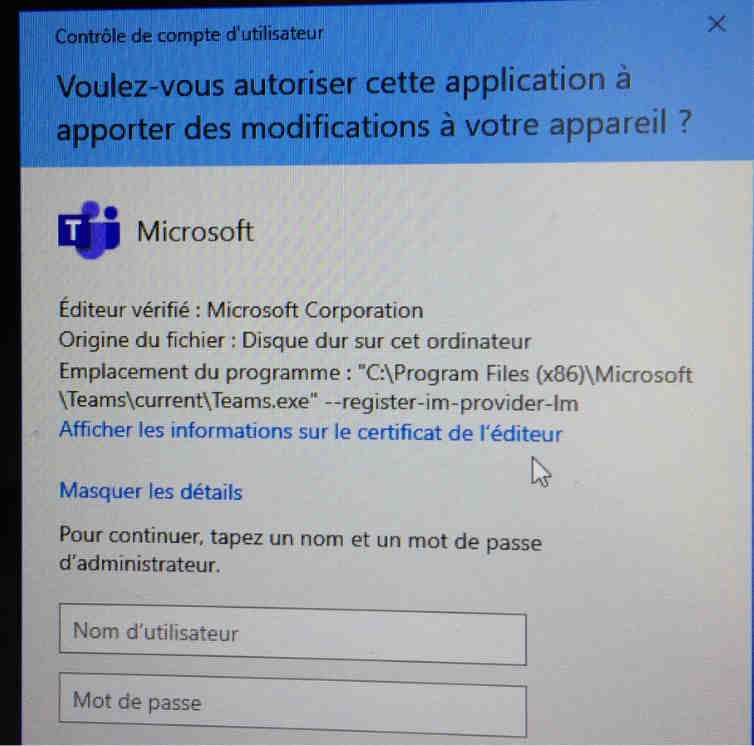
- teams_64_win10_pop_up_secu.jpg (34.81 KB) Viewed 10372 times
Re: tis-microsoft-teams
Published: August 3, 2020 - 5:09 PM
by jpele
Hello,
Thank you for the clarification. It seems that a link with Microsoft Office is being attempted to integrate Teams as a "Chat" application.
Source:
https://techcommunity.microsoft.com/t5/ ... mp/353660
You will need to adjust the application preferences, which you can do from the "session-setup" section of the package. If you want to test this, you will need to modify the options labeled "Meeting," "Chat," etc.
This option could be: "registerAddinOnMeetingPolicySettingsSync": true => false
I'll make a note of this for later. Please feel free to keep us updated on your tests.
Best regards,
Jimmy
Re: tis-microsoft-teams
Published: August 5, 2020 - 11:31
by alex_30
Hello,
Thank you for your feedback. Unfortunately, I won't be able to modify the options or run further tests.
I think I'll wait for your next updates to test it again.
Sincerely,
Alexandre.
Re: tis-microsoft-teams
Published: September 17, 2020 - 3:03 PM
by jpele
Hello,
I've made the change, the problem should be solved!

The package will be available on the store very soon.
Regards,
Jimmy
Re: [SOLVED] tis-microsoft-teams
Published: July 12, 2021 - 2:50 PM
by alex_30
Hello,
sorry I didn't reply, but yes, the problem has been resolved.
Thanks again.