Page 2 of 2
Re: OS Domain Junction Code 1326
Published: April 27, 2022 - 9:35 AM
by sfonteneau
Can you remove the MACHINEOU command to see?
Is the machine with the console in the same domain as the domain requested for the join?
Re: OS Domain Junction Code 1326
Published: April 27, 2022 - 1:33 PM
by sfonteneau
After some testing here, I can reproduce the problem:
The message corresponds to a problem with MACHINEOU.
I can reproduce the problem if the specified OU is cn=computers; apparently, the djoin doesn't work with cn=computers. You must specify an OU and not a CN.
When creating the djoin, in the top right corner, you can manually specify an OU in text mode (if the OU doesn't appear in the list).
Re: OS Domain Junction Code 1326
Published: April 27, 2022 - 1:43 PM
by florian777
Okay, I'll try as soon as I can
Re: OS Domain Junction Code 1326
Published: April 27, 2022 - 2:21 PM
by dcardon
Hello,
indeed:
https://social.technet.microsoft.com/Fo ... igMgrCBOSD
If you want to integrate the machine into cn=computers, you shouldn't specify anything (assuming that the default container for computers is indeed cn=computers). That said, from an AD management perspective, it's good not to integrate your machines into cn=computers, but to have a default OU for the computers and redirect the default container; this allows some GPOs to apply by default.
We'll take this case into account in the GUI. Thanks for the debugging.
Best regards,
Denis
Re: OS Domain Junction Code 1326
Published: April 27, 2022 - 2:57 PM
by florian777
So I created an OU where I will temporarily send the PCs that I will redistribute to my other servers in the future
Re: OS Domain Junction Code 1326
Published: April 27, 2022 - 3:21 PM
by dcardon
Hello Florian777,
there's the `redircmp` command [1] to define the default OU for all new domain joins. And as I mentioned in my previous post, it's considered good practice to do this.
I've submitted an internal ticket to block the `cn=computers` option in the WaptConsole.
Regards,
Denis
[1]
https://docs.microsoft.com/fr-fr/troubl ... containers
Re: [SOLVED] OS Domain Junction Code 1326
Published: April 28, 2022 - 9:45 AM
by florian777
Good morning,
Since this morning I've encountered a new problem. Until now, I could use djoin perfectly. I restarted my WAPT server, and now when I try to use djoin, I get the following error:
Code: Select all
C:\Users\xxxx>djoin.exe /PROVISION /DOMAIN "xxx.xxx.fr" /MACHINE "test-iso" /MACHINEOU "ou=Import_wapt,dc=xxx,dc=xxx,dc=fr" /SAVEFILE "C:\Windows\temp\join-202204280936" /REUSE

Approvisionnement de l'ordinateur...
Échec de l'approvisionnement de [test-iso] dans le domaine [xxx.xxx.fr] : 0x54b.
Il peut être nécessaire de spécifier /REUSE pendant la réexécution de djoin.exe avec le même nom d'ordinateur.
Échec de l'approvisionnement de l'ordinateur : 0x54b.
Le domaine spécifié n'existe pas ou n'a pas pu être contacté.
The account I am logged into has permission to add users to the domain and the wapt server can contact the domain.
[update]
I restarted the server and now I'm getting this additional error:
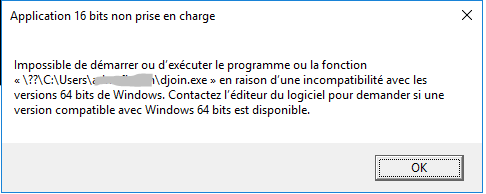
But if I switch to a command prompt with another account, I no longer have it
Re: [SOLVED] OS Domain Junction Code 1326
Published: April 28, 2022 - 11:26 AM
by sfonteneau
Good morning
The djoin has nothing to do with the wapt server; the djoin.exe command is executed as is by the wapt console.
We just retrieve the output of the djoin.exe command (the SAVEFILE) to send the result to the wapt server.
Therefore, there is no need to restart the wapt server; everything happens between your waptconsole workstation and your Active Directory
After a Google search for the error code 0x54b that you mentioned:
https://docs.microsoft.com/en-us/troubl ... -to-domain
We come across things like this:
Code: Select all
<DateTime> NetpDsGetDcName: failed to find a DC in the specified domain: 0x54b, last error is 0x0
<DateTime> NetpJoinDomainOnDs: NetpDsGetDcName returned: 0x54b
<DateTime> NetpJoinDomainOnDs: Function exits with status of: 0x54b
<DateTime> NetpDoDomainJoin: status: 0x54b
So the domain controller is unavailable? The message is indeed: The specified domain does not exist or could not be contacted.
The command is being executed correctly in a command prompt using a domain account that has the right to create machine accounts? (It won't work with a local account.)
For your screenshot, djoin.exe is in
????
Normally, djoin.exe is located here: c:\windows\system32\djoin.exe
Do you have a djoin.exe file in your home directory?
Simon
Re: [SOLVED] OS Domain Junction Code 1326
Published: April 28, 2022 - 11:57 AM
by florian777
Okay, I just tried again and I'm not getting any more error messages, it's working perfectly (I must be cursed). I have no idea what happened, I haven't touched anything since my last message...
Re: [SOLVED] OS Domain Junction Code 1326
Published: April 29, 2022 - 09:11
by dcardon
I'm closing this thread then. Please open a new thread for another problem.
To summarize: you shouldn't specify /machineou in djoin if you want to add a machine to cn=computers, otherwise djoin.exe crashes with /machineou=cn=computer. This is a bug/limitation of Microsoft's djoin tool; it would have been nice if the tool displayed a more explicit error message. We'll add protection to the wapt console to avoid encountering this djoin bug/limitation.
As a reminder, it's not recommended to store your machine accounts in cn=computers.
Denis