Good morning,
I arrived at the same situation and to try to solve the problem I started all over again from scratch.
I deleted all my machines from the wapt console (except the one I use for admin).
On the workstations, by uninstalling the agents via an innosetup package that I created and deployed with another WAPT solution (except the one I use for admin):
Code: Select all
C:\Program Files (x86)\wapt\unins000.exe /VERYSILENT /purge_wapt_dir=1
I waited 15 minutes and verified that no machines had registered on the server again. Once confirmed, I removed all the packages I had in my private repository, then removed my machine from the inventory, and subsequently uninstalled the console, agent, and console from that machine.
On my admin machine, I deleted the following directories:
Code: Select all
c:\program files (x86)\wapt --> en théorie il est supprimé par l'uninstall mais dans le doute
c:\Users\MonUser\AppData\Local\wapt*
c:\Users\MonUser\AppData\Roaming\wapt*
c:\Users\MonUser\private --> les certif en rapport avec wapt
On my server, I uninstalled all the packages tis-wapt*, nginx, postgresql (it's a Debian server and my server only manages wapt)
Code: Select all
apt remove tis-* nginx* postgesql* --purge
Deleted directories
Rebooted the server and restarted the installation following the procedure in the documentation.
I used waptsetup from my admin machine, created the agent from the console, and generated a new personal certificate to sign the packages. Even then, I still encountered errors when trying to register my admin machine with the server (an error related to the server certificates). I had to uninstall the waptsetup package and install the waptagent package, which I downloaded from my server's portal, for it to register correctly.
But the story is not over.
Just for fun, I'll look for the tis-7zip package on the WAPT store, download it, sign it with my certificate, and add it to the hosts package list on my test machine. I wait, and bam, it starts working. On the console and server logs, I get the following message:
Code: Select all
Impossible de récupérer l'action. Error on server:
EWaptTimeoutWaitingForResult('Timeout, client did not send result within 15.0 s')
Not even scared, I close the console and reboot my test machine. The wapt installation window appears, but there's no sign of the 7zip package waiting to be installed. I let it run, log in, and open the console. The machine's status is "To-upgrade." I right-click on it and select "Start installations," answer the various questions, and wait.
Nothing happens, 5 minutes later.
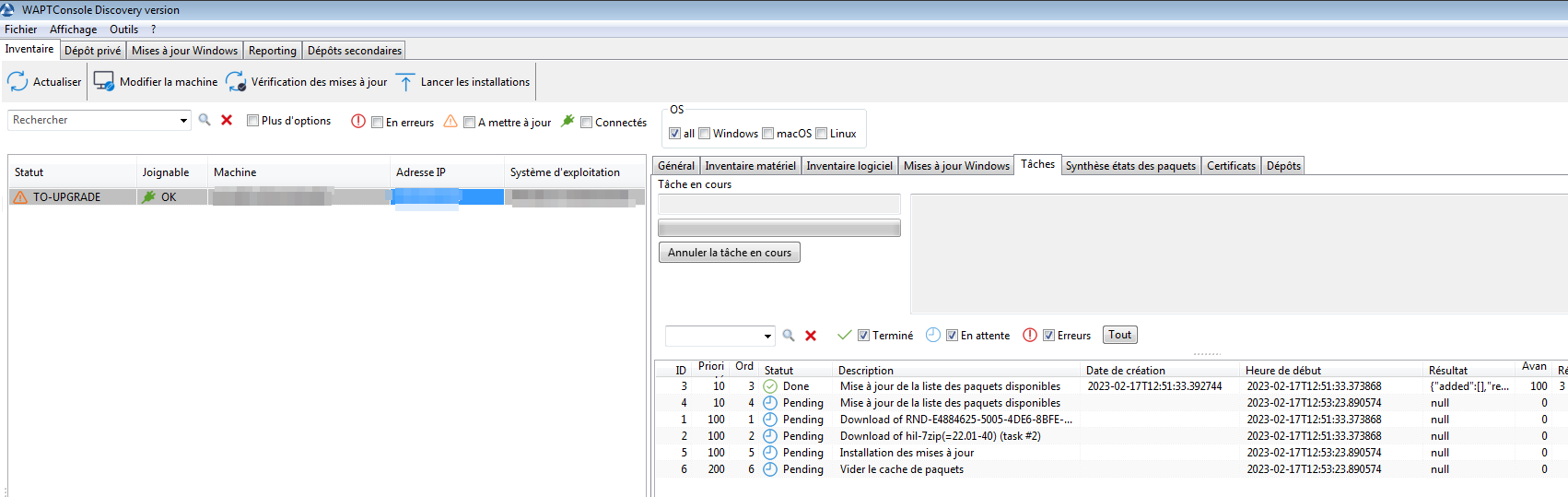
- wapt-1.png (59.92 KB) Viewed 15219 times
Unfortunately, the more I try to get the wapt-server solution working, the less it works. Is this something I'm doing wrong, or is it related to version 2.3?


 .
. .
.