Page 2 of 3
Re: Creating MS-Office 2013 package
Published: October 26, 2015 - 12:44 PM
by Jonathan
Hello,
I'm contacting you again because I tried deploying MS Office according to the information you provided. This allowed me to make progress. I was able to deploy the MS Office package on another machine, but it displays a critical error message regarding its installation. It seems to be looking for the "silent.msp" file (the one I created and placed in the Office "updates" folder) (see attached). I tried placing it elsewhere, but the error persists. I think my script is still incorrect, but I don't know where!
Secondly, I can no longer deploy directly via my administrator console when I click "save and apply." I get an error message: "The upgrade could not be started: Restricted access." Yet, I have full administrator privileges. On the test laptop, I need to click "Install updates" for my packages to install.
Thank you
. Sincerely,
Jonathan
Re: Creating MS-Office 2013 package
Published: October 26, 2015 - 12:46 PM
by Jonathan
Here are some more images attached.
Thanks
, Jonathan.
Re: Creating MS-Office 2013 package
Published: October 26, 2015 - 1:25 PM
by sfonteneau
The silent.msp file must be in the root directory of the package, in the same folder as setup.exe, and not in the update folder.
Regarding the restricted access issue:
The problem occurs during certain startups; more information is available here:
http://lists.tranquil.it/pipermail/wapt ... 01318.html
Re: Creating MS-Office 2013 package
Published: October 26, 2015 - 3:23 PM
by Rudy
Here are the errors I'm getting on the console (attached)
I also noticed that when performing a local installation before the package was published on my server, I get an Office error
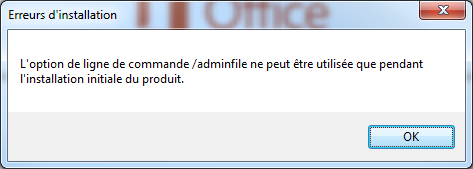
- error3.png (23.58 KB) Viewed 15583 times
The installation can only be performed if it's the first time. Therefore, on the client machine, which already uninstalled Office 2013 for testing purposes, there must still be remnants of the previous installation, even after cleaning the PC with CCleaner.
I think that's why my previous script worked once and then never again.
Is there a way to get around this?
Re: Creating MS-Office 2013 package
Published: October 26, 2015 - 4:32 PM
by sfonteneau
Indeed, the error in the console indicates that the timeout reached 1200 seconds and quit.
Actually, it's the famous window that should appear.
Indeed, there must still be some residue from the old installation that went wrong, and that's what's causing you problems.
cannot be executed only once, which is why in setup.py there is a test to see if Microsoft Office 2013 appears in the list of software on the machine.
Re: Creating MS-Office 2013 package
Published: October 27, 2015 - 3:29 PM
by Jonathan
Thanks again for the information!
My deployment failed because when I saved my .msp file, I didn't save it in the root directory from the start, but in the update folder. Even after moving it, it wouldn't recognize the change. So, I deleted it and did it again correctly. The deployment went perfectly.
My only issue is that my KMS script (.vbs) didn't activate my Microsoft Office.
I'm looking for how to add this to my setup.py file.
I would be very grateful if anyone could help me. Thanks,
Jonathan
Re: Creating MS-Office 2013 package
Published: October 27, 2015 - 7:31 PM
by sfonteneau
You can add the following to the end of the script:
You need to add the kms.vbs script to the root of your wapt package, then add this to setup.py:
run("kms.vbs")
Simon
Re: Creating MS-Office 2013 package
Published: October 29, 2015 - 11:11
by Rudy
Hello,
I'm reaching out to the community again because I'm still unable to install Office 2010 or 2013 using WAPT.
I've tried deploying the Office suite again on a freshly installed Windows 7 machine, but still nothing. I'm encountering the same errors mentioned in my previous messages.
When I check my client, I can see the package in the WAPT "cache" folder, but no installation takes place.
However, when I test the package on my local machine (using the `wapt-get install` command) before publishing it to my repository, it works.
Do you have any suggestions?
Thanks in advance
, Rudy
Re: Creating MS-Office 2013 package
Published: October 30, 2015 - 11:10 AM
by sfonteneau
I'm a bit confused by the different messages I've received.
Could you please send the contents of your setup.py file,
along with screenshots of your console (including any errors (by clicking on the package with the error))
and also a screenshot of the package in your private repository?
Simon
Re: Creating MS-Office 2013 package
Published: October 30, 2015 - 12:12 PM
by sfonteneau
It's very surprising that it works with wapt-get install and not through the console.