Page 2 of 3
Re: How did you deploy your agent?
Published: March 14, 2016 - 11:09 PM
by knpc
Thanks for the reply.
Regarding the installation of version 1.3.5, do I install it over the existing version or do I need to uninstall everything? It would be more convenient for me to install it over the existing version because I tried installing it directly and encountered problems.
Thanks for your invaluable help,
Knpc.
Re: How did you deploy your agent?
Published: March 15, 2016 - 11:20
by sfonteneau
Hello
, yes indeed.
You will find instructions on how to update your Wapt server here (Windows version):
https://dev.tranquil.it/scenari/guide_u ... ndows.html
Simon Fonteneau
Re: How did you deploy your agent?
Published: March 15, 2016 - 2:02 PM
by knpc
Hi,
It now works manually, except that you MUST write the hash entirely in lowercase
I'm starting on the GPO and will get back to you with the result.
Thank you all so much for your help
However, I still get the message at address 127.0.0.1
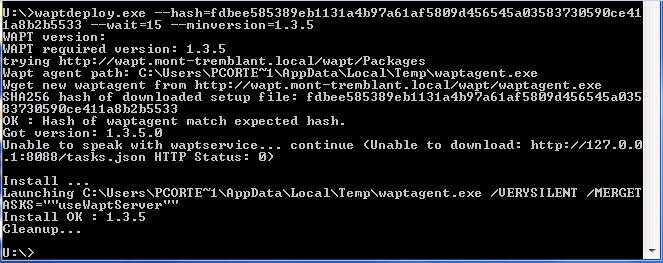
- waptdeploy.JPG (59.89 KB) Viewed 19065 times
Re: How did you deploy your agent?
Published: April 4, 2016 - 10:11 AM
by a.grisard
Good morning,
I'm also tearing my hair out trying to install the agent via GPO.
For now I'm testing the command locally, I have:
- Copy waptagent to the root of c:wapt
- retrieved the hash and entered it in the following command:
In the wapt/waptserver/repository/wapt folder, I have:
- waptagent (created via the tools menu)
- waptdeploy
- waptdeploy.version
The contents of waptdeploy.version:
Code: Select all
1.3.5
https://serveurwapt/wapt/waptserver/repository/wapt/waptsetup-tis.exe
The contents of my order:
Code: Select all
\\serveurwapt\wapt\waptserver\repository\wapt\waptdeploy.exe --hash=f4ac7e3d64887a3ac74d1dc2effa147c87b853d8a4225adde45c694540750a4 --wait=15 --minversion=1.3.5 --waptsetupurl=http://serveurwapt/wapt/waptserver/repository/wapt/waptagent.exe --repo_url=http://serveurwapt/wapt/waptserver/repository/wapt

The .exe file does not appear to be placed in the temporary file, and therefore the HTTP request does not work.
Re: How did you deploy your agent?
Published: April 5, 2016 - 9:16 AM
by a.grisard
I finally managed to deploy my agent locally using a command.
Unfortunately, my GPO isn't working. I set the following parameters (the GPO is correctly deployed to the machine):
Script name: \\serveurad\netlogon\wapt\waptdeploy.exe
Parameters: --hash=be973fac01600641d33239cb45f7863a542f4bb9a0e7d99eed00b6dfedc005f2 --wait=15 --minversion=1.3.5 --repo_url=
http://serveurwapt/wapt/
Does anyone have any idea what the problem might be?
Re: How did you deploy your agent?
Published: April 27, 2016 - 2:29 PM
by SamDaPiRatE
Hello,
I'm also trying to deploy WaptAgent via GPO, and I'm having trouble...
I think my GPO is correct
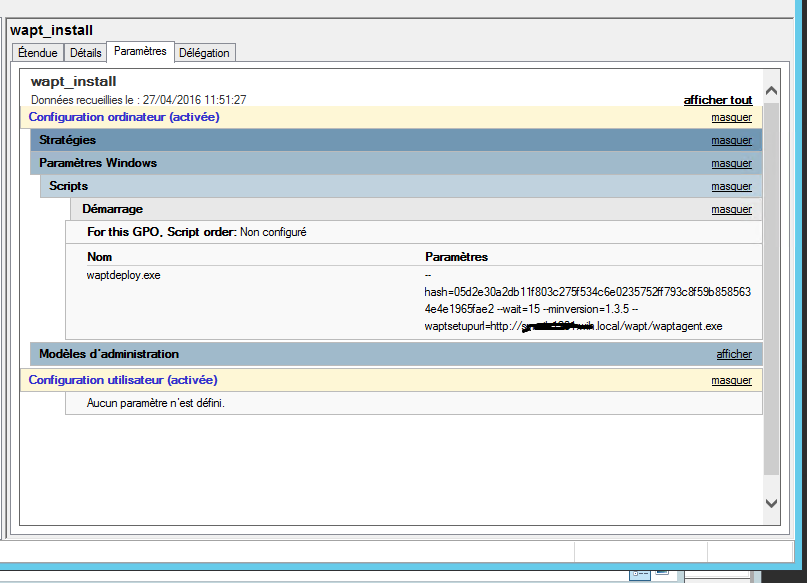
. However, I'm unsure where to place waptdeploy.exe.
I put it in this path: \\MYDOMAIN.local\netlogon\waptdeploy.exe.
Where do you place this waptdeploy.exe file?
Thanks
Re: How did you deploy your agent?
Published: April 27, 2016 - 3:14 PM
by sfonteneau
Have you tried running the command manually?
Re: How did you deploy your agent?
Published: April 27, 2016 - 4:04 PM
by SamDaPiRatE
I tried launching the following command via DOS:
\\domain.local\netlogon\waptdeploy.exe --hash=05d2e30a2db11f803c275f534c6e0235752ff793c8f59b8585634e4e1965fae2 --wait=15 --minversion=1.3.5 --waptsetupurl=
http://server.domain.local/wapt/waptagent.exe
It launches successfully, and the agent is installed correctly.
Re: How did you deploy your agent?
Published: April 27, 2016 - 5:23 PM
by sfonteneau
First of all, run gpupdate /force and then reboot to verify that the startup script gpo has been enabled.
Otherwise:
Have you tried enabling this GPO?
"Always wait for the network to start up and connect"
The settings:
Computer Configuration\Administrative Templates\System\Logon\ Always wait for the network at computer startup and logon
Then, on the client machine, run the following command:
Then restart the
Simon
Re: How did you deploy your agent?
Published: April 28, 2016 - 00:01
by knpc
Hi,
To find the path, I simply used the GPO's browse function and copied the file into the folder that opened. I don't have the URL in my deployment either.
Best regards,
knpc
