Page 3 of 3
Re: Wapt not deploying via GPO
Published: March 18, 2019 - 4:55 PM
by davidm
Hello,
I have a very similar problem: (some of the information presented here should help some people configure their GPO

)
the GPO is deployed, the WAPT service starts, but the computer doesn't register with the WAPT server.
I have to do it manually via a "wapt-get register" command line on the target machine, providing it with the private key.
(This renders the GPO deployment useless.)
I'm using the following parameters for the GPO (Script runs during shutdown, not startup, otherwise the installation fails because Windows 10 doesn't wait for the network to start):
waptdeploy.exe --hash="MY-HASH" --minversion=1.7.3.5 --wait=15 --waptsetupurl="
http://URL-OF-MY-WAPT-SERVER.LAN/wapt/waptagent.exe"
I thought the agent contained the private key.
Any ideas?
Thanks
Re: Wapt not deploying via GPO
Published: March 19, 2019 - 10:43
by davidm
Note:
I do not use Kerberos authentication, so I modified the line in the /opt/wapt/conf/waptserver.ini file
allow_unauthenticated_registration = True
, replacing allow_unauthenticated_registration = False (default).
Re: Wapt not deploying via GPO
Published: March 19, 2019 - 11:18
by agauvrit
Could you post the contents of the wapt-get.ini file (anonymized) of a recalcitrant agent?
Re: Wapt not deploying via GPO
Published: March 19, 2019 - 12:40
by davidm
Here is the wapt-get.ini file on the agent that is not registering with the WAPT server:
[global]
repo_url=
https://MY-WAPT-SERVER.DOMAIN.LAN/wapt
send_usage_report=1
use_hostpackages=1
wapt_server=
https://MY-WAPT-SERVER.DOMAIN.LAN/
use_kerberos=0
check_certificates_validity=1
verify_cert=C:\Program Files (x86)\wapt\ssl\server\MY-WAPT-SERVER.DOMAIN.LAN.crt
use_fqdn_as_uuid=1
dnsdomain=DOMAIN.LAN
max_gpo_script_wait=180
pre_shutdown_timeout=180
hiberboot_enabled=0
[wapt-templates]
repo_url=
https://store.wapt.fr/wapt
verify_cert=1
Re: Wapt not deploying via GPO
Published: March 25, 2019 - 2:04 PM
by davidm
I can confirm the registration problem:
waptserver.log:
2019-03-25 14:02:14,450 WARNING Websocket connect params: Unable to get auth token: Error on server:
EWaptAuthenticationFailure(u'Unknown host UUID 01962215-7F3A-7A4C-BF90-F76BF79F6844. Please register first.',)
I'm close to solving the problem, but I'm stuck. If you have any ideas, I'm all ears.
THANKS
Now I have this at the point where the GPO is applied:
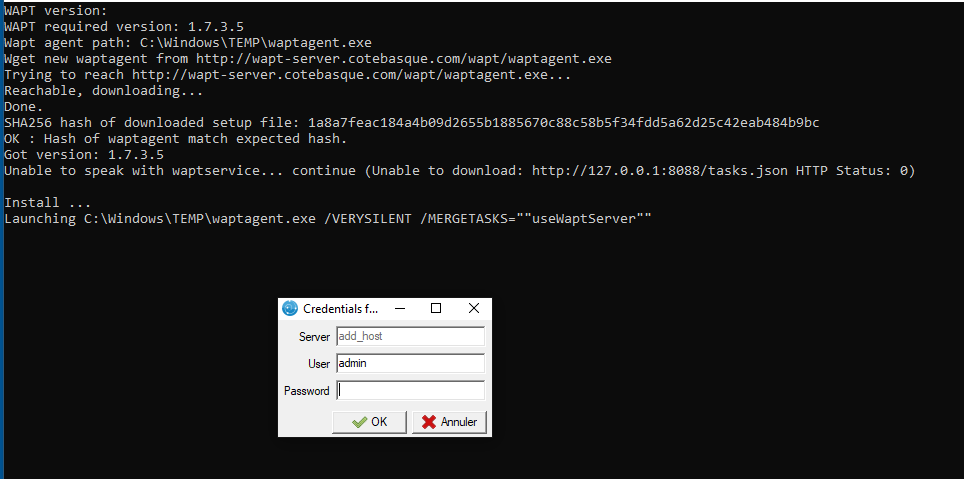
- GPO WAPT.PNG (26.84 KB) Viewed 26319 times
Re: Wapt not deploying via GPO
Published: April 9, 2019 - 12:23
by agauvrit
You activated the second registration option during post-configuration, which requires a password when registering machines.
Rerun the post-configuration on the server and select the first option, which allows machines to be registered without authentication.
Re: Wapt not deploying via GPO
Published: April 26, 2019 - 12:10 PM
by toma
Good morning
I'm encountering the same problem. The GPO is active and WAPT is working because I can see my workstations appearing in GLPI with the correct software. However, I don't have the workstations in the console.
contents of /opt/wapt/conf/waptserver.ini
Code: Select all
[options]
waptwua_folder = /var/www/waptwua
server_uuid = xx-548c-11e9-9845-xx
wapt_password = $xx
use_kerberos = False
allow_unauthenticated_connect = False
secret_key = xx
allow_unauthenticated_registration = True
wapt_admin_group_dn = CN=waptadmins,CN=Users,DC=xx,DC=xx
ldap_auth_server = xx.xx
ldap_auth_base_dn = DC=xx,DC=xx
ldap_auth_ssl_enabled = False
contents of /var/log/daemon.log
Code: Select all
Apr 26 12:03:56 wapt-01 python[30730]: 2019-04-26 12:03:56,160 CRITICAL Get_websocket_auth_token failed EWaptAuthenticationFailure(u'Unknown host UUID 4C4C4544-0038-5A10-8033-B5C04F4E3132. Please register first.',)
Apr 26 12:04:00 wapt-01 python[30730]: 2019-04-26 12:04:00,080 CRITICAL Get_websocket_auth_token failed EWaptAuthenticationFailure(u'Unknown host UUID 4C4C4544-0039-5710-8051-C6C04F4B3132. Please register first.',)
Apr 26 12:04:00 wapt-01 python[30730]: 2019-04-26 12:04:00,310 WARNING SocketIO connection refused for uuid 4C4C4544-0039-5710-8051-C6C04F4B3132, sid 860d48e6180048609a1b7812ad4ca489: SocketIO connection not authorized, invalid token: 400 Bad Request: The browser (or proxy) sent a request that this server could not understand., instance
Apr 26 12:04:00 wapt-01 python[30730]: 2019-04-26 12:04:00,312 WARNING Application rejected connection
Apr 26 12:04:30 wapt-01 python[30730]: 2019-04-26 12:04:30,491 CRITICAL Get_websocket_auth_token failed EWaptAuthenticationFailure(u'Unknown host UUID 4C4C4544-0051-4C10-8050-B6C04F534D32. Please register first.',)
Apr 26 12:04:33 wapt-01 python[30730]: 2019-04-26 12:04:33,676 CRITICAL Get_websocket_auth_token failed EWaptAuthenticationFailure(u'Unknown host UUID 4C4C4544-0031-4610-8047-B6C04F38354A. Please register first.',)
Apr 26 12:04:38 wapt-01 python[30730]: 2019-04-26 12:04:38,064 CRITICAL Get_websocket_auth_token failed EWaptAuthenticationFailure(u'Unknown host UUID 4C4C4544-0053-3910-8035-C2C04F354C32. Please register first.',)
Apr 26 12:04:40 wapt-01 python[30730]: 2019-04-26 12:04:40,136 CRITICAL Get_websocket_auth_token failed EWaptAuthenticationFailure(u'Unknown host UUID 4C4C4544-0057-3810-8030-CAC04F313532. Please register first.',)
Apr 26 12:04:41 wapt-01 python[30730]: 2019-04-26 12:04:41,374 WARNING SocketIO connection refused for uuid 4C4C4544-0053-3910-8035-C2C04F354C32, sid c2d6c49fc48e43b6adfa544e8ca41f73: SocketIO connection not authorized, invalid token: 400 Bad Request: The browser (or proxy) sent a request that this server could not understand., instance
Apr 26 12:04:41 wapt-01 python[30730]: 2019-04-26 12:04:41,376 WARNING Application rejected connection
I'm not really sure which way to turn.
At the beginning of the installation I planned to use Kerberos, but I changed my mind later. I don't know if I need to redo the entire installation.
Re: Wapt not deploying via GPO
Published: April 30, 2019 - 09:19
by sfonteneau
Therefore, in my opinion, your WAPT agent was generated with the "Kerberos registration" option
Re: Wapt not deploying via GPO
Published: May 3, 2019 - 12:35
by toma
That's true. Thank you very much, because I completely missed that setting. I regenerated an agent, and two new workstations are now visible in my console. However, the workstations where the old version of the agent was deployed are still causing me problems.
I deploy the agent using the following command (GPO method / scheduled task)
Code: Select all
c:\windows\temp\waptdeploy.exe --hash=xxx --minversion=1.7.3.5 --waptsetupurl=C:\windows\temp\waptagent.exe --wait=10
Is there an option to add to this command that would force the reinstallation of waptagent with the new version?
Re: Wapt not deploying via GPO
Published: May 3, 2019 - 5:30 PM
by dcardon
Hello Toma,
you can use the --force flag [1]. However, you will need to remember to remove it once all the workstations are back online.
Regards,
Denis
[1]
https://www.wapt.fr/fr/doc/wapt-configu ... waptdeploy