Page 4 of 5
Re: WAPTWUA on 24H2
Published: February 14, 2025 - 12:29
by sfonteneau
Can you clarify the problem?
Is it the installation that's failing? (Note that a reboot is required after installation for the cab to be recognized as installed.)
Re: WAPTWUA on 24H2
Published: February 17, 2025 - 2:20 PM
by smandel
Yes, sorry, I wasn't clear.
I was referring to the fact that the computers were still trying to get updates from Microsoft.
But it seems better this morning.
A reboot of the computers was probably necessary.
Re: WAPTWUA on 24H2
Published: February 21, 2025 - 11:27
by smandel
Hello,
I saw in the latest changelog that installing Windows updates on system shutdown is no longer supported in 24H2.
What is the workaround?
Thank you.
Re: WAPTWUA on 24H2
Published: February 24, 2025 - 10:53 AM
by sfonteneau
Hello
, yes, this is new. We had to remove the option because of Windows.
Now, if we launch the Windows Update engine while it's stopped on a 24/7 server to start the installations, the engine responds "impossible, stopping in progress."
The workaround is to use "installation scheduling" -> for example: install_scheduling=1d. The installations will then take place during the day (no other option).
Re: WAPTWUA on 24H2
Published: March 13, 2025 - 3:28 PM
by guigeek
Hello,
I'm still having trouble, particularly with KB5053598.
On some machines, I managed to install it, but on others, it seems to install, but it doesn't show up as installed despite several reboots.
On other machines, I even manually pushed the KB, but it's the same; it doesn't show up as installed afterward. However, on some machines, it works...
It's very strange; I can't understand why it works on some machines and not on others...
Have you had any other feedback?
Thank you.
Re: WAPTWUA on 24H2
Published: March 14, 2025 - 09:46
by guigeek
Actually, after analyzing which machines are working and which aren't, I realize it seems to be a display issue:
the machines that remain in PENDING despite manually installing the KB still appear as version 10.0.26100.3476 [24H2].
So, everything seems to be okay, except that it shows some updates still need to be installed.
Any idea where the problem might be coming from?
Thanks!
Re: WAPTWUA on 24H2
Published: March 14, 2025 - 11:14
by sfonteneau
Hello,
I was looking here (still on 24h2).
The 24h2 installation is done with DISM (a new method to work around 24h2 bugs). When installing with DISM, if you run a scan again, the Windows Update engine still considers the KB to be uninstalled. After restarting the Windows machine, if you run another scan, it then considers the KB installed.
On your end, after rebooting and rescanning, is it working correctly?
Re: WAPTWUA on 24H2
Published: March 14, 2025 - 4:31 PM
by guigeek
No, not on all positions.
The KB is still PENDING, but the displayed Windows version is indeed 10.0.26100.3476 [24H2] (So the KB should be installed)
I've done several reboots and rescans... but for now it only represents a minority of the workstations.
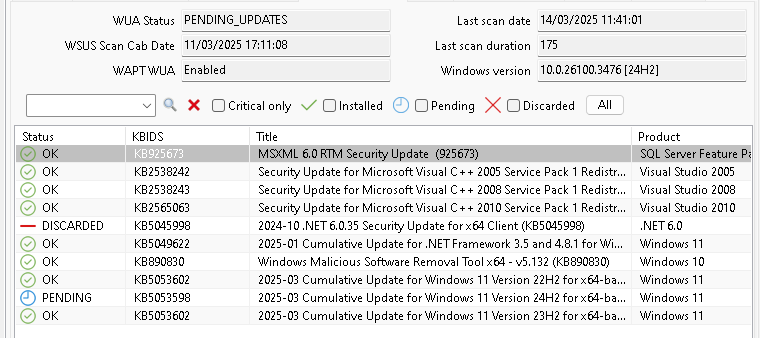
- Screenshot 2025-03-14 163325.png (26.98 KB) Viewed 28623 times
Re: WAPTWUA on 24H2
Published: March 20, 2025 - 5:06 PM
by guigeek
Hello,
am I the only one having this problem?
Thank you
Re: WAPTWUA on 24H2
Published: March 20, 2025 - 5:44 PM
by sfonteneau
I just noticed that in your screenshot your Windows version is 26100.3476
https://support.microsoft.com/en-us/top ... 99f551cec2.
So the version looks correct, but Windows Update reports that it's not installed. I would have suggested rebooting and then running another scan, but you've already done that.
You should also check if the KB update appears in the Software Inventory by searching for 5053598.
Alternatively, you could try a forced inventory update to be sure.
Could you also clean the C:\Windows\SoftwareDistribution folder and then run another scan?