Page 1 of 2
[SOLVED] Console crash
Published: April 26, 2018 - 9:52 AM
by renaud.counhaye
Good morning,
I have a small problem; after importing several files, my console now crashes when I go to the "Softwares repository" section
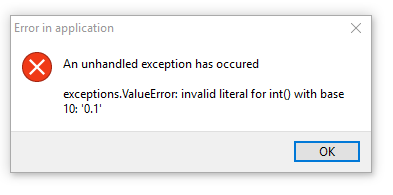
- 2018-04-26 09_48_33-WAPT console.png (5.32 KB) Viewed 15485 times
I then checked to see if I had a duplicate packet on the server, but it seems correct:

- 2018-04-26 09_50_24-Settings.png (31.89 KB) Viewed 15485 times
And when I try to rebuild the packet index via the .py file on the server:
Code: Select all
rcounhaye@wapt $ /usr/bin/python /opt/wapt/wapt-scanpackages.py /var/www/wapt/
Traceback (most recent call last):
  File "/opt/wapt/wapt-scanpackages.py", line 32, in <module>
    from waptutils import __version__,setloglevel
  File "/opt/wapt/waptutils.py", line 41, in <module>
    import requests
ImportError: No module named requests

[ /var/www ]
rcounhaye@wapt $ sudo /usr/bin/python /opt/wapt/wapt-scanpackages.py /opt/websites/wapt/
Traceback (most recent call last):
  File "/opt/wapt/wapt-scanpackages.py", line 32, in <module>
    from waptutils import __version__,setloglevel
  File "/opt/wapt/waptutils.py", line 41, in <module>
    import requests
ImportError: No module named requests
In short, it had to happen to me D:
WAPT 1.5 server on Debian 9
Windows 10 PC Admin.
Re: Console crash
Published: April 26, 2018 - 12:00 PM
by sfonteneau
Re: Console crash
Published: April 26, 2018 - 4:14 PM
by renaud.counhaye
Hm, well
Code: Select all
[ ~ ]
rcounhaye@wapt $ sudo wapt-scanpackages /var/www/wapt/
I haven't received any feedback, is that normal?
Oh, and it looks like I've crashed my server now :/ I'm really bad at this

(502 bad gateway even on the console)
Re: Console crash
Published: April 26, 2018 - 4:21 PM
by htouvet
For more information:
Code: Select all
wapt-scanpackages -ldebug /var/www/wapt
To force a rescan of all packets:
Code: Select all
wapt-scanpackages -f /var/www/wapt
502 bad gateway error: the waptserver service is stopped.
Code: Select all
systemctl stop waptserver
systemctl start waptserver
systemctl status waptserver
A 502 status code can sometimes be "negatively cached" in the reverse proxy (nginx)
To be sure:
Re: Console crash
Published: April 26, 2018 - 5:08 PM
by renaud.counhaye
Ah great, the -ldebug command does display the scan correctly

However, you are right, the server is down, and it won't start:
Code: Select all
[ ~ ]
rcounhaye@wapt $ sudo systemctl status waptserver
● waptserver.service - WAPT Server startup script
   Loaded: loaded (/usr/lib/systemd/system/waptserver.service; enabled; vendor preset: enabled)
   Active: failed (Result: exit-code) since Thu 2018-04-26 17:07:10 CEST; 2s ago
  Process: 11218 ExecStart=/opt/wapt/bin/python /opt/wapt/waptserver/waptserver.py (code=exited, status=1/FAILURE)
 Main PID: 11218 (code=exited, status=1/FAILURE)

Apr 26 17:07:10 wapt systemd[1]: waptserver.service: Failed with result 'exit-code'.
Apr 26 17:07:10 wapt systemd[1]: waptserver.service: Service hold-off time over, scheduling restart.
Apr 26 17:07:10 wapt systemd[1]: Stopped WAPT Server startup script.
Apr 26 17:07:10 wapt systemd[1]: waptserver.service: Start request repeated too quickly.
Apr 26 17:07:10 wapt systemd[1]: Failed to start WAPT Server startup script.
Apr 26 17:07:10 wapt systemd[1]: waptserver.service: Unit entered failed state.
Apr 26 17:07:10 wapt systemd[1]: waptserver.service: Failed with result 'exit-code'.
Re: Console crash
Published: May 2, 2018 - 8:41 AM
by renaud.counhaye
Okay.
For some reason I don't know, the permissions on the /etc/ssl/private folder had become incorrect.
What was blocking the start of the service "
postgresql@9.6-main.service"
Code: Select all
● postgresql@9.6-main.service - PostgreSQL Cluster 9.6-main
   Loaded: loaded (/lib/systemd/system/postgresql@.service; disabled; vendor preset: enabled)
   Active: failed (Result: exit-code) since Wed 2018-05-02 08:32:10 CEST; 20s ago
  Process: 8843 ExecStart=postgresql@9.6-main --skip-systemctl-redirect 9.6-main start (code=exited, status=1/FAILURE)

May 02 08:32:10 wapt systemd[1]: Starting PostgreSQL Cluster 9.6-main...
May 02 08:32:10 wapt postgres[8848]: [1-1] 2018-05-02 08:32:10.305 CEST [8848] FATAL:  could not access private key file "/etc/ssl/private/ssl-cert-snakeoil.key": Permission denied
May 02 08:32:10 wapt postgresql@9.6-main[8843]: The PostgreSQL server failed to start. Please check the log output:
May 02 08:32:10 wapt postgresql@9.6-main[8843]: 2018-05-02 08:32:10.305 CEST [8848] FATAL:  could not access private key file "/etc/ssl/private/ssl-cert-snakeoil.key": Permission denied
May 02 08:32:10 wapt postgresql@9.6-main[8843]: 2018-05-02 08:32:10.305 CEST [8848] LOG:  database system is shut down
May 02 08:32:10 wapt systemd[1]: postgresql@9.6-main.service: Control process exited, code=exited status=1
May 02 08:32:10 wapt systemd[1]: Failed to start PostgreSQL Cluster 9.6-main.
May 02 08:32:10 wapt systemd[1]: postgresql@9.6-main.service: Unit entered failed state.
May 02 08:32:10 wapt systemd[1]: postgresql@9.6-main.service: Failed with result 'exit-code'.
And so the WAPT server also failed to start without its SQL manager (assuming that's the case).
Perhaps the WAPT server lacks a proper exit code to point the finger at this culprit.
Re: Console crash
Published: May 2, 2018 - 8:43 AM
by htouvet
Hello,
thank you for this feedback.
Re: Console crash
Published: May 2, 2018 - 9:05 AM
by renaud.counhaye
Hello again,
Unfortunately, I still have this problem:
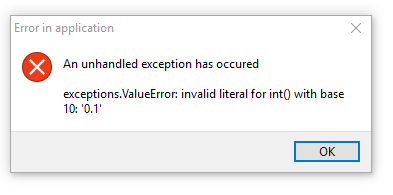
- 2018-04-26 09_48_33-WAPT console.png (5.32 KB) Viewed 15415 times
I'm going to try reinstalling the software

Re: Console crash
Published: May 2, 2018 - 09:13
by htouvet
You should check the waptconsole.ini file
%LOCALAPPDATA%\waptconsole\waptconsole.ini
to see if there's a timeout parameter with a decimal value.
If so, remove the decimal part.
You mentioned earlier that this problem appeared after importing packages...
Do you remember which packages and from which repository?
Re: Console crash
Published: May 2, 2018 - 10:06 AM
by renaud.counhaye
Indeed, there are no decimal places in the .ini file. However, I did import some old packages from my old private WAPT 1.3 repository to this new 1.5 repository, having read that it was possible. But I may have missed a step in the process...
I just did a
sudo wapt-scanpackages -f -ldebug /var/www/wapt
Just to check, I don't suspect any fatal errors:
rcounhaye@wapt $ sudo wapt-scanpackages -f -ldebug /var/www/wapt
2018-05-02 09:54:12,869 INFO Processing new /var/www/wapt/ymg-teamviewer-full_13.0.5640.0-8_all.wapt
2018-05-02 09:54:12,983 INFO Processing new /var/www/wapt/ymg-teamviewer-host-only_13.0.5640.0-17_all.wapt
2018-05-02 09:54:13,116 INFO Processing new /var/www/wapt/ymg-viscosity_1.7.8-39_all.wapt
2018-05-02 09:54:13,146 INFO Processing new /var/www/wapt/ymg-disable-ipv6_1.0-5_all.wapt
2018-05-02 09:54:13,148 DEBUG Unable to extract icon for /var/www/wapt/ymg-disable-ipv6_1.0-5_all.wapt:no icon.png found in package name /var/www/wapt/ymg-disable-ipv6_1.0-5_all.wapt
2018-05-02 09:54:13,149 INFO Processing new /var/www/wapt/ymg-wapt-schtask-auto-upgrade_6_all.wapt
2018-05-02 09:54:13,152 INFO Processing new /var/www/wapt/ymg-java8_8.171-2_all.wapt
2018-05-02 09:54:13,523 INFO Processing new /var/www/wapt/ymg-SAP74_7.4.3-24_all.wapt
2018-05-02 09:54:14,513 INFO Processing new /var/www/wapt/ymg-vpn-schrewsoft_2.2.2-3_all.wapt
2018-05-02 09:54:14,572 DEBUG Unable to extract icon for /var/www/wapt/ymg-vpn-schrewsoft_2.2.2-3_all.wapt:no icon.png found in package name /var/www/wapt/ymg-vpn-schrewsoft_2.2.2-3_all.wapt
2018-05-02 09:54:14,573 INFO Processing new /var/www/wapt/ymg-BizagiModeler-32_3.1.11.0-2_all.wapt
2018-05-02 09:54:15,389 INFO Processing new /var/www/wapt/ymg-add-YMCA-autolaunch_0.8_all.wapt
2018-05-02 09:54:15,393 INFO Processing new /var/www/wapt/ymg-ms-teams_1.1.0.2253-0.1_all.wapt
2018-05-02 09:54:15,855 INFO Processing new /var/www/wapt/ymg-check-point-vpn_98.60.276-7_all.wapt
2018-05-02 09:54:15,902 INFO Processing new /var/www/wapt/ymg-python27_2.7.14-2_all.wapt
2018-05-02 09:54:16,022 INFO Processing new /var/www/wapt/ymg-pyscripter_3.3.2-14_all.wapt
2018-05-02 09:54:16,077 INFO Processing new /var/www/wapt/ymg-FsFInventory_0.7_all.wapt
2018-05-02 09:54:16,137 DEBUG Unable to extract icon for /var/www/wapt/ymg-FsFInventory_0.7_all.wapt:no icon.png found in package name /var/www/wapt/ymg-FsFInventory_0.7_all.wapt
2018-05-02 09:54:16,137 INFO Processing new /var/www/wapt/ymg-7zip_18.1.0.0-3_all.wapt
2018-05-02 09:54:16,149 INFO Processing new /var/www/wapt/ymg-adobeair_27.0.0.124-2_all.wapt
2018-05-02 09:54:16,214 INFO Processing new /var/www/wapt/ymg-addfont_0.9_all.wapt
2018-05-02 09:54:16,227 INFO Processing new /var/www/wapt/ymg-Office2016-launcher-english_1.1_all.wapt
2018-05-02 09:54:16,346 INFO Processing new /var/www/wapt/ymg-BizagiModeler_3.1.11.0-2_all.wapt
2018-05-02 09:54:16,349 INFO Processing new /var/www/wapt/ymg-waptupgrade_1.5.1.23-7_all.wapt
2018-05-02 09:54:16,458 INFO Processing new /var/www/wapt/ymg-BizagiModeler-64_3.1.11.0-2_all.wapt
2018-05-02 09:54:17,009 INFO Processing new /var/www/wapt/ymg-FileMakerPro16-x32_16.0.1.162-5_all.wapt
2018-05-02 09:54:18,534 INFO Processing new /var/www/wapt/ymg-waptdev.wapt
2018-05-02 09:54:18,562 INFO Processing new /var/www/wapt/ymg-windowsupdate-no-ads_13_all.wapt
2018-05-02 09:54:18,565 INFO Processing new /var/www/wapt/ymg-dotnetfx4.6_4.6.2-7_all.wapt
2018-05-02 09:54:18,738 DEBUG Unable to extract icon for /var/www/wapt/ymg-dotnetfx4.6_4.6.2-7_all.wapt:no icon.png found in package name /var/www/wapt/ymg-dotnetfx4.6_4.6.2-7_all.wapt
2018-05-02 09:54:18,738 INFO Processing new /var/www/wapt/ymg-ff-ggl-intranet_1.0-13_all.wapt
2018-05-02 09:54:18,743 INFO Processing new /var/www/wapt/ymg-add-YMCA-desktop_0.5_all.wapt
2018-05-02 09:54:18,746 INFO Processing new /var/www/wapt/ymg-telephony-fuze_1.11_all.wapt
2018-05-02 09:54:18,967 INFO Processing new /var/www/wapt/ymg-dotnetfx4.7_4.7.2046-9_all.wapt
2018-05-02 09:54:19,141 INFO Processing new /var/www/wapt/ymg-Office2016-launcher-deutch_1.1_all.wapt
2018-05-02 09:54:19,262 INFO Processing new /var/www/wapt/ymg-FileMakerPro16-x64_16.0.1.162-5_all.wapt
2018-05-02 09:54:20,886 INFO Processing new /var/www/wapt/ymg-OutlookSignatureFix_1.0-2_all.wapt
2018-05-02 09:54:20,888 DEBUG Unable to extract icon for /var/www/wapt/ymg-OutlookSignatureFix_1.0-2_all.wapt:no icon.png found in package name /var/www/wapt/ymg-OutlookSignatureFix_1.0-2_all.wapt
2018-05-02 09:54:20,889 INFO Processing new /var/www/wapt/ymg-chrome_66.0.3359.117-3_all_all.wapt
2018-05-02 09:54:21,340 DEBUG Unable to extract icon for /var/www/wapt/ymg-chrome_66.0.3359.117-3_all_all.wapt:no icon.png found in package name /var/www/wapt/ymg-chrome_66.0.3359.117-3_all_all.wapt
2018-05-02 09:54:21,340 INFO Processing new /var/www/wapt/ymg-Office2016-launcher-french_1.1_all.wapt
2018-05-02 09:54:21,437 INFO Processing new /var/www/wapt/ymg-SAP-BO_1.21_all.wapt
2018-05-02 09:54:21,729 INFO Processing new /var/www/wapt/ymg-SAP-config-files-wapt_1.0-10_all.wapt
2018-05-02 09:54:21,732 DEBUG Unable to extract icon for /var/www/wapt/ymg-SAP-config-files-wapt_1.0-10_all.wapt:no icon.png found in package name /var/www/wapt/ymg-SAP-config-files-wapt_1.0-10_all.wapt
2018-05-02 09:54:21,732 INFO Processing new /var/www/wapt/ymg-vlc_2.2.6-5_all.wapt
2018-05-02 09:54:21,917 INFO Processing new /var/www/wapt/ymg-ymagis-signature-updater_1.6_all.wapt
2018-05-02 09:54:21,920 INFO Processing new /var/www/wapt/ymg-proscope16_16.0.3.0-6_all.wapt
2018-05-02 09:54:22,230 INFO Processing new /var/www/wapt/ymg-avid-codecs_2.7.3.39175-1_all.wapt
2018-05-02 09:54:22,282 DEBUG Unable to extract icon for /var/www/wapt/ymg-avid-codecs_2.7.3.39175-1_all.wapt:no icon.png found in package name /var/www/wapt/ymg-avid-codecs_2.7.3.39175-1_all.wapt
2018-05-02 09:54:22,283 INFO Check / update CRL for embedded certificates
2018-05-02 09:54:22,283 INFO Writing new /var/www/wapt/Packages
2018-05-02 09:54:22,286 INFO Finished
2018-05-02 09:54:22,286 INFO Set Packages file ownership to wapt
I've put in bold the ones I've imported.