Page 1 of 1
[RESOLVED] Problem during server update
Published: October 8, 2018 - 9:06 AM
by PPE
Hello,
WAPT server OS: Windows Server 2012.
I upgraded from version 1.5 to version 1.6
. I'm encountering a problem during post-installation configuration: `read-timed-out` after entering the server access password (see attached image). I don't dare proceed further because of the message...
What have I missed?
Thanks in advance.
Re: Problem updating the server
Published: October 8, 2018 - 11:09 AM
by Christophe
Hello,
I am in exactly the same situation as PPE.
upgrading from version 1.5.1.26 to 1.6.2.7.
My server OS is Windows 2012 R2.
Do you have a solution?
Re: Problem updating the server
Published: October 8, 2018 - 12:01
by PPE
The problem seems similar to the one discussed in the thread
viewtopic.php?f=13&t=1481.
The WAPTserver service is shown as paused. It does not restart.
Re: Problem updating the server
Published: October 11, 2018 - 11:25 AM
by PPE
Is there anyone who can point us in the right direction?
Thanks in advance.
Re: Problem updating the server
Published: October 11, 2018 - 2:07 PM
by root2.0
Good morning
I have the same problem on a 2008 R2
I even uninstalled Wapt, but it didn't change anything
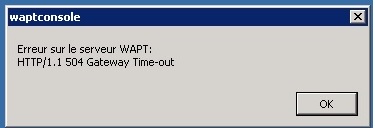
- error.jpg (12.12 KB) Viewed 9622 times
Re: Problem updating the server
Published: October 12, 2018 - 09:13
by PPE
Problem solved following sfonteneau's post on this thread:
viewtopic.php?f=13&t=1481
The solution:
Create a
code: Select all
net stop waptserver
net stop waptservice
net stop waptnginx
sc delete waptserver
then restart the installation
THANKS.
I'm marking this issue as resolved.
Good day.