Page 1 of 1
[SOLVED] Socket error #10061 Connection refused
Published: May 1, 2019 - 03:47
by PierreM
Hello everyone,
I have been trying for several hours to complete the installation but I am stuck, and I cannot find the cause.
Wapt server is installed on a virtual machine under Hyper-V, Windows Server 2012. Static IP address: 192.168.3.9
The steps taken are:
- Installation of WAPT Server version 1.7
- Modifying listening ports (via the Nginx conf file and in Wapt-get)
- Modification of firewall rules
- Added Aliases and CNAME
I think the problem is due to my server URL being incorrect. Thank you in advance for your help.
A few screenshots:
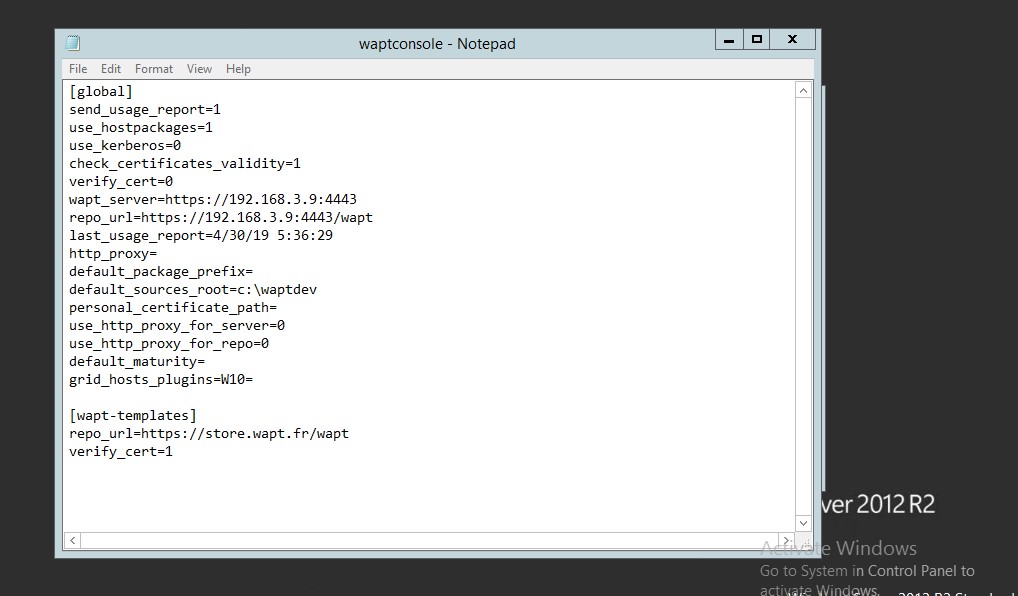
- Wapt.jpg (84.03 KB) Viewed 29541 times
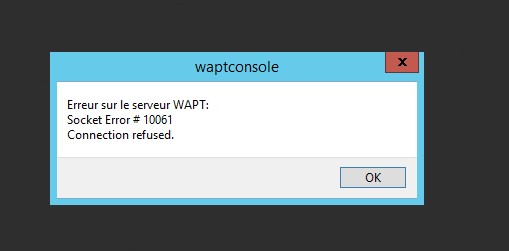
- Wapt2.jpg (15.49 KB) Viewed 29541 times
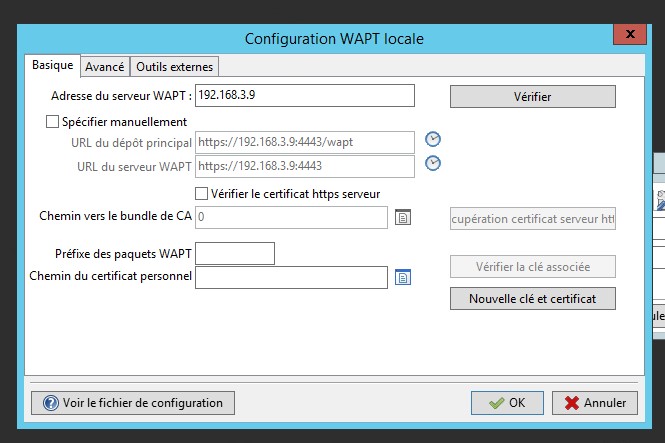
- Wapt3.jpg (60.03 KB) Viewed 29541 times
Re: Socket error #10061 Connection refused
Published: May 1, 2019 - 10:23
by PierreM
I also tried using the associated DNS name (the machine is called waptsrv and our domain is lfrd.net)
I entered the IP address on our Firewall (pfsense), linking waptsrv to our domain.
Same result...
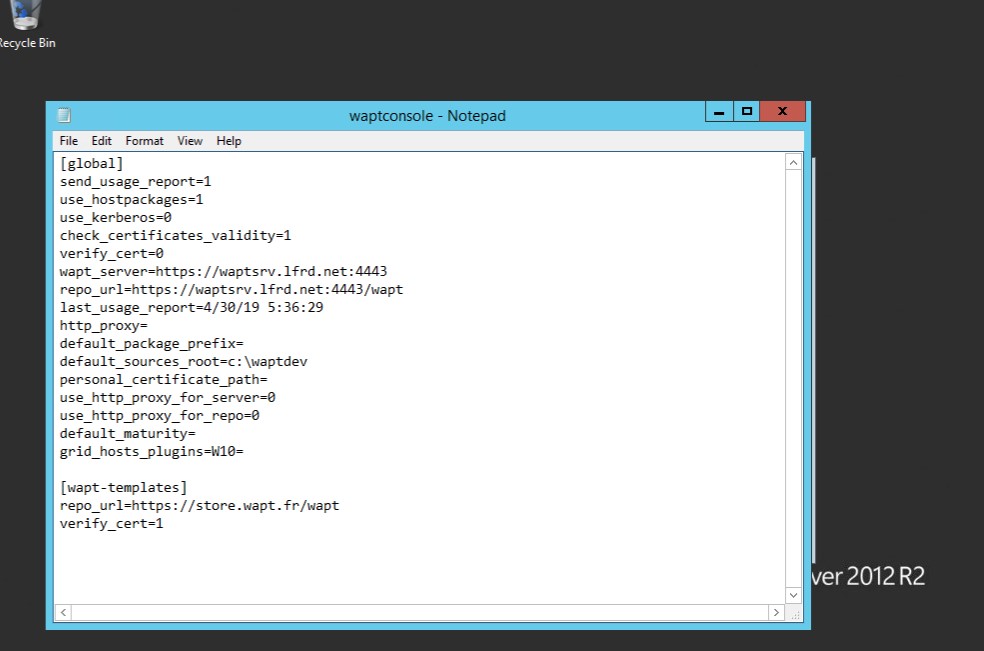
- Wapt4.jpg (81.28 KB) Viewed 29526 times
Re: Socket error #10061 Connection refused
Published: May 1, 2019 - 10:24 AM
by PierreM
Alias and CNAME
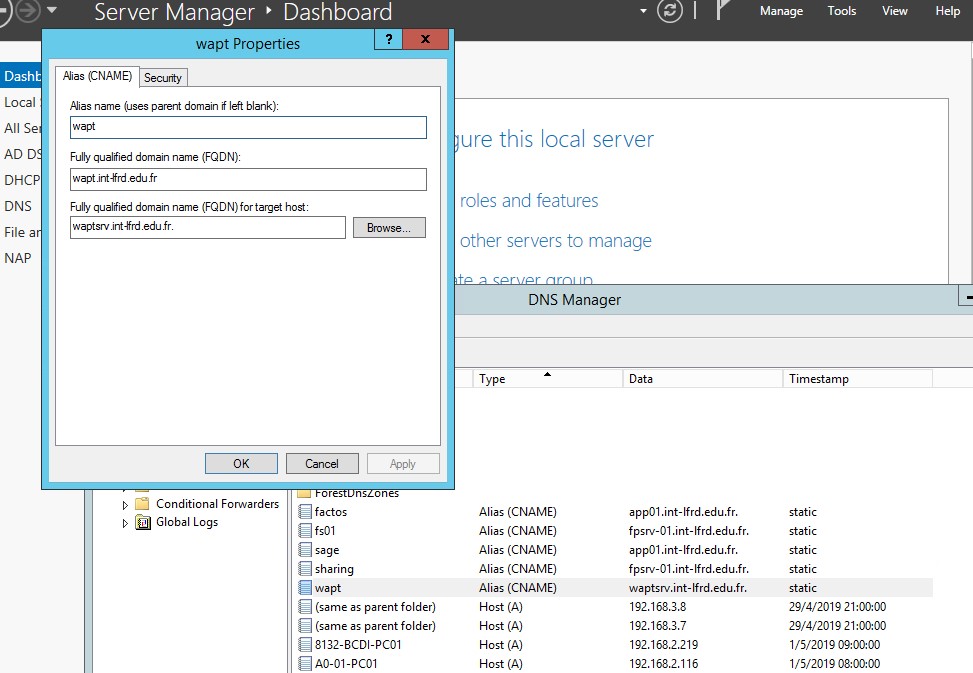
- wapt6.jpg (118.13 KB) Viewed 29533 times
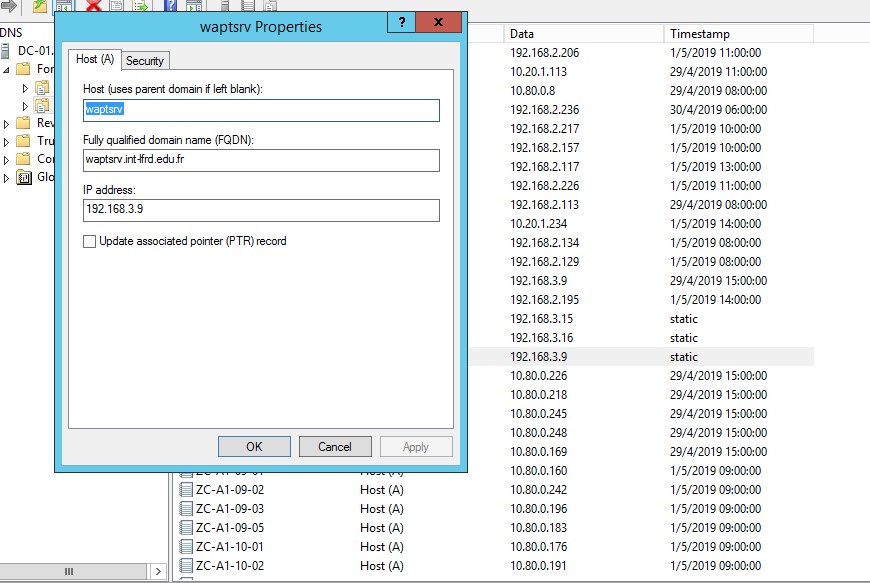
- wapt7.jpg (123.1 KB) Viewed 29533 times
Thank you again in advance.
Re: Socket error #10061 Connection refused
Published: May 23, 2019 - 09:05
by PierreM
Hello,
does anyone have any ideas?
Thanks in advance...
Re: Socket error #10061 Connection refused
Published: May 23, 2019 - 1:48 PM
by sfonteneau
What does this command return on your wapt server?
And regarding your client:
Bonus info for enabling telnet client on your Windows system:
Code: Select all
dism /online /Enable-Feature /FeatureName:TelnetClient
Re: Socket error #10061 Connection refused
Published: May 24, 2019 - 09:09
by PierreM
Thank you very much!
The command `netstat -ano | find ":4443"` is not recognized: parameter format not correct.
I haven't been able to install the client yet because I don't have access to the Wapt server...
Re: Socket error #10061 Connection refused
Published: May 24, 2019 - 09:17
by PierreM
By running netstat -a -b I get this:
C:\Users\Administrator>netstat -a -b
Active Connections
Proto Local Address Foreign Address State
TCP 0.0.0.0:135 waptsrv:0 LISTENING
RpcSs
[svchost.exe]
TCP 0.0.0.0:445 waptsrv:0 LISTENING
Can not obtain ownership information
TCP 0.0.0.0:5985 waptsrv:0 LISTENING
Can not obtain ownership information
TCP 0.0.0.0:8000 waptsrv:0 LISTENING
[nginx.exe]
TCP 0.0.0.0:8080 waptsrv:0 LISTENING
[waptpython.exe]
TCP 0.0.0.0:8443 waptsrv:0 LISTENING
[nginx.exe]
TCP 0.0.0.0:47001 waptsrv:0 LISTENING
Can not obtain ownership information
TCP 0.0.0.0:49152 waptsrv:0 LISTENING
[wininit.exe]
TCP 0.0.0.0:49153 waptsrv:0 LISTENING
EventLog
[svchost.exe]
TCP 0.0.0.0:49154 waptsrv:0 LISTENING
Schedule
[svchost.exe]
TCP 0.0.0.0:49155 waptsrv:0 LISTENING
[lsass.exe]
TCP 0.0.0.0:49162 waptsrv:0 LISTENING
[spoolsv.exe]
TCP 0.0.0.0:49176 waptsrv:0 LISTENING
[lsass.exe]
TCP 0.0.0.0:49190 waptsrv:0 LISTENING
Can not obtain ownership information
TCP 127.0.0.1:5432 waptsrv:0 LISTENING
[postgres.exe]
TCP 127.0.0.1:8088 waptsrv:0 LISTENING
[waptpython.exe]
TCP 127.0.0.1:8088 waptsrv:49463 ESTABLISHED
[waptpython.exe]
TCP 127.0.0.1:49413 waptsrv:8088 TIME_WAIT
TCP 127.0.0.1:49415 waptsrv:8088 TIME_WAIT
TCP 127.0.0.1:49416 waptsrv:8088 TIME_WAIT
TCP 127.0.0.1:49417 waptsrv:8088 TIME_WAIT
TCP 127.0.0.1:49419 waptsrv:8088 TIME_WAIT
TCP 127.0.0.1:49420 waptsrv:8088 TIME_WAIT
TCP 127.0.0.1:49421 waptsrv:8088 TIME_WAIT
TCP 127.0.0.1:49422 waptsrv:8088 TIME_WAIT
TCP 127.0.0.1:49424 waptsrv:8088 TIME_WAIT
TCP 127.0.0.1:49425 waptsrv:8088 TIME_WAIT
TCP 127.0.0.1:49426 waptsrv:8088 TIME_WAIT
TCP 127.0.0.1:49427 waptsrv:8088 TIME_WAIT
TCP 127.0.0.1:49429 waptsrv:8088 TIME_WAIT
TCP 127.0.0.1:49430 waptsrv:8088 TIME_WAIT
TCP 127.0.0.1:49431 waptsrv:8088 TIME_WAIT
TCP 127.0.0.1:49433 waptsrv:8088 TIME_WAIT
TCP 127.0.0.1:49434 waptsrv:8088 TIME_WAIT
TCP 127.0.0.1:49436 waptsrv:8088 TIME_WAIT
TCP 127.0.0.1:49438 waptsrv:8088 TIME_WAIT
TCP 127.0.0.1:49440 waptsrv:8088 TIME_WAIT
TCP 127.0.0.1:49441 waptsrv:8088 TIME_WAIT
TCP 127.0.0.1:49442 waptsrv:8088 TIME_WAIT
TCP 127.0.0.1:49443 waptsrv:8088 TIME_WAIT
TCP 127.0.0.1:49445 waptsrv:8088 TIME_WAIT
TCP 127.0.0.1:49446 waptsrv:8088 TIME_WAIT
TCP 127.0.0.1:49447 waptsrv:8088 TIME_WAIT
TCP 127.0.0.1:49449 waptsrv:8088 TIME_WAIT
TCP 127.0.0.1:49451 waptsrv:8088 TIME_WAIT
TCP 127.0.0.1:49452 waptsrv:8088 TIME_WAIT
TCP 127.0.0.1:49453 waptsrv:8088 TIME_WAIT
TCP 127.0.0.1:49455 waptsrv:8088 TIME_WAIT
TCP 127.0.0.1:49456 waptsrv:8088 TIME_WAIT
TCP 127.0.0.1:49457 waptsrv:8088 TIME_WAIT
TCP 127.0.0.1:49458 waptsrv:8088 TIME_WAIT
TCP 127.0.0.1:49460 waptsrv:8088 TIME_WAIT
TCP 127.0.0.1:49461 waptsrv:8088 TIME_WAIT
TCP 127.0.0.1:49462 waptsrv:8088 TIME_WAIT
TCP 127.0.0.1:49463 waptsrv:8088 ESTABLISHED
[wapttray.exe]
TCP 127.0.0.1:49464 waptsrv:8088 TIME_WAIT
TCP 127.0.0.1:49467 waptsrv:8088 TIME_WAIT
TCP 127.0.0.1:49468 waptsrv:8088 TIME_WAIT
TCP 192.168.3.9:139 waptsrv:0 LISTENING
Can not obtain ownership information
TCP [::]:135 waptsrv:0 LISTENING
RpcSs
[svchost.exe]
TCP [::]:445 waptsrv:0 LISTENING
Can not obtain ownership information
TCP [::]:5985 waptsrv:0 LISTENING
Can not obtain ownership information
TCP [::]:47001 waptsrv:0 LISTENING
Can not obtain ownership information
TCP [::]:49152 waptsrv:0 LISTENING
[wininit.exe]
TCP [::]:49153 waptsrv:0 LISTENING
EventLog
[svchost.exe]
TCP [::]:49154 waptsrv:0 LISTENING
Schedule
[svchost.exe]
TCP [::]:49155 waptsrv:0 LISTENING
[lsass.exe]
TCP [::]:49162 waptsrv:0 LISTENING
[spoolsv.exe]
TCP [::]:49176 waptsrv:0 LISTENING
[lsass.exe]
TCP [::]:49190 waptsrv:0 LISTENING
Can Not obtaining ownership information
TCP [::1]:5432 waptsrv:0 LISTENING
[postgres.exe]
I've already made the port changes, but I don't understand why port 4443 isn't showing up with netstat...
Thanks again for your help!
Re: Socket error #10061 Connection refused
Published: May 24, 2019 - 10:53
by sfonteneau
There's a small error in our documentation; two ports are mixed up:
4443 and 8443.
TCP 0.0.0.0:8443 waptsrv:0 LISTENING
[nginx.exe]
The documentation uses port 8443 as an example.
You need to modify the following on your system: C:\Program Files (x86)\wapt\wapt-get.ini
repo_url=
https://wapt.mydomain.lan:8443/wapt
wapt_server=
https://wapt.mydomain.lan:8443
Re: Socket error #10061 Connection refused
Published: May 27, 2019 - 11:08 AM
by PierreM
Thank you so much, it works!