Page 1 of 1
[SOLVED] Issue creating Kaspersky MSI package
Published: August 8, 2019 - 2:58 PM
by Gaetan
Hello everyone,
I had the problem described in this thread:
viewtopic.php?t=1891
So I tried to work around it using this code:
Code: Select all
# -*- coding: utf-8 -*-
import subprocess

uninstallkey = []

def install():
    print('installing tls-agent-kav-10-installer')
    subprocess.call(["msiexec", "/i 'Kaspersky_Network_Agent.msi' /qn /l*vx c:\windows\temp\nag_inst.log SERVERADDRESS='\\kamoulox' DONT_USE_ANSWER_FILE=1 EULA=1 PRIVACYPOLICY=1"])
It's spinning but displaying this:
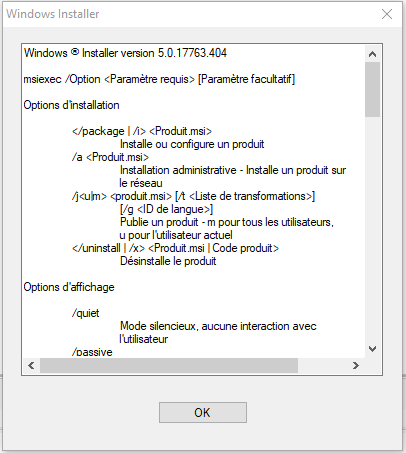
- wapt.PNG (17.28 KB) Viewed 8465 times
Through research, I read that this would come from the msiexec line and its parameters.
This command works fine when launched by PowerShell.
Do you have any idea?
THANKS.
- Installed WAPT version (1.7)
- Linux server OS and CentOS 7 version
- Operating system of the administration machine/creation of Windows 10 packages
Re: Problems creating Kaspersky MSI package
Published: August 8, 2019 - 3:13 PM
by jpele
Hello,
Subprocess is not necessary. I suggest you test the installation with the "install_msi_if_needed" function.
A CTRL + left click will allow you to access all the functions and parameters.
For your new packages, I would advise you to use the "generate a package template" tool available in the WAPT console and documented here:
https://www.wapt.fr/fr/doc/wapt-create- ... index.html
Sincerely,
Jimmy
Re: Problems creating Kaspersky MSI package
Published: August 9, 2019 - 09:13
by Gaetan
Hello,
I didn't explain my initial question very well.
I've already tried using that function, but it gives me the same result as the issue I mentioned in my first message.
The solution isn't fully provided, and I don't know how to perform a clean installation as instructed.
Thank you.
Re: Problems creating Kaspersky MSI package
Published: August 9, 2019 - 1:51 PM
by sfonteneau
Hello, following the Zabbix documentation:
https://www.zabbix.com/documentation/4. ... es/win_msi
And following the Wapt documentation:
https://doc.ad.tranquil.it/wapt/fr/doc/ ... -arguments
It works
Code: Select all
# -*- coding: utf-8 -*-
from setuphelpers import *

uninstallkey = []

def install():
    print('installing zabbix-agent')

    properties = {
        'LOGTYPE':'file',
        'LOGFILE':r'c:\za.log',
        'ENABLEREMOTECOMMANDS':'1',
        'SERVER':'192.168.6.76',
        'LISTENPORT':'12345',
        'SERVERACTIVE':'::1',
        'HOSTNAME':'myHost',
        'TLSCONNECT':'psk',
        'TLSACCEPT':'psk',
        'TLSPSKIDENTITY':'MyPSKID',
        'TLSPSKFILE':r'c:\mykey.psk',
        'TLSCAFILE':r'c:\temp\f.txt1',
        'TLSCRLFILE':r'c:\temp\f.txt2',
        'TLSSERVERCERTISSUER':'"My CA"',
        'TLSSERVERCERTSUBJECT':'"My Cert"',
        'TLSCERTFILE':r'c:\temp\f.txt5',
        'TLSKEYFILE':r'c:\temp\f.txt6',
        'ENABLEPATH':'1',
        'INSTALLFOLDER':r'c:\toto.log',
        'SKIP':'fw'}
    install_msi_if_needed('zabbix_agent-4.2.4-win-amd64-openssl.msi', properties = properties,force=True)
We need to adapt now
Re: Problems creating Kaspersky MSI package
Published: August 9, 2019 - 3:41 PM
by Gaetan
Hello sfonteneau,
Thank you for your explanation, it works much better and I understood my mistakes.
Here's the code, in case it helps others:
Code: Select all
# -*- coding: utf-8 -*-
from setuphelpers import *

uninstallkey = []

properties = {
	'SERVERADDRESS':'10.31.8.47',
	'DONT_USE_ANSWER_FILE':1,
    	'EULA':1,
	'PRIVACYPOLICY':1,
    	'LAUNCHPROGRAM':1
	}

def install():

    print('installing tls-agent-kav-10-installer')
    if os.path.isdir('C:\Program Files (x86)\Kaspersky Lab\NetworkAgent') == False:
        install_msi_if_needed('Kaspersky Network Agent.msi', properties = properties )
    else:
        print ('Kaspersky Agent already installed')