Page 1 of 1
Private key error during import
Published: September 24, 2019 - 2:09 PM
by tice
Hello, after generating the .wapt file, I try to import it via the console and I consistently get the following error:
EWaptPackageSignError: no matching private key found for signing using certificate SSL certificate cn="mycertificate".
I've tried with several different certificates I have, and none of them match

the indexes.
(Information in signature)
Re: Private key error during import
Published: September 25, 2019 - 00:07
by sfonteneau
Hello,
the private key must be right next to the selected certificate.
Re: Private key error during import
Published: September 26, 2019 - 10:05 AM
by tice
Yet that is indeed the case.
Here's what I have in C:\Program Files (x86)\wapt\private
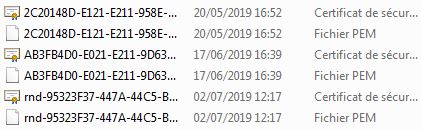
- wapt certif.JPG (25.45 KB) Viewed 18758 times
and in SSL:
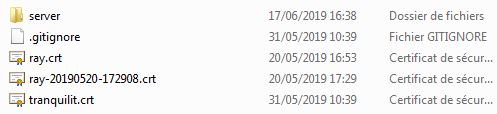
- wapt certifssl.JPG (18.97 KB) Viewed 18758 times
Re: Private key error during import
Published: September 26, 2019 - 11:08 AM
by sfonteneau
You've confused
C:\Program Files (x86)\wapt\private with the agent certificates folder, which is for internal Wapt operation.
This folder should be ignored.
Your private key is most likely located in
C:\private.
Re: Private key error during import
Published: September 26, 2019 - 11:25 AM
by tice
The previous captures were on the client machine with a console.
On the server machine I have this:
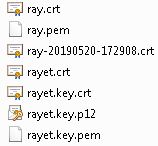
- wapt certifSrv.JPG (13.67 KB) Viewed 18746 times
When generating a packet, do you need to use the server's certificate?
Re: Private key error during import
Published: September 26, 2019 - 12:01 PM
by sfonteneau
There are a lot of files in c:\private.
You generated several keys???
I don't know which one is the correct key...
Only leave the correct keys in c:\private.
Your agent apparently only accepts keys ending in "ray".
Keep only ray-2019 and ray.pem in the folder.
Back up your data before deleting the other keys...
Re: Private key error during import
Published: September 26, 2019 - 12:19 PM
by tice
Okay, and what do I need for the console unit?
Re: Private key error during import
Published: September 26, 2019 - 12:50 PM
by tice
wasted an hour struggling with certificates and keys.
I still don't understand what's needed on the console, even after rereading the documentation and regenerating the key/certificate.
Is there a way to work without it? Secure software is great, but if it doesn't work, it's useless.
Re: Private key error during import
Published: September 26, 2019 - 5:40 PM
by cfargues
Hello tice,
Certificate-based operation is at the heart of WAPT; it's what allows us to control access to the deployment on your network.
Without certificates, anyone could deploy anything on your network, which is precisely the situation we want to avoid with a tool like WAPT.
We understand that this operation may seem cumbersome, which is why we strive to maintain comprehensive documentation on this topic, available at
https://www.wapt.fr/fr/doc/wapt-configu ... index.html.
Regarding your issue, the best advice I can give you is to reread the documentation, verifying at each step that everything is correct in your installation. Since we don't have access to your WAPT infrastructure, it's difficult for us to determine the best way to assist you.
I invite you to contact the sales department at +33 2 40 97 57 55 to discuss a potential support contract (our prices are very affordable) so we can best assist you.
Have a good day,
Camille