Page 1 of 1
[RESOLVED] No more packets and error message
Published: October 4, 2019 - 10:59 AM
by Robin
Hello everyone,
I wanted to import a package into my private repository. The package was LibreOffice, which is about 250MB.
The upload crashed at around 50% with a message saying the server was no longer responding. My Wapt server crashes every time; I've tested it twice.
I restarted my server and console. I no longer have any packages and I get an error message when I refresh the packages available in my groups and repository.
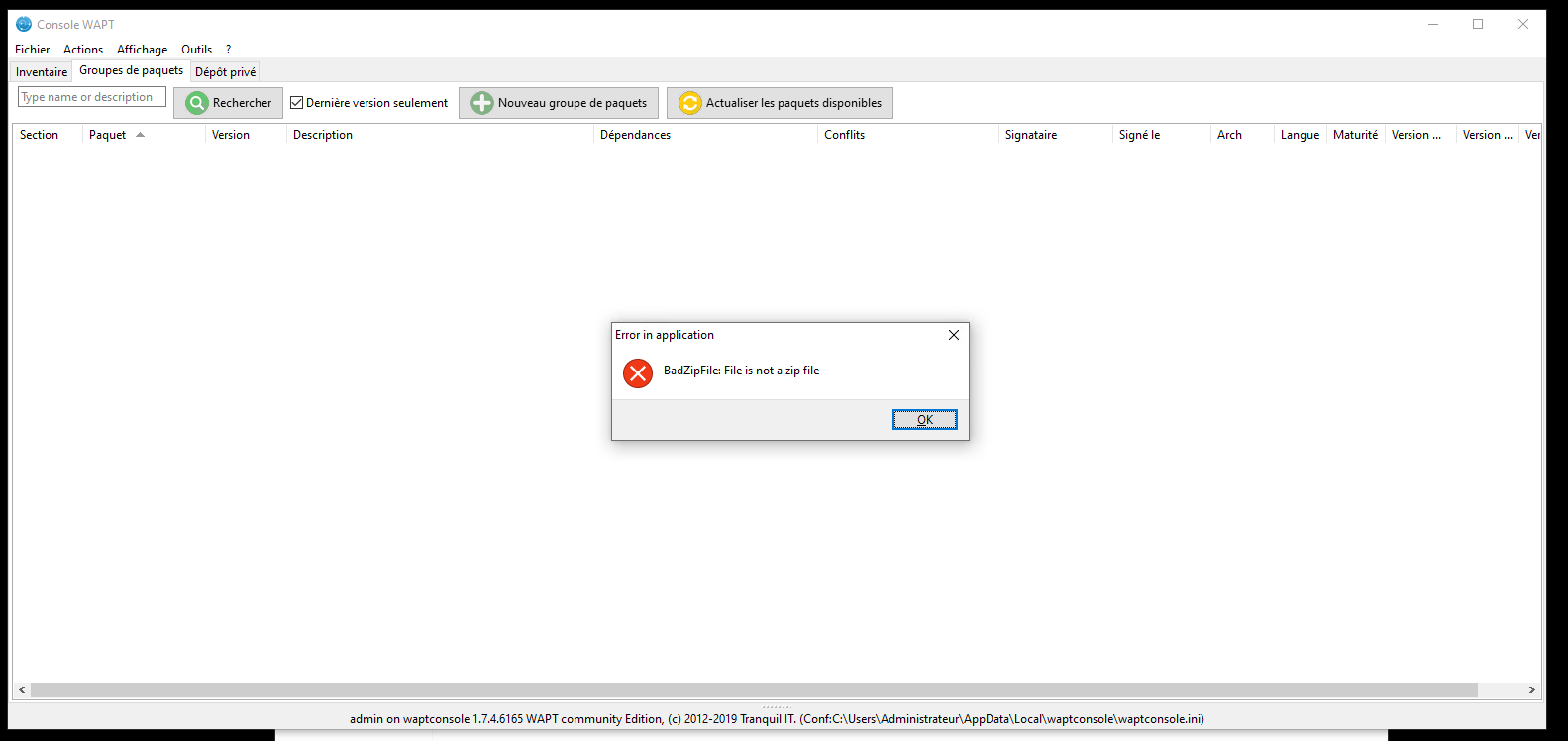
- Captureww.PNG (34.39 KB) Viewed 10197 times
WAPT Server version: 1.7.4 - OS Linux debian 9.11 stretch
OS Windows 10 (administration)
Thanks in advance
Re: No more packets and error message
Published: October 4, 2019 - 11:18 AM
by sfonteneau
Hello, I can give you the procedure to fix the problem, but I'm missing some information (see forum rules at the top of the page)
Re: No more packets and error message
Published: October 4, 2019 - 2:33 PM
by Robin
sfonteneau wrote: ↑Oct 4, 2019 - 11:18 AM
Hello, I can give you the procedure to fix the problem, but I'm missing some information (see forum rules at the top of the page)
Good morning
I edited my post
WAPT Server version: 1.7.4 - OS Linux debian 9.11 stretch
OS Windows 10 (administration)
Re: No more packets and error message
Published: October 4, 2019 - 6:56 PM
by sfonteneau
Run `wapt-scanpackages /var/www/wapt -ldebug`.
Remove the problematic Wapt package, then run
`wapt-scanpackages /var/www/wapt -ldebug`
Re: No more packets and error message
Published: October 7, 2019 - 9:49 AM
by Robin
sfonteneau wrote: ↑Oct 4, 2019 - 6:56 PM
Run `wapt-scanpackages /var/www/wapt -ldebug`.
Delete the problematic wapt package, then run
`wapt-scanpackages /var/www/wapt -ldebug`
Thanks for your reply. It was just a test image at first, so I reverted to my original one. I'll test it next time.
Re: No more packets and error message
Published: October 7, 2019 - 10:44 AM
by Robin
sfonteneau wrote: ↑Oct 4, 2019 - 6:56 PM
Run `wapt-scanpackages /var/www/wapt -ldebug`.
Delete the problematic wapt package, then run
`wapt-scanpackages /var/www/wapt -ldebug`
I imported a package and I'm getting the error message again. When you talk about deleting the package, can you tell me which folder on the server it's installed in by default?.
Re: [RESOLVED] No more packets and error message
Published: October 7, 2019 - 11:15 AM
by sfonteneau
Hello, in /var/www/wapt or /var/www/html/wapt,
can you tell me which package you are trying to import?
Re: [RESOLVED] No more packets and error message
Published: October 7, 2019 - 11:31
by Robin
sfonteneau wrote: ↑Oct 7, 2019 - 11:15 AM
Hello, in /var/www/wapt or /var/www/html/wapt,
can you tell me which package you are trying to import?
I wanted to create a simple MSI package (
https://www.wapt.fr/fr/doc/wapt-create- ... index.html)
When making my selection, I used "Create and edit..." instead of "Create and upload". Nothing happened, and I've been getting the error message "BadZipFile: File is not a zip file"
I don't have a /var/www/html/wapt directory, and my .msi file isn't in /var/www/wapt
Re: [RESOLVED] No more packets and error message
Published: October 7, 2019 - 12:00 PM
by sfonteneau
Robin wrote: ↑Oct 7, 2019 - 11:31
When making my selection, I used "Create and edit..." instead of "Create and upload". Nothing happened, and since then I've been getting the error message "BadZipFile: File is not a zip file".
Have you installed PyScripter correctly? (If you haven't clicked "build-upload" yet, the server hasn't received anything.)
Robin wrote: ↑Oct 7, 2019 - 11:31 AM
I don't have a /var/www/html/wapt directory. And in /var/www/wapt I don't have my .msi file.
https://www.wapt.fr/fr/doc/wapt-create- ... index.html
First line:
A WAPT package is a zip file that contains several elements
Therefore, you will only find .wapt files in the /var/www/wapt folder
Re: [RESOLVED] No more packets and error message
Published: October 7, 2019 - 2:26 PM
by Robin
sfonteneau wrote: ↑Oct 7, 2019 - 12:00 PMDid you install PyScripter correctly? (If you haven't clicked "build-upload" yet, the server hasn't received anything.)
I installed it manually. I didn't do it via a Wapt package (I only saw that in the documentation later). So when I try to install it, it doesn't automatically open PyScripter.
Yes, I made a mistake with "generate a package template" for the .msi file