Page 1 of 1
[SOLVED] Certificate problem during installation
Published: Dec 9, 2019 - 11:49
by elib
Hello everyone

, I'm encountering a certificate error while installing WAPT server version 1.7.4.
The server machine is running Debian 9.9.0.
When I run the command "wget -O -
https://wapt.tranquil.it/debian/tiswapt-pub.gpg | apt-key add -" I get this error message:
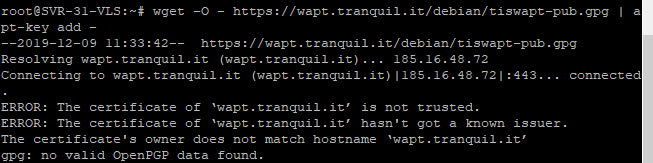
I've also checked the server's connectivity and I have no name resolution problems.
Thank you for your help!
Re: Certificate problem during installation
Published: Dec 9, 2019 - 10:37 PM
by dcardon
Hello Elib,
elib wrote: ↑Dec 9, 2019 - 11:49 AM
Hello everyone
, I am encountering a certificate error during the installation of the WAPT server version 1.7.4.
The server machine is running Debian 9.9.0.
When launching the command "wget -O -
https://wapt.tranquil.it/debian/tiswapt-pub.gpg | apt-key add -", I get this error message:
I have also checked the server's connectivity and I have no name resolution problems.
The certificate on the website is recognized by an up-to-date Debian system and is valid until June 20, 2020. Therefore, two options are most likely:
* The root certificates are not up to date on the machine (but I would be surprised given the version)
* You have a filtering firewall that does a man-in-the-middle attack with a wildcard certificate that needs to be deployed on all machines (that's not good).
Sincerely,
Denis
Re: Certificate problem during installation
Published: Dec 10, 2019 - 4:26 PM
by elib
Hello dcardon,
Thank you for your reply.
We resolved the issue by directly importing the tiswapt-pub.gpg file (via WinSCP) onto our server and running the command "apt-key add tiswapt-pub.gpg".
However, there is almost certainly a certificate problem on our firewall. We will investigate this carefully.
Best regards.