Page 1 of 1
[SOLVED] SQL Express 2016 installation
Published: June 18, 2020 - 10:01
by toto25
Good morning,
I've been working on installing SQL Express 2016 for a few days now. I created the configuration file for a silent installation, and it works locally. I copied all the contents of the SQL setup folder into the WAPT package. However, when I deploy, I get a significant error, and no files are installed on my client.
Here is the error and my setup.py.
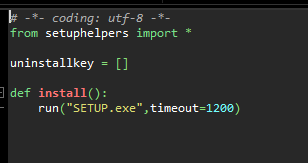
- sql2.PNG (4.67 KB) Viewed 8687 times
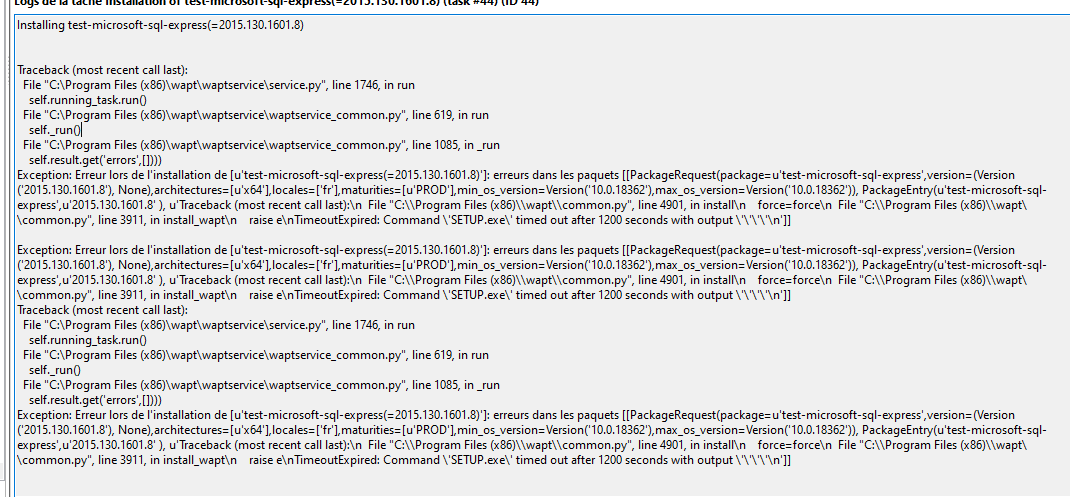
- sql1.PNG (56.23 KB) Viewed 8687 times
Has anyone managed to install it or encountered a similar error? Thank you very much!
Re: Installing SQL Express 2016
Published: June 18, 2020 - 10:31
by htouvet
Good morning,
It seems that a silent installation of SQL Server requires some additional parameters...
Maybe at least
Code: Select all
/Q /IACCEPTSQLSERVERLICENSETERMS /ACTION="install"
setup.exe /Q /IACCEPTSQLSERVERLICENSETERMS /ACTION="install" ...
Apparently, setup.exe /help displays the available parameters
Re: Installing SQL Express 2016
Published: June 18, 2020 - 11:20
by toto25
Thank you for your response
I tried using the "required" options from the Microsoft documentation, but it didn't work. So I copied my entire configuration file like this:
Code: Select all
def install():
    install_exe_if_needed("SETUP.exe",'/Q /IACCEPTSQLSERVERLICENSETERMS /ACTION="install" /ROLE="AllFeatures_WithDefaults" /ENU="False" /IACCEPTSQLSERVERLICENSETERMS="True" /QUIET="True" /UpdateEnabled="True" /USEMICROSOFTUPDATE="True" /FEATURES=SQLENGINE'      (le reste)........
result, "returned non-zero exit status -2068052377."
I can't figure out what this error code means.
Re: Installing SQL Express 2016
Published: June 18, 2020 - 12:28
by florentR2
I'm interested if you find a solution. I have a piece of software that I can't package and it includes an SQL Express module that I suspect is causing the problem.
There are no issues if I run the installation locally using PyScripter.
However, if you can reproduce the problem in a command prompt with `psexec -i -s cmd`, I think it means that SQL Express doesn't support installation under the system account.
Re: Installing SQL Express 2016
Published: June 19, 2020 - 09:07
by toto25
Good morning,
I successfully completed the installation, so I'm going to share the steps I followed for those who need them!
So I created my SQL Express 2016 configuration file (start an install then cancel it, easy to find on google), I removed QUIETSIMPLE e and put QUIET = TRUE.
Then I put everything as is in the setup.py file
Code: Select all
def install():
    install_exe_if_needed("SETUP.exe",'/ACTION="install" /ROLE="AllFeatures_WithDefaults" /ENU="False" /IACCEPTSQLSERVERLICENSETERMS="True" /QUIET="True" /UpdateEnabled="True" /USEMICROSOFTUPDATE="True" /FEATURES=SQLENGINE etc....
I put the contents of the installation folder into the package.
The problem was that during each "test" installation, I hadn't completely removed all traces of the software, hence the error message. After a complete uninstall, it works.
Re: Installing SQL Express 2016
Published: June 19, 2020 - 09:37
by florentR2
toto25 wrote: ↑June 19, 2020 - 09:07
Code: Select all
def install():
    install_exe_if_needed("SETUP.exe",'/ACTION="install" /ROLE="AllFeatures_WithDefaults" /ENU="False" /IACCEPTSQLSERVERLICENSETERMS="True" /QUIET="True" /UpdateEnabled="True" /USEMICROSOFTUPDATE="True" /FEATURES=SQLENGINE etc....
Good morning,
Could you list all the default options to provide?
Or would that alone be enough?
Code: Select all
install_exe_if_needed("SETUP.exe",'/ACTION="install" /ROLE="AllFeatures_WithDefaults" /ENU="False" /IACCEPTSQLSERVERLICENSETERMS="True" /QUIET="True"')
Re: Installing SQL Express 2016
Published: June 19, 2020 - 11:38
by toto25
That's really all the options in the configuration file.
Code: Select all
def install():
install_exe_if_needed("SETUP.exe",'/ACTION="install" /ROLE="AllFeatures_WithDefaults" /ENU="False" /IACCEPTSQLSERVERLICENSETERMS="True" /QUIET="True" /UpdateEnabled="True" /USEMICROSOFTUPDATE="True" /FEATURES=SQLENGINE /UpdateSource="MU" /HELP="False" /INDICATEPROGRESS="False" /X86="False" /INSTALLSHAREDDIR="C:\Program Files\Microsoft SQL Server" /INSTALLSHAREDWOWDIR="C:\Program Files (x86)\Microsoft SQL Server" /INSTANCENAME="MONENTREPRISE" /SQMREPORTING="False" /INSTANCEID="MONENTREPRISE" /INSTANCEDIR="C:\Program Files\Microsoft SQL Server" /AGTSVCACCOUNT="AUTORITE NT\SERVICE RÉSEAU" /AGTSVCSTARTUPTYPE="Disabled" /COMMFABRICPORT="0" /COMMFABRICNETWORKLEVEL="0" /COMMFABRICENCRYPTION="0" /MATRIXCMBRICKCOMMPORT="0" /SQLSVCSTARTUPTYPE="Automatic" /FILESTREAMLEVEL="0" /ENABLERANU="True" /SQLCOLLATION="French_CI_AS" /SQLSVCACCOUNT="NT Service\MSSQL$MONENTREPRISE" /SQLSYSADMINACCOUNTS="BUILTIN\Administrateurs" /SECURITYMODE="SQL" /SAPWD="Colo#2009" /ADDCURRENTUSERASSQLADMIN="False" /TCPENABLED="1" /NPENABLED="0" /BROWSERSVCSTARTUPTYPE="Automatic"',timeout=1200)