Page 1 of 1
Unable to launch NGINX
Published: October 8, 2020 - 3:35 PM
by nat.dejonghe
Good morning,
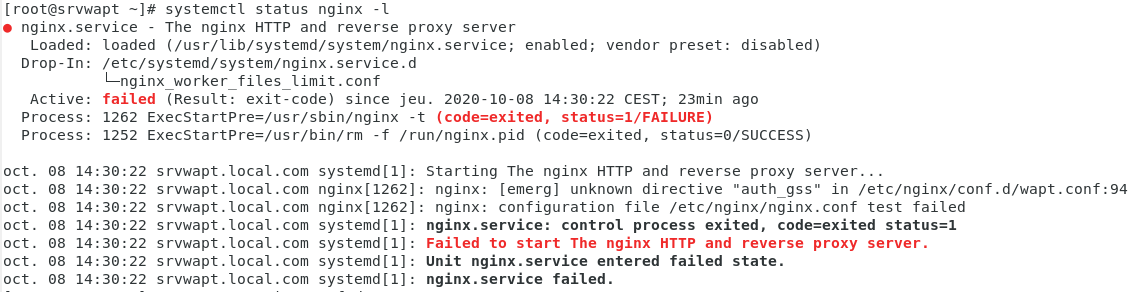
I'm having trouble with nginx. It won't start. It displays "failed" with several errors.
- nginx.PNG (63.09 KB) Viewed 6336 times
It doesn't recognize "auth_gss". Until I manage to launch nginx, I won't be able to access the wapt page to download waptclient.exe.

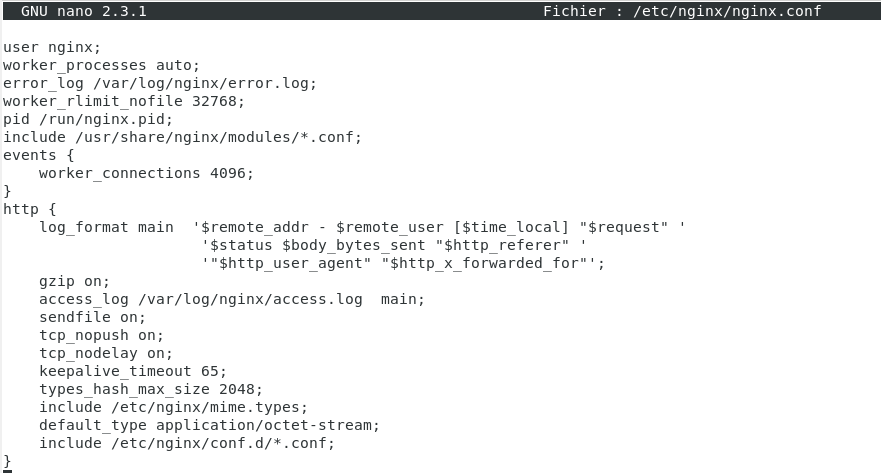
Here is the nginx configuration (/etc/nginx/nginx.conf) ->
- config nginx.conf.PNG (43.01 KB) Viewed 6336 times
Does anyone have any ideas, please?
Re: Unable to launch NGINX
Published: October 14, 2020 - 11:34 AM
by nat.dejonghe
Okay, I managed to restart Nginx. The problem now is that I can access the WAPT page from CentOS but not from Windows Server! Yet I can ping my server's address and communicate with the machine hosting WAPT.
Any ideas?
Re: Unable to launch NGINX
Published: October 15, 2020 - 2:27 PM
by dcardon
nat.dejonghe wrote: ↑Oct 14, 2020 - 11:34 AM
Okay, I managed to restart Nginx. The problem now is that I can access the WAPT page from CentOS
Do you have a graphical interface on your WAPT server? It's really not recommended; NetworkManager and firewalld can do strange things in the background.
but not from Windows Server!
Is this a machine with the Wapt agent?
However, I can ping my server's address and communicate with the machine on which WAPT is located.
"communique" -> Do you see the WAPT server web page displayed? Does the console connect?
Sincerely,
Denis Cardon
Re: Unable to launch NGINX
Published: October 19, 2020 - 11:07 AM
by nat.dejonghe
Hi, it's working now. I just needed to delete the SSL certificates and run the script again to generate new ones.

Okay, I have another problem... I want to use WaptDeploy, but following the installation instructions, it doesn't work... I also saw that you need admin rights to run WaptDeploy, so I don't think it will ever work.
Have you ever encountered this problem?
Re: Unable to launch NGINX
Published: October 19, 2020 - 2:25 PM
by vcardon
nat.dejonghe wrote: ↑Oct 19, 2020 - 11:07 AM
Hello, it's working now. All I had to do was delete the SSL certificates and run the script again to generate new ones.
Mark the topic as [RESOLVED] (see forum rules) and start a new thread to open a new topic (... do some research first too).