Page 1 of 1
Errors during import to GLPI
Published: April 30, 2021 - 09:34
by emilien.gauthier
Hello,
I'm getting errors when importing workstations.
Have I forgotten a setting?
Where can I find information/logs about these errors?
Thank you for your help.
Sincerely.
AP
Published: May 21, 2021 - 4:12 PM
by ee68
Good morning,
Same here, I can't export the inventory to GLPI
I should clarify that the GLPI + Fusion Inventory server is working and the inventory data from the Fusion Inventory agent is correctly uploaded
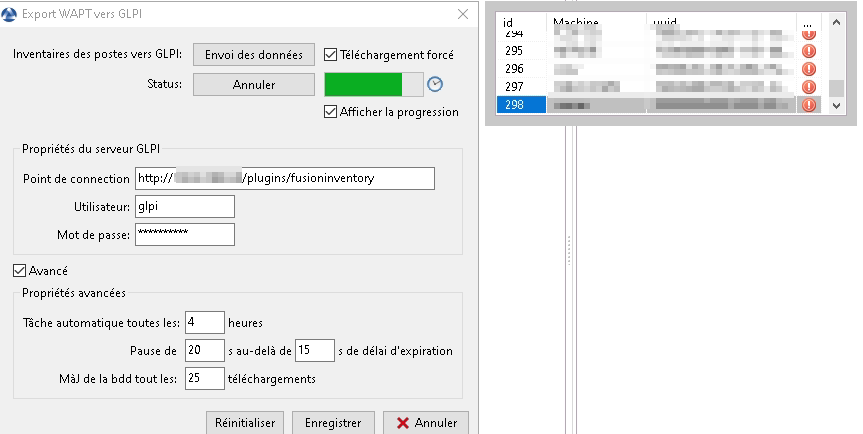
- 2021-05-21_15-33.png (17.05 KB) Viewed 10091 times
The only information in the GLPI and Apache server logs during the attempted export to GLPI
[21/May/2021:15:59:02 +0200] "POST /plugins/fusioninventory HTTP/1.1" 301 670 "-" "python-requests/2.25.0"
glpi [21/May/2021:15:59:02 +0200] "GET /plugins/fusioninventory/ HTTP/1.1" 200 3043 "-" "python-requests/2.25.0"
[21/May/2021:15:59:02 +0200] "POST /plugins/fusioninventory HTTP/1.1" 301 670 "-" "python-requests/2.25.0"
[21/May/2021:15:59:02 +0200] "GET /plugins/fusioninventory/ HTTP/1.1" 200 3040 "-" "python-requests/2.25.0"
Any ideas to help us?
Thanks in advance
WAPT 2.0 Enterprise Edition
WAPT server OS: Debian 10
OS administration console WAPT Windows 10 8:2 p.m
OS Server GLPI 9.5.5: Debian 10
Re: Errors during import to GLPI
Published: May 21, 2021 - 5:43 PM
by jacky35
I think you forgot to add a slash at the end.
If it still doesn't work, you can try adding `/index.php` to the end to see if that helps,
but you clearly have a configuration problem with your Apache or Nginx server.
Re: Errors during import to GLPI
Published: May 27, 2021 - 2:41 PM
by ee68
Good morning,
Thanks, great, it works by adding
/index.php
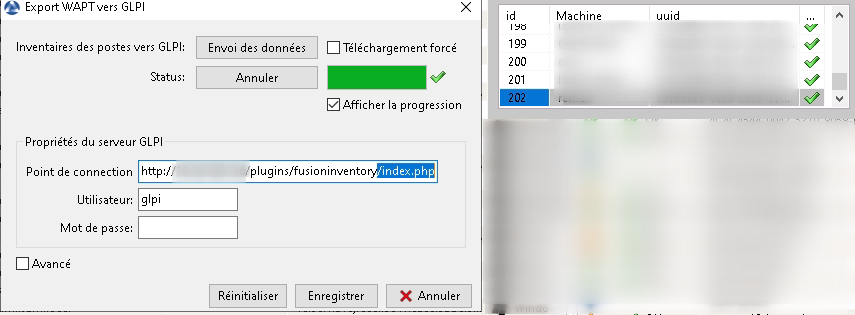
- 2021-05-27_14-40.png (46.54 KB) Viewed 10038 times
No doubt this will be useful to other people later on
Good day
Eric