Page 1 of 1
Access to the WAPT console
Published: May 15, 2015 - 3:56 PM
by rezidu
Good morning,
First of all, sorry if this topic is in the wrong section.
I am contacting you because I have a problem; I cannot launch the WAPT graphical console on certain computers. I get the following message:
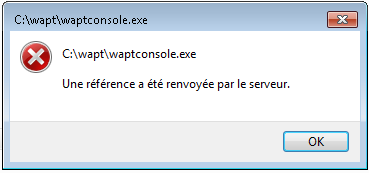
- consolwapterror.PNG (7.33 KB) Viewed 9869 times
I have 2 different domains, what's strange is that I can't launch the console from my machines under domain X, but I can with those under domain Y.
Has anyone else encountered this problem and/or know how to fix it?.
For your information, I am using WAPT version 1.2.3 and my server (Windows) is not part of a domain.
Re: Accessing the WAPT console
Published: May 22, 2015 - 11:13
by willyodin
Hello, I have the same problem when installing the server on a Windows machine.
I would add that when I try to launch the console via the system tray, nothing happens, or rather, a consent.exe process starts and then closes.
Re: Accessing the WAPT console
Published: May 22, 2015 - 3:06 PM
by rezidu
Yes, I have the same problem.
I asked about it on the mailing list; here's the discussion:
"The message is a bit cryptic... but see if it's related to Windows UAC.
To test, launch the console as administrator (right-click on c:\wapt\waptsoncole.exe, "Run as administrator").
This message could appear if Windows cannot validate the identity of the software publisher (Tranquil-it Systems).
Check the digital signature in the file properties...
No guarantees...
Hubert."
"Thank you for your reply.
I had already tried launching the console by right-clicking and selecting "Run as administrator," but I had the same problem.
However, as you suggested, I then looked at the digital signature. And indeed, that's where the problem lies; Windows can't verify the certificate in the signature. I think it's because the computer on which I want to launch the console doesn't have internet access.
Luc."
So, to this day, I still have the problem because I haven't tried giving the computer internet access. I'll test that in the next few days.
Re: Accessing the WAPT console
Published: May 26, 2015 - 12:10
by htouvet
Try modifying the waptconsole.manifest file in c:\wapt.
It's a text file that you can open with Notepad.
Locate the line
<requestedExecutionLevel level="requireAdministrator" uiAccess="true"/>
and replace requireAdministrator with highestAvailable
<requestedExecutionLevel level="highestAvailable" uiAccess="true"/>
Re: Accessing the WAPT console
Published: October 9, 2015 - 9:38 AM
by Olie95
Hello,
Having experienced the same issue, I simply modified the waptconsole.exe.manifest file with uiAccess=False in the RequestedExecutionLevel item, and the console launched without error.
Hoping this helps someone.
Olivier.