Page 1 of 2
[SOLVED] Win deployment issue
Published: May 4, 2022 - 11:35 AM
by eliottiph
- Installed WAPT version: WAPT 2.2.11899
- Server OS: Debian 10
- DHCP Server: Win19 Server
- Operating system of the administration/package creation machine: Windows 10
Good morning,
I am currently testing WAPT on a virtual environment (Virtualbox).
I'm having a problem during deployment:
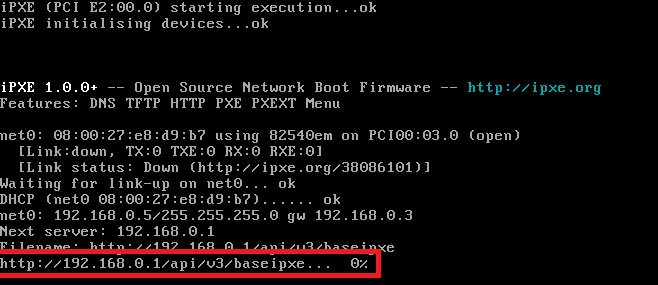
- screen deployment.png (11.79 KB) Viewed 8288 times
The task remains stuck at 0%, I can't find the source of this problem...
Thanks in advance.
Re: Windows deployment problem
Published: May 4, 2022 - 2:28 PM
by sfonteneau
Can you try accessing this URL from the VirtualBox machine? (You'll need an operating system for this) (via HTTP)
Re: Windows deployment problem
Published: May 4, 2022 - 2:35 PM
by eliottiph
Yes, here's what I get:

- wapt forum.png (8.8 KB) Viewed 8272 times
Re: Windows deployment problem
Published: May 4, 2022 - 2:51 PM
by sfonteneau
Your capture is using HTTPS.
Do you have an automatic redirect to HTTPS on your server?
If you want to use HTTPS with IPXE, you need a valid HTTPS certificate or you'll need to recompile IPXE...
Re: Windows deployment problem
Published: May 4, 2022 - 3:33 PM
by eliottiph
Yes, indeed I used the --force-https parameter when running the post-conf script.
Thank you for the information.
Re: Windows deployment problem
Published: May 4, 2022 - 4:49 PM
by eliottiph
I still have some concerns:
-Deployment crashes during launch; the deployment remains stuck on the line media/sources/boot.wim ok
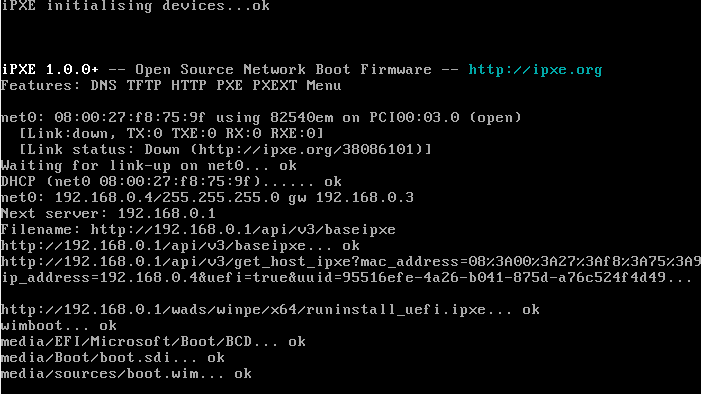
- Error during deployment.png (18.66 KB) Viewed 8252 times
-When I want to prepare the offline Djoin, only one OU is offered even though I have other OUs created in my AD.
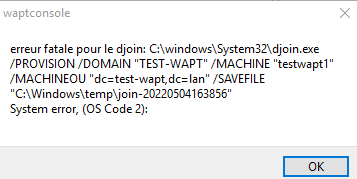
- DJOIN ERROR.png (6 KB) Viewed 8252 times
We're making slow but steady progress

Re: Windows deployment problem
Published: May 4, 2022 - 8:17 PM
by sfonteneau
Judging from the screenshot, you have a VirtualBox legacy BIOS, not a UEFI one
However, the machine is trying to boot in UEFI mode according to the screenshots
In this type of case, the address should be
http://srvwapt.mydomain.lan/api/v3/baseipxe?uefi=false
The DHCP configuration that automatically redirects based on the BIOS type must be incorrect.
To understand how this works in DHCP:
Code: Select all
# Si la machine est une machine avec un bios legacy (client-architecture = 00:00) alors:
filename "undionly.kpxe"     (on indique ici de démarer ipxe)

# Si la machine est une machine avec un bios legacy (client-architecture = 00:00) ET que c'est ipxe qui demande alors :
filename "http://srvwapt.mydomain.lan/api/v3/baseipxe?uefi=false"

# Si la machine est une machine avec un bios uefi (client-architecture != 00:00) alors:
filename "ipxe.efi";

# Si la machine est une machine avec un bios uefi (client-architecture != 00:00) ET que c'est ipxe qui demande alors :
filename "http://srvwapt.mydomain.lan/api/v3/baseipxe
The machine therefore makes two DHCP requests: one to retrieve the IPXE file, and once IPXE has started, IPXE itself makes another DHCP request to retrieve its configuration URL
Note that our documentation does not mention legacy for Windows DHCP servers:
https://www.wapt.fr/fr/doc/wapt-wads-tf ... hcp-server
Regarding OUs, wapt only displays OUs that are known through the already installed wapt agent. If you want to mention an OU that does not appear, directly modify the field in the top right of the "OU" window
In your example, you selected the domain root, which isn't possible; you need to use an OU. We just haven't implemented security at that level yet
Re: Windows deployment problem
Published: May 5, 2022 - 11:01
by eliottiph
Good morning,
I modified my DHCP settings as follows, but the crash occurred at the same point:

- legacy modif options.png (10.6 KB) Viewed 8182 times
Re: Windows deployment problem
Published: May 5, 2022 - 11:39
by sfonteneau
UEFI no longer appears in the screenshot?
Re: Windows deployment problem
Published: May 5, 2022 - 12:12
by eliottiph
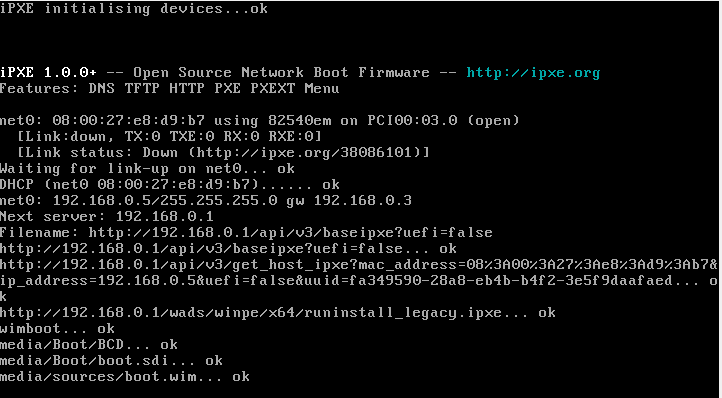
- boot error.wim.png (19.97 KB) Viewed 8176 times