Page 1 of 1
[SOLVED] WADS: Failure after wgetwads64.exe
Published: June 20, 2022 - 2:00 PM
by t.heroult
Hello everyone
We have a problem with our WADs on certain machines only:
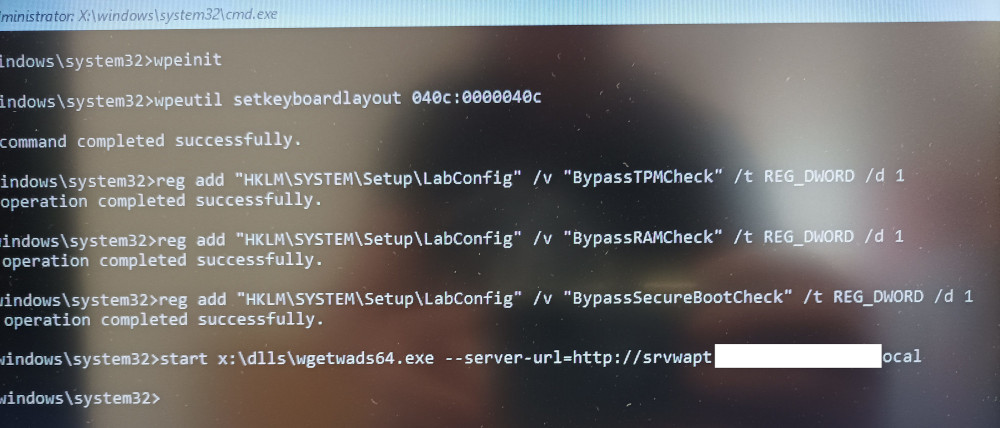
- IMG_20220620_134834.jpg (124.09 KB) Viewed 5094 times
From this point on, the cursor blinks.
On some machines, it works without any problems, on others, it stops there.
It's a Windows 10 Pro master image.
Any ideas?
Sincerely
Tom
Re: WADS: Random failure after wgetwads64.exe
Published: June 20, 2022 - 3:58 PM
by sfonteneau
Hello,
are you using the latest version?
The latest version generates a WinPE installation with 127.0.0.1 at the beginning to avoid network issues.
Also, to better see the error, you can rerun the command without the `start` command.
Re: WADS: Random failure after wgetwads64.exe
Published: June 20, 2022 - 4:08 PM
by t.heroult
Hi Simon
, yes, everything is up to date (both Wapt server and the wads package).
Actually, according to the log, the failure occurs after startnet.cmd, when launching setup.exe... which doesn't exist.
However, "rerun the command without the start"?
Could you be more specific, please?

Re: WADS: Random failure after wgetwads64.exe
Published: June 20, 2022 - 4:18 PM
by sfonteneau
Strange, I don't see 127.0.0.1 in your screenshot (hence my question about the version). Was WinPE regenerated?
When I say rerun the command without `start`, I mean copy the `wgetwads64` command without copying `start`, then rerun the command.
`start` allows WinPE to use the French keyboard layout, but it also hides errors.
Re: WADS: Random failure after wgetwads64.exe
Published: June 20, 2022 - 4:53 PM
by t.heroult
OK, I've re-uploaded WinPE, we'll see how it goes on the next ones.
In the meantime, manually running `wgetwads64 --server-url` worked!
Thanks!