Page 1 of 1
[RESOLVED] WADS - Error during Windows 10 deployment
Published: July 27, 2022 - 4:39 PM
by eliottiph
WAPT version: Enterprise version 2.2.1.11957
WAPT Server: Debian 11 Bullseye
Console: Windows Server 19
PC to be deployed: Dell Latitude 3520
------------------------------------------------------------------------------------------
Good morning,
I'm getting this error when deploying Windows 10 on Dell Latitude 3520s:
It would appear that there is an error related to the disk.
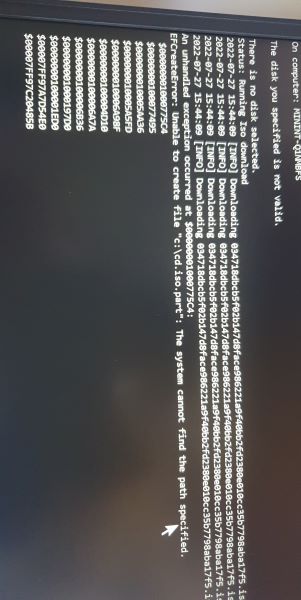
- Snapchat-1227f07810.jpg (33.24 KB) Viewed 7240 times
I don't understand, given that I followed the WAPT documentation correctly.
Thanks in advance.
Eliott.
Re: WADS - Error during Windows 10 deployment
Published: July 28, 2022 - 8:55 PM
by dcardon
Hello,
it seems the disk driver wasn't found in the ISO: "There is no disk selected". What kind of SSD is it? Is it a fairly recent machine? Did it come with Windows 10 or Windows 11 by default? Basically, it's the same issue as with MDT. If the hardware includes a disk driver or a network driver that doesn't have a generic driver in the Windows ISO, you need to add it to the WIM file.
Is the disk's BIOS configuration perhaps in RAID or NVMe mode (see [1])?
Regards,
Denis
[1]
https://www.reddit.com/r/MDT/comments/p ... t_install/
Re: WADS - Error during Windows 10 deployment
Published: July 29, 2022 - 10:30 AM
by eliottiph
Good morning,
I found the solution last night, indeed for the DELL Latitude 3520 the BIOS setting for the drives has to be changed from RAID to AHCI / NVMe.
And I have another small problem: to automatically integrate the Win10 license key and the BIOS key, do I need to configure the XML in this way?
Code: Select all
<ProductKey>
			<!-- Do not uncomment the Key element if you are using trial ISOs -->
			<!-- You must uncomment the Key element (and optionally insert your own key) if you are using retail or volume license ISOs -->
			<Key>[KEY]</Key> (j'ai lu sur un forum qu'en remplaçant la clé par "[KEY]", cela permettais d'aller chercher la clé présente dans le BIOS).
			<WillShowUI>Never</WillShowUI>
</ProductKey>
Perhaps this line should also be set to false?
Code: Select all
<component name="Microsoft-Windows-Security-SPP-UX" processorArchitecture="{{architecture}}" publicKeyToken="31bf3856ad364e35" language="neutral" versionScope="nonSxS" xmlns:wcm="http://schemas.microsoft.com/WMIConfig/2002/State" xmlns:xsi="http://www.w3.org/2001/XMLSchema-instance">
			<SkipAutoActivation>false</SkipAutoActivation>
		</component>
And, can I delete the ProductKey line there without causing problems? Because it included the key between the tags and caused an error.
Code: Select all
		<component name="Microsoft-Windows-Shell-Setup" processorArchitecture="{{architecture}}" publicKeyToken="31bf3856ad364e35" language="neutral" versionScope="nonSxS" xmlns:wcm="http://schemas.microsoft.com/WMIConfig/2002/State" xmlns:xsi="http://www.w3.org/2001/XMLSchema-instance">
			<ComputerName>{{hostname}}</ComputerName>
			<ProductKey>W269N-WFGWX-YVC9B-4J6C9-T83GX</ProductKey>
		</component
Thanks in advance,
Eliott.
Re: [SOLVED] WADS - Error during Windows 10 deployment
Published: July 29, 2022 - 7:02 PM
by dcardon
Hello,
thank you for keeping each ticket separate. Could you please open a new one with your new question?
Thank you, Best regards,
Denis