Page 1 of 2
[RESOLVED] IPXE Problem: Network unreachable
Published: September 9, 2022 - 9:41 AM
by t.heroult
Good morning
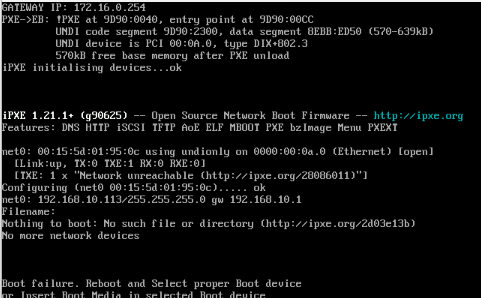
Since this morning, we've been experiencing strange behavior when booting from PXE.
We tried it with VMs and physical machines and it always gives the same result:
- ipxe.png (19.11 KiB) Viewed 6284 times
Even after restarting the WAPT server, nothing changes.
Any ideas?
Sincerely,
Tom
EDIT: Problem with DHCP server desynchronization
Re: IPXE Problem: Network unreachable
Published: September 9, 2022 - 9:57 AM
by sfonteneau
Hello,
the IPXE has been successfully retrieved, so the first step is OK (TFTP part).
Now the IPXE is retrieving its configuration (it's making another DHCP request to get the IPXE script URL).
Has this already worked for you, or is this a new setup?
Simon
Re: IPXE Problem: Network unreachable
Published: September 9, 2022 - 12:57 PM
by t.heroult
It's been in place for a while now, we've already mastered a few machines with it.
Re: IPXE Problem: Network unreachable
Published: September 9, 2022 - 6:40 PM
by sfonteneau
t.heroult wrote: ↑09 Sep 2022 - 12:57
It's been in place for a while now, we've already mastered a few machines with it.
Interesting, has anything changed on your end in the meantime? A Wapt upgrade? A DHCP configuration modification?
Do you see anything in the nginx logs on the wapt server?
Re: IPXE Problem: Network unreachable
Published: September 12, 2022 - 10:06 AM
by t.heroult
Hello Simon
No, there are no changes in our system or in WAPT.
That's what's really weird...
Here is the result of the command:
Code: Select all
root@SRVWAPT:~# tail -f /var/log/nginx/access.log
172.18.0.7 - - [12/Sep/2022:10:02:15 +0200] "POST /update_host HTTP/1.1" 200 1204 "-" "wapt/2.2.2"
172.16.2.173 - - [12/Sep/2022:10:02:28 +0200] "HEAD /ping HTTP/1.1" 200 0 "-" "wapt/2.2.2"
172.16.2.173 - - [12/Sep/2022:10:02:30 +0200] "POST /update_host HTTP/1.1" 200 1276 "-" "wapt/2.2.2"
172.16.2.103 - - [12/Sep/2022:10:02:37 +0200] "HEAD /waptwua/wsusscn2.cab HTTP/1.1" 200 0 "-" "wapt/2.2.2"
172.16.10.69 - - [12/Sep/2022:10:02:38 +0200] "HEAD /ping HTTP/1.1" 200 0 "-" "wapt/2.2.2"
172.16.10.69 - - [12/Sep/2022:10:02:40 +0200] "POST /update_host HTTP/1.1" 200 1276 "-" "wapt/2.2.2"
172.17.1.35 - - [12/Sep/2022:10:02:46 +0200] "HEAD /ping HTTP/1.1" 200 0 "-" "wapt/2.2.2"
172.17.1.35 - - [12/Sep/2022:10:02:47 +0200] "POST /update_host HTTP/1.1" 200 1270 "-" "wapt/2.2.2"
172.17.1.19 - - [12/Sep/2022:10:02:58 +0200] "HEAD /ping HTTP/1.1" 200 0 "-" "wapt/2.2.2"
172.17.1.19 - - [12/Sep/2022:10:02:59 +0200] "POST /update_host HTTP/1.1" 200 1270 "-" "wapt/2.2.2"
172.16.1.127 - - [12/Sep/2022:10:03:19 +0200] "GET /rules.json HTTP/1.1" 200 2 "-" "wapt/2.2.2"
172.16.1.127 - - [12/Sep/2022:10:03:19 +0200] "HEAD /waptwua/wsusscn2.cab HTTP/1.1" 200 0 "-" "wapt/2.2.2"
172.16.1.127 - - [12/Sep/2022:10:03:19 +0200] "GET /licences.json HTTP/1.1" 200 2658 "-" "wapt/2.2.2"
172.16.1.127 - - [12/Sep/2022:10:03:19 +0200] "HEAD /wapt/Packages HTTP/1.1" 200 0 "-" "wapt/2.2.2"
172.16.1.127 - - [12/Sep/2022:10:03:19 +0200] "GET /wapt/Packages HTTP/1.1" 200 134009 "-" "wapt/2.2.2"
172.16.1.127 - - [12/Sep/2022:10:03:20 +0200] "HEAD /wapt-host/xxxxxxxxxxx.local.wapt HTTP/1.1" 200 0 "-" "wapt/2.2.2"
172.16.1.127 - - [12/Sep/2022:10:03:20 +0200] "GET /rules.json HTTP/1.1" 200 2 "-" "wapt/2.2.2"
172.16.1.127 - - [12/Sep/2022:10:03:20 +0200] "HEAD /waptwua/wsusscn2.cab HTTP/1.1" 200 0 "-" "wapt/2.2.2"
172.16.1.127 - - [12/Sep/2022:10:03:20 +0200] "GET /licences.json HTTP/1.1" 200 2658 "-" "wapt/2.2.2"
172.16.1.127 - - [12/Sep/2022:10:03:20 +0200] "HEAD /wapt/Packages HTTP/1.1" 200 0 "-" "wapt/2.2.2"
172.16.1.127 - - [12/Sep/2022:10:03:20 +0200] "HEAD /wapt-host/xxxxxxxxxxx.local.wapt HTTP/1.1" 200 0 "-" "wapt/2.2.2"
172.16.1.127 - - [12/Sep/2022:10:03:20 +0200] "HEAD /ping HTTP/1.1" 200 0 "-" "wapt/2.2.2"
172.16.1.127 - - [12/Sep/2022:10:03:21 +0200] "POST /update_host HTTP/1.1" 200 1270 "-" "wapt/2.2.2"
172.16.10.69 - - [12/Sep/2022:10:03:31 +0200] "HEAD /ping HTTP/1.1" 200 0 "-" "wapt/2.2.2"
172.16.10.69 - - [12/Sep/2022:10:03:33 +0200] "POST /update_host HTTP/1.1" 200 1276 "-" "wapt/2.2.2"
172.16.3.11 - - [12/Sep/2022:10:03:48 +0200] "HEAD /ping HTTP/1.1" 200 0 "-" "wapt/2.2.2"
172.16.3.11 - - [12/Sep/2022:10:03:50 +0200] "POST /update_host HTTP/1.1" 200 1268 "-" "wapt/2.2.2"
172.16.2.89 - - [12/Sep/2022:10:03:56 +0200] "HEAD /ping HTTP/1.1" 200 0 "-" "wapt/2.2.2"
172.16.2.89 - - [12/Sep/2022:10:03:57 +0200] "POST /update_host HTTP/1.1" 200 1274 "-" "wapt/2.2.2"
172.16.1.201 - - [12/Sep/2022:10:04:00 +0200] "HEAD /ping HTTP/1.1" 200 0 "-" "wapt/2.2.2"
172.16.1.201 - - [12/Sep/2022:10:04:02 +0200] "POST /update_host HTTP/1.1" 200 1276 "-" "wapt/2.2.2"
172.17.1.19 - - [12/Sep/2022:10:04:09 +0200] "HEAD /ping HTTP/1.1" 200 0 "-" "wapt/2.2.2"
172.17.1.19 - - [12/Sep/2022:10:04:10 +0200] "POST /update_host HTTP/1.1" 200 1269 "-" "wapt/2.2.2"
172.16.1.219 - - [12/Sep/2022:10:04:10 +0200] "HEAD /ping HTTP/1.1" 200 0 "-" "wapt/2.2.2"
172.16.50.144 - - [12/Sep/2022:10:04:11 +0200] "HEAD /ping HTTP/1.1" 200 0 "-" "wapt/2.2.2"
172.16.50.144 - - [12/Sep/2022:10:04:12 +0200] "POST /update_host HTTP/1.1" 200 1265 "-" "wapt/2.2.2"
172.16.1.219 - - [12/Sep/2022:10:04:12 +0200] "POST /update_host HTTP/1.1" 200 1264 "-" "wapt/2.2.2"
172.17.1.16 - - [12/Sep/2022:10:04:12 +0200] "HEAD /ping HTTP/1.1" 200 0 "-" "wapt/2.2.2"
172.17.1.16 - - [12/Sep/2022:10:04:13 +0200] "POST /update_host HTTP/1.1" 200 1270 "-" "wapt/2.2.2"
172.16.1.161 - - [12/Sep/2022:10:04:14 +0200] "HEAD /ping HTTP/1.1" 200 0 "-" "wapt/2.2.2"
...
Re: IPXE Problem: Network unreachable
Published: September 12, 2022 - 10:41
by sfonteneau
Code: Select all
cat /var/log/nginx/access.log |grep -i pxe
will be better for searching for PXE in access.log
Re: IPXE Problem: Network unreachable
Published: September 12, 2022 - 11:52 AM
by t.heroult
There are no results there.
Re: IPXE Problem: Network unreachable
Published: September 12, 2022 - 1:16 PM
by sfonteneau
Same answer as here:
viewtopic.php?p=10982#p10982
It's strange that it crashes without any changes (no Wapt upgrade, no DHCP configuration modification).
Re: IPXE Problem: Network unreachable
Published: September 12, 2022 - 2:44 PM
by t.heroult
Unfortunately, that doesn't help.
The entire DHCP configuration seems OK; a test returns the correct filename (ipxe.efi) and the correct IP address.
The file is correctly located in /var/www/wads/pxe (dated 5/8/22).
I don't know what to check next.
Re: IPXE Problem: Network unreachable
Published: September 12, 2022 - 3:04 PM
by t.heroult
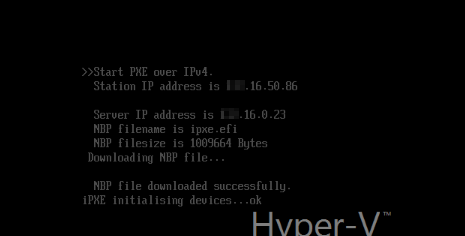
Update: By pausing at the beginning of the boot process, it seems that the file is successfully retrieved
- ipxe.png (9.92 KB) Viewed 6219 times
The file size matches what I see in filezilla on the Wapt server.