Page 1 of 1
Package removed from group, not removed from individual workstation
Published: July 17, 2015 - 08:35
by daftcraft
Hello,
So, first of all, I want to commend the team for the work done on this fabulous software, which is so useful to me every day!
I have a small problem, however. I have about 100 machines where certain software is installed, managed by groups. Yesterday, I tried to update a package (PDFCreator). I created a package with the latest version and added it to my package group. This went smoothly, and the installation was successful.
However, I wanted to remove the old package, so I deleted it from the package group, but it still appears in the package list on each machine. Do I have to remove them manually?
Thank you
. Sincerely,
Re: Package deletion in group, no deletion on workstation
Published: July 20, 2015 - 4:19 PM
by sfonteneau
Hello
, removing the software from the group is not enough to uninstall it.
This simply means the software will no longer be included in the list of software to install on the machine.
To force the uninstallation of the software using a group, you must also add the software to the "Forbidden Packages" list.
Another solution would be to add the old package to the "Conflict" field in the control file of the new package.
The conflict will force the software to be uninstalled.
For this to work, however, the uninstallation of the old package must, of course, be successful.
Simon
Re: Package deletion in group, no deletion on workstation
Published: July 21, 2015 - 08:08
by daftcraft
Hello,
Thank you for your reply. So, if I understand correctly, it's mandatory to uninstall the old package beforehand, either by uninstalling it or via the conflict field. Thank you for this clarification.

However, the problem is that if I uninstall the old package after installing the new one, since it's the same software, it will either uninstall the new one or fail to remove the old one because the registry key no longer exists (replacing it with the new version of the software). I simply want to "Forget the package."
Sincerely,
Re: Package deletion in group, no deletion on workstation
Published: July 21, 2015 - 6:40 PM
by sfonteneau
Hello.
Actually, there are several methods for updating software.
I do it like this:
I don't change the package name, but I just change the package version. For example: smp-firefox.
For Firefox, for instance, it's not necessary to uninstall the old software since the new Firefox installation replaces the old one.
The Scribus software, on the other hand, leaves the older versions of the software.
So, in the setup.py file, in the def install() section, you need to include the uninstallation of the old version before launching the installation.
The other solution is to put the version number in the package: For example, for Java, smp-java6, smp-java7, or smp-java8.
When installing Java 7, for example, the Java 7 installation doesn't uninstall the old version.
If Java 6 was installed with Wapt, you just need to put smp-java6 in the conflct field of the smp-java7 package to uninstall Java 6.
Wapt will then uninstall Java 6 and then install Java 7.
Actually, there are many solutions depending on what you want to do; that's one of Wapt's major advantages.
It's up to you to see the best method for your situation. Without further information, I can't tell you,
Simon.
Re: Package deletion in group, no deletion on workstation
Published: July 30, 2015 - 11:36
by daftcraft
Good morning,
Thank you for these answers.
So let me clarify a little more what exactly I want to do.
I therefore have a GROUP of packages which include several packages. We will call it the ALL-MACHINE package which will therefore be associated with all the machines in the fleet.
In this group, which contains several packages, I want to update the PDFCreator software version. The "-pdfcreator" package, version 2.1.1, is installed on all machines because the ALL-MACHINE group is enabled. I create a new PDFCreator package using the package creation method, which is named "tis-pdfcreator" and is version 2.1.2.
I add it to my "ALL-MACHINE" group. I run a package update on all machines; the package installs on all machines and successfully uninstalls the old version of PDFCreator to replace it with the new one.
So far, so good.
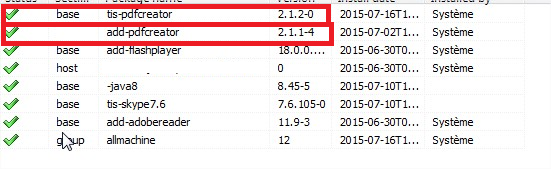
The "-pdfcreator" package, which was in the "ALL-MACHINE" group and therefore assigned to all machines, is no longer needed. I've removed it from my "ALL-MACHINE" group. The problem is that it's no longer present in the "ALL-MACHINE" group's package list, but it's still displayed in the software list for each machine. Here's a screenshot
- tis.png (101.33 KB) Viewed 8921 times
So I have to go through all the stations to right-click --> forget the package.
I therefore wonder why, by simply removing the package from the ALL-MACHINE group, it is not also removed from the list of packages to be updated on the machine, the package no longer being installed (Replaced by PDFCreator 2.1.2) and being properly removed from the group.
I hope I've been clear

Thanks in advance.
Re: Package deletion in group, no deletion on workstation
Published: July 30, 2015 - 1:38 PM
by sfonteneau
Hi.
Actually, there's a problem.
All packages coming from your private repository should start with "add-" (your prefix) and not "tis-" or "-" (like Java's).
It still works the way you're doing it, but normally it's not like that (otherwise it gets complicated).
So, your pdfcreator 2.1.2 should have been called "add-pdfcreator" and not "tis-pdfcreator".
That way you would have only one add-pdfcreator package in the machine's software list.
So, your list needs some cleaning up. Basically, make sure that in "private repository" you only have packages with "add-".
Then, create a fixup package that misses packages in bulk.
Simon
Re: Package deletion in group, no deletion on workstation
Published: August 26, 2015 - 4:05 PM
by daftcraft
Hello!
Thanks for your input, sorry for the slightly late reply, I just got back from vacation.
Okay, I also thought the prefix might be a problem, but I didn't think so. Anyway, I'll test it when I have time and I'll give feedback, but that's probably it, and it seems quite logical now.
Just goes to show, sometimes it really is simple...
