Page 1 of 2
[SOLVED] Bug in uploading a Windows ISO
Published: January 23, 2023 - 09:56
by Cédric-KER
Good morning,
Since WAPT was updated to version 2.3 (a problem was reported in versions 2.3.0.13438 and 2.3.0.13356), I am unable to upload Windows ISOs. However, uploading Debian, GParted, or other ISOs works fine.
I have this error in the log:
Code: Select all
[waptserver ] CRITICAL upload deploy files (8ba0afbab1863815fcd54355573f535437e0070a5d28c0de21bd0e0243cdf4ef.iso) failed Exception('File already exists')
And I have this on the screen at the end of the upload:
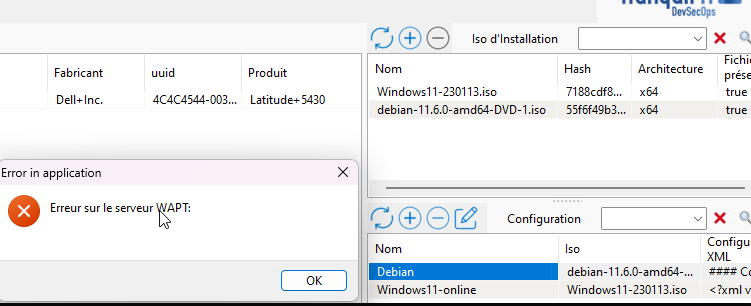
- 2023-01-23 09_52_34.png (28.34 KB) Viewed 10,600 times
I should mention that I've already emptied the /var/www/wads/iso folder, generated new ISOs, and used old ones, which are fully functional when booted from a USB, but I'm still getting this error. Do you have any ideas? Thanks.
Re: Bug in uploading a Windows ISO
Published: January 23, 2023 - 3:34 PM
by sfonteneau
Very strange
Can you do this?
The part of the code that checks if the file exists is correct:
Code: Select all
        target = os.path.join(upload_folder,secure_filename(filename))
        upload = False
        if os.path.isfile(target):
            if overwrite == 'True':
                if hash_file == '':
                    os.unlink(target)
                    upload = True
                elif get_hash256_exe(target) != hash_file:
                    os.unlink(target)
                    upload = True
            else:
                raise Exception("File already exists")
        else:
            upload = True
Re: Bug in uploading a Windows ISO
Published: January 23, 2023 - 3:55 PM
by Cédric-KER
Here is the result:
Code: Select all
root@wapt:/var/www/wads/iso# sha256sum *
61975b4e81f312b2ad803768436eef32b58685a8896d6ca429cb030adf3415fa  24d1a820cc3567e0f67feca7e459d55cc99810b3e67722f44eb5de0323bb5e0b.iso
7892981e1da216e79fb3a1536ce5ebab157afdd20048fe458f2ae34fbc26c19b  7892981e1da216e79fb3a1536ce5ebab157afdd20048fe458f2ae34fbc26c19b.iso
fc05b055e3e22598b73b612ac151247e66beab785d41ff7f458a0b5ff7a3c1b1  fc05b055e3e22598b73b612ac151247e66beab785d41ff7f458a0b5ff7a3c1b1.iso
respectively Windows 11, Debian 11 and gparted.
Re: Bug in uploading a Windows ISO
Published: January 23, 2023 - 4:37 PM
by bkolovljanovic
Hello,
Technically, the ISO file carries the hash in terms of its filename. So it's surprising that the first one isn't correct (perhaps the ISO upload was canceled or something else).
Looking at the initial screenshot, it's surprising that the displayed hashes don't match either. Unless these are newer and/or modified files.
Re: Bug in uploading a Windows ISO
Published: January 23, 2023 - 4:40 PM
by Cédric-KER
Indeed, these are new files. I deleted the previous IDOs and regenerated Windows this morning. Therefore, the log and screenshot are no longer up-to-date.
Re: Bug in uploading a Windows ISO
Published: January 23, 2023 - 4:50 PM
by bkolovljanovic
Okay, I understand better now.
However, it's really strange. The ISO upload process checks for the presence of the file on the server (hashDuFichier.iso) and returns the error "File already exists" if an upload attempt is made for a file that already exists.
The idea is that the console displays what it has in memory; you need to delete any files not present in the console from the server and then try uploading again.
(24d1a820cc3567e0f67feca7e459d55cc99810b3e67722f44eb5de0323bb5e0b.iso is probably this one since its hash doesn't match).
Re: Bug in uploading a Windows ISO
Published: January 23, 2023 - 5:03 PM
by Cédric-KER
I've already tried that, but it didn't help. What I don't understand is why it only happens with Windows ISOs. While I'm waiting to find a solution, is it possible to import them using the command line?
Re: Bug in uploading a Windows ISO
Published: January 23, 2023 - 5:09 PM
by bkolovljanovic
What is the size of the Windows ISO?
Could it be larger than the maximum file upload size configured on the nginx server (client_max_body_size in the nginx configuration file)?
Is there enough disk space on the server to accommodate the file?
(viewtopic.php?t=2989&start=20)
This should be investigated.
Re: Bug in uploading a Windows ISO
Published: January 23, 2023 - 7:05 PM
by Cédric-KER
I just checked all that, I'm at 12 GB upload on nginx, and the ISO is 4.1 GB.
I just tried again with another Windows ISO and I have this in the logs:
access.log
Code: Select all
[23/Jan/2023:19:01:15 +0100] "POST /api/v3/upload_deploy_files?filename=dd5082f658887ac012dd5532834e9d2bf4e57829dfc6d2a2f1ec328ecfe91bf2.iso&folder=iso&overwrite=False&hash=dd5082f658887ac012dd5532834e9d2bf4e57829dfc6d2a2f1ec328ecfe91bf2 HTTP/1.1" 400 0 "-" "waptconsole/2.3.0.13356W"
Could this help?
Nothing in the error.log
Re: Bug in uploading a Windows ISO
Published: January 24, 2023 - 09:48
by bkolovljanovic
I discussed this with a colleague here; one possibility would be to check the firewall to see if something is blocking it.
Or a timeout. Nginx is configured to be quite large, though.
Because the log shows an HTTP 400 error.
What was the size of the Debian ISO? (since it was working)