Page 1 of 1
[RESOLVED] V 2.3.0.13505: External Tools Not Working
Published: February 14, 2023 - 10:52 AM
by t.heroult
Good morning
Since version 2.3, external tools no longer work, except for one.
I use external tools quite a bit and apart from the one based on explorer.exe, none of them work anymore since the latest updates.
I kept a machine with console v 2.2.3 and the tools are OK.
Here's what I have:
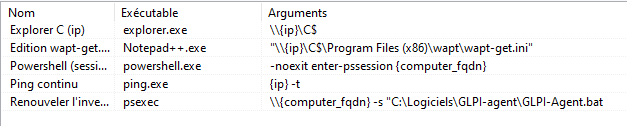
- external tools.png (8.04 KB) Viewed 6621 times
In this list when I launch the tool:
Explorer works
Notepad++: error message
The others: nothing happens
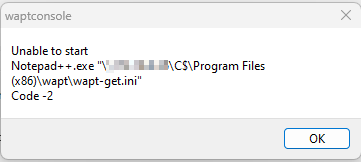
- notepad.png (4.9 KB) Viewed 6621 times
Any ideas?
Re: V 2.3.0.13505: External Tools Not Working
Published: February 14, 2023 - 3:19 PM
by htouvet
Good morning,
The reasons could be:
- that the executables do not have a full path.
- The command requires a shell (a CMD) to display something. This is the case with ping. In this case, put cmd.exe in the executable and start the arguments with /C
- cmd.exe should also be used as an executable if you need to expand environment variables, for example.

- external.jpg (12.44 KB) Viewed 6606 times
The code for executing commands has been modified since version 2.2.3, and it would be interesting to improve this part with a "run command in a shell" checkbox
Remarks :
the settings are now at
"Mustache" format (that is, with double curly braces) {{ ip }} instead of {ip}
(for information on Mustache:)
https://blog.synopse.info/?post/2014/04 ... phi-part-2 )
The old {ip} notation is still supported for the few parameters that existed in that form:
{ip} is replaced by {{ main_ip}}
{uuid} replaced by {{ uuid }}
{computer_fqdn} replaced by {{computer_fqdn}}
Now all columns of the inventory grid data are usable in external commands. (This is indicated in parentheses by right-clicking on the column headers in the grid.)
Mustache is a template language also used in the console for HTML views (equipment inventory, audit). Clicking "Edit template" displays it and allows customization.
Re: [SOLVED] V 2.3.0.13505: External Tools Not Working
Published: March 28, 2023 - 4:01 PM
by julien.guyonnet
Good morning,
For my part, I added a link to the 'user' and 'computer' pages in GLPI
Executable = cmd
Arguments =
Code: Select all
/c start "" "https://glpi.domain.local/front/user.php?is_deleted=0&as_map=0&browse=0&itemtype=User&criteria%5B0%5D%5Blink%5D=AND&criteria%5B0%5D%5Bfield%5D=view&criteria%5B0%5D%5Bsearchtype%5D=contains&criteria%5B0%5D%5Bvalue%5D={{connected_users.0}}"
Executable = cmd
Arguments =
Code: Select all
/c start "" "https://glpi.domain.local/front/computer.php?criteria%5B0%5D%5Blink%5D=AND&criteria%5B0%5D%5Bfield%5D=1&itemtype=Computer&criteria%5B0%5D%5Bsearchtype%5D=contains&criteria%5B0%5D%5Bvalue%5D={{computer_name}}"