Page 1 of 2
[SOLVED] Private key/certificate issue
Published: March 13, 2023 - 09:53
by TFR-CH
Good morning,
After performing a minor update of the WAPT server, I reinstall the console and try to redeploy the agent.
However, since my private key/certificate pair no longer works, it's impossible to do anything (sign packages, modify a machine, etc.)
From what I remember, it seems I checked it, I don't know why (what a mistake)
"Install the certificates provided by this installer" during the console installation. I therefore assume that this error is what's causing everything to stop working.
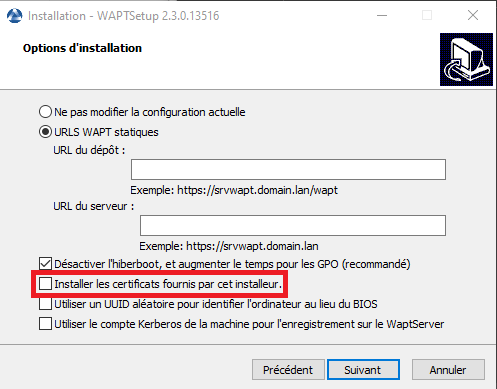
- waptsetup.png (19.4 KB) Viewed 7496 times
When I try to:
- Check the associated key
- Modify a machine
- Sign a package
- Everything related to the key, actually...
I received the following error message:
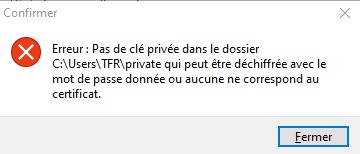
- key.jpg (16.6 KB) Viewed 7496 times
The private key and the certificate are located in the folder C:\Users\TFR\private\
The certificate is located in the \wapt\ssl\ folder
The password is correct (100%)
But my question is, what do I need to do to get it working again?
WAPT Server version: 2.3.0.13516 Discovery edition
Server OS: Debian 11
Administration machine operating system: Windows 10 22H2
Thank you for your time.
Re: Private key/certificate problem
Published: March 13, 2023 - 2:20 PM
by dcardon
Hello Valentin,
in accordance with the forum rules, I have removed the images linking to the third-party site. Could you please upload them directly to your post?
Thank you very much, Best regards,
Denis
Re: Private key/certificate problem
Published: March 13, 2023 - 4:16 PM
by dcardon
Hi Valentin,
thanks for re-uploading the images.
Do you have an unusual character in your password? We had a similar problem quite a while ago, but it's been a while since we've had any reports about it.
For your information, the certificate located in c:\program files (x86)\wapt\ssl can be retrieved from any computer on your network.
In older versions of WAPT, the certificate and private key were created in c:\private; could the correct key be located there?
Best regards,
Denis
Re: Private key/certificate problem
Published: March 14, 2023 - 09:30
by TFR-CH
Hello,
my password consists only of lowercase letters, uppercase letters, and numbers.
I already have the public certificate (.crt).
By default, my keys were located in C:\private, but after discussing this with moderators on your community Discord server, they suggested I move the folder containing the keys.
My problem isn't the loss of the key pair (private and public). I know where they are stored.
The WAPT console is unable to decrypt the key with the given password after I updated the console.
The key and the certificate are in the same folder, and waptconsole.ini is configured correctly.
The password I entered is correct.
I even tried uninstalling and reinstalling the console, but without success.
Re: Private key/certificate problem
Published: March 14, 2023 - 09:45
by sfonteneau
TFR-CH wrote: ↑March 14, 2023 - 09:30
The WAPT console is unable to decrypt the key with the given password after I updated the console.
Could you try using an older console to check if it works properly with the console in the previous version?
https://wapt.tranquil.it/wapt/releases/?C=M&O=D
Besides, what was the previous version? Your forum post doesn't indicate that.
Re: Private key/certificate problem
Published: March 14, 2023 - 10:14
by TFR-CH
I uninstalled console version 2.3.0.13516 and installed the previous version 2.3.0.13505, without success, same error:
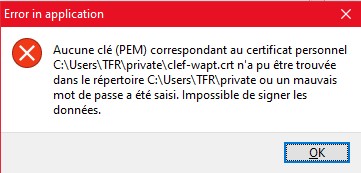
- error.jpg (23.66 KB) Viewed 7471 times
I only have one computer with the WAPT console installed.
The key and the certificate are in the same folder... I never touched it before installing update 2.3.0.13516
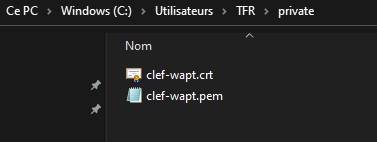
- path.jpg (8.3 KB) Viewed 7471 times
In the installer, what does the action: "Install the certificates provided by this installer" do?
I suppose that's where my problem stems from.
Re: Private key/certificate problem
Published: March 14, 2023 - 10:19
by sfonteneau
The "Install the certificates provided by this installer" option installs the Tranquility certificates, that's all.
If your problem persists despite downgrading the console, then the issue isn't related to the upgrade.
Could you check via Tools -> Preferences -> Verify Key?
Re: Private key/certificate problem
Published: March 14, 2023 - 10:43
by TFR-CH
All right.
The error message is the same whether I try to check the associated key from the preferences or modify the packages on a machine.
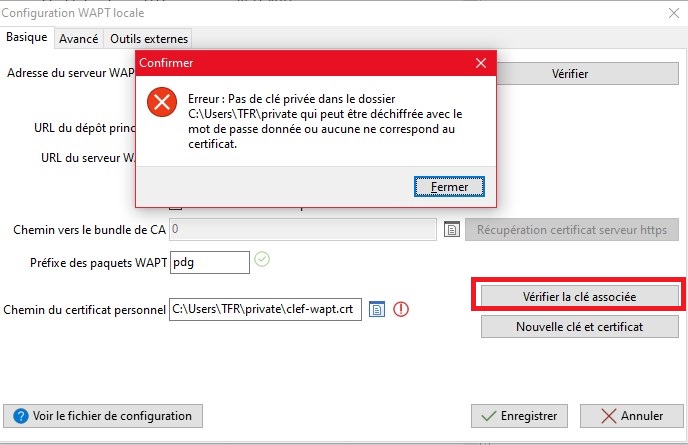
- preferences_wapt.jpg (76 KB) Viewed 7466 times
Re: Private key/certificate problem
Published: March 14, 2023 - 12:18
by sfonteneau
TFR-CH wrote: ↑March 14, 2023 - 09:30
By default, my keys were in C:\private, but after exchanging with moderators of your community Discord, they suggested I move the folder containing the keys.
Do you have a snapshot or a backup of the machine's state at that time? To perform a file diff?
Re: Private key/certificate problem
Published: March 14, 2023 - 12:19
by TFR-CH
No, I don't have a backup of the machine before the update, unfortunately.