Page 1 of 1
[SOLVED] Boot TFTP WADS
Published: April 7, 2023 - 4:00 PM
by jdziadek
Hello, I'm having trouble with PXE booting for WADS
I successfully enabled WADS with the post-configuration file, and I enabled the TFTP service. I can connect to it and download a file (ipxe.efi).
When I boot my machine I can see the machine's IP address, but then it returns to the boot selection screen.
When I run a TCPDUMP on my WAPT server
Code: Select all
IP 172.31.XX.XXX.1924 > wapt2-standalone-l1.XXXXXXX.fr.tftp: TFTP, length 51, RRQ "ipxe.efi" octet tsize 0 blksize 1468 windowsize 4
At first glance, it would seem that the WAPT server is not sending a response?
Julian
Re: Boot TFTP WADS
Published: April 11, 2023 - 12:33 PM
by dcardon
jdziadek wrote: ↑Apr 7, 2023 - 4:00 PM
I successfully enabled WADS with the post-configuration file, and I enabled the TFTP service. I can connect to it and download a file (ipxe.efi).
When I boot my machine I can see the machine's IP address, but then it returns to the boot selection screen.
When I run a TCPDUMP on my WAPT server
Code: Select all
IP 172.31.XX.XXX.1924 > wapt2-standalone-l1.XXXXXXX.fr.tftp: TFTP, length 51, RRQ "ipxe.efi" octet tsize 0 blksize 1468 windowsize 4
At first glance, it would seem that the WAPT server is not sending a response?
What is the tcpdump command line you used? Was the tftpclient launched on the same client network as the PXE client? Note that the TFTP protocol uses ephemeral ports. What machine are you using? Are you experiencing the same issue with a VirtualBox VM (in bridged mode)?
Sincerely,
Denis
Re: Boot TFTP WADS
Published: April 11, 2023 - 12:52 PM
by jdziadek
Hello, thank you for your reply:
I used this command:
Code: Select all
tcpdump port 67 or port 68 or port 69 or port 4011
(This is used to debug Fog's PXE)
The TFTP server is on the WAPT server, the machines to be deployed are on a computer VLAN which have access to all the ports of the WAPT server, we used to use a WDS for deployment, and it worked with the current conf, we just changed the destination in the DCHP.
I encountered this issue on an HP Elitedesk 650G9 (which I can successfully deploy from a USB drive) as well as from a Hyper-V VM.
Julian
Re: Boot TFTP WADS
Published: April 12, 2023 - 09:41
by dcardon
Hello Julien,
jdziadek wrote: ↑Apr 11, 2023 - 12:52
I used this command:
Code: Select all
tcpdump port 67 or port 68 or port 69 or port 4011
(This is used to debug Fog's PXE)
Are you using wapttftpserver on your WAPT server? Ephemeral port ranges are quite broad. You should use the source IP address as a filter rather than ports.
The TFTP server is on the WAPT server, the machines to be deployed are on a computer VLAN which have access to all the ports of the WAPT server, we used to use a WDS for deployment, and it worked with the current conf, we just changed the destination in the DCHP.
Could you please display your DHCP configuration?
I encountered this issue on an HP Elitedesk 650G9 (which I can successfully deploy from a USB drive) as well as from a Hyper-V VM.
Was the USB key in question generated from the wapt console?
Sincerely,
Denis
Re: Boot TFTP WADS
Published: April 12, 2023 - 10:30 AM
by jdziadek
Thank you for the detailed response.
My USB drive was indeed created via the console and works perfectly.
The DHCP configuration is copied from the documentation.
On the machine side, when I boot on a physical machine, I am returned to the "boot manager" after a certain time.
With a VM on Hyper-V I get this message:
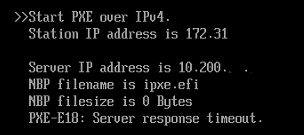
I ran a tcpdump on the IP address of the machine awaiting deployment.
Code: Select all
10:12:06.450483 IP 172.31.42.XXX.1191 > wapt2-standalone-l1.XXXXXX.fr.tftp: TFTP, length 51, RRQ "ipxe.efi" octet tsize 0 blksize 1482 windowsize 4
This somewhat confirms the lack of response from the WAPT server.
Re: Boot TFTP WADS
Published: April 12, 2023 - 2:21 PM
by jdziadek
I came across this thread:
viewtopic.php?t=2977&start=10
The problem still persists even with tftpd-hpa
tftpd-hpa logs
Code: Select all
Apr 12 14:34:35 wapt2-standalone-l1 tftpd-hpa[3250832]: Starting HPA's tftpd: in.tftpd.
Apr 12 14:36:07 wapt2-standalone-l1 in.tftpd[3250898]: RRQ from 172.31.42.122 filename ipxe.efi
Apr 12 14:36:11 wapt2-standalone-l1 in.tftpd[3250899]: RRQ from 172.31.42.122 filename ipxe.efi
Apr 12 14:36:15 wapt2-standalone-l1 in.tftpd[3250901]: RRQ from 172.31.42.122 filename ipxe.efi
Apr 12 14:36:19 wapt2-standalone-l1 in.tftpd[3250903]: RRQ from 172.31.42.122 filename ipxe.efi
Apr 12 14:36:23 wapt2-standalone-l1 in.tftpd[3250914]: RRQ from 172.31.42.122 filename ipxe.efi
Apr 12 14:36:27 wapt2-standalone-l1 in.tftpd[3250915]: RRQ from 172.31.42.122 filename ipxe.efi
(I'm using a Hyper-V VM with Secure Boot disabled for my tests)
Code: Select all
drwxrwxrwx 6 root root        4096  4 avril 15:25 .
drwxr-xr-x 6 root root        4096  9 févr. 10:36 ..
drwxrwxrwx 4 wapt root        4096 23 janv. 11:45 drivers
-rw-r--r-- 1 wapt www-data    3577  4 avril 15:25 hash.json
drwxrwxrwx 2 wapt www-data    4096  6 avril 08:36 iso
drwxrwxrwx 2 wapt root        4096  7 avril 15:00 pxe
-rwxrwxrwx 1 wapt root     1728976  3 mars  15:47 wads32.exe
-rwxrwxrwx 1 wapt root     2203088  3 mars  15:47 wads64.exe
drwxrwxrwx 4 wapt root        4096 23 janv. 11:45 winpe
No copyright issues with the WADS file? You never know...
Edit of 13/04
I specified the size of the EFI file using the command:
Code: Select all
dhcp-option=option:boot-file-size,2002
Now the correct size appears, but I'm still getting my PXE-18 timeout error.
Re: Boot TFTP WADS
Published: April 25, 2023 - 12:18 PM
by dcardon
Hi Julien,
did you manage to get your TFTP working? If not, we'll need to call the office so we can take a look at it via screen sharing, because I'm running out of ideas. If it doesn't work with tftpd-hpa either, Wapt is no longer really involved...
See you soon,
Denis
Re: Boot TFTP WADS
Published: April 25, 2023 - 3:45 PM
by jdziadek
dcardon wrote: ↑Apr 25, 2023 - 12:18 PM
Hello Julien,
did you manage to get your TFTP working? If not, we'll have to call the office so we can take a look at it via screen sharing, because I'm running out of ideas. If it doesn't work with tftpd-hpa either, Wapt is no longer really involved...
See you soon,
Denis
Hello, thank you for checking in.

I was on vacation last week, and the network manager is on vacation this week, but I do think the problem is on our end and not with WAPT.
We can close the subject; I'll make a phone call if we can't resolve this.
Re: [SOLVED] Boot TFTP WADS
Published: April 25, 2023 - 3:49 PM
by dcardon
Thanks for the feedback. The TFTP protocol isn't the most intuitive with its ephemeral ports. But hey, it's what's implemented in the BIOS, so we don't really have a choice but to work with it...
I'm marking the topic as resolved.
Denis