Page 1 of 1
[RESOLVED] Implementing client-side certificate authentication
Published: July 31, 2023 - 2:52 PM
by cefinformatique
EDIT: I should clarify that I'm using the Discovery version. Is this feature only available in the Enterprise version?
Hello,
I want to set up certificate authentication to secure WAPT before opening it up to the WAN.
I followed this documentation:
https://www.wapt.fr/fr/doc-2.4/wapt-sec ... se-feature
And this one, because I'm also using an internal certificate authority for the WAPT server certificate:
https://www.wapt.fr/fr/doc-2.4/wapt-sec ... ganization
On the agent side, it seems to work; however, I get a 401 error if I look in the console preferences (see attached screenshot): From the console, I go to "Tools -> Preferences" and there I see the line "Main repository URL" which displays "Repository access error: 401 Client Error".
From there, I don't know what to do to resolve this problem.
Re: Setting up client-side certificate authentication
Published: August 11, 2023 - 2:47 PM
by blemoigne
Hello,
Is this CA installed in the machine certificate store?
If so, you can enter the number 1 instead of the path.
https://www.wapt.fr/fr/doc/wapt-securit ... ertificate
Bertrand
Re: Setting up client-side certificate authentication
Published: August 29, 2023 - 2:50 PM
by cefinformatique
Good morning,
Yes, the CA is present in the store of each machine registered in WAPT, and I have already set "verify_cert = 1" in wapt-get.ini
I took the opportunity to look in the nginx error logs and I found this:
Code: Select all
2023/08/29 14:43:45 [error] 8404#8404: *7 connect() failed (111: Connection refused) while connecting to upstream, client: 192.168.50.1, server: _, request: "POST /get_websocket_auth_token HTTP/1.1", upstream: "http://127.0.0.1:8080/get_websocket_auth_token", host: "wapt.xyz.info"
2023/08/29 14:43:45 [error] 8404#8404: *9 connect() failed (111: Connection refused) while connecting to upstream, client: 192.168.50.253, server: _, request: "OPTIONS / HTTP/1.0", upstream: "http://127.0.0.1:8080/"
2023/08/29 14:43:46 [error] 8404#8404: *11 connect() failed (111: Connection refused) while connecting to upstream, client: 192.168.50.253, server: _, request: "OPTIONS / HTTP/1.0", upstream: "http://127.0.0.1:8080/"
2023/08/29 14:43:47 [error] 8404#8404: *13 connect() failed (111: Connection refused) while connecting to upstream, client: 192.168.50.1, server: _, request: "POST /get_websocket_auth_token HTTP/1.1", upstream: "http://127.0.0.1:8080/get_websocket_auth_token", host: "wapt.xyz.info"
2023/08/29 14:43:47 [error] 8404#8404: *15 connect() failed (111: Connection refused) while connecting to upstream, client: 192.168.50.253, server: _, request: "OPTIONS / HTTP/1.0", upstream: "http://127.0.0.1:8080/"
2023/08/29 14:43:48 [error] 8404#8404: *17 connect() failed (111: Connection refused) while connecting to upstream, client: 192.168.50.253, server: _, request: "OPTIONS / HTTP/1.0", upstream: "http://127.0.0.1:8080/"
2023/08/29 14:43:49 [error] 8404#8404: *19 connect() failed (111: Connection refused) while connecting to upstream, client: 192.168.50.1, server: _, request: "POST /get_websocket_auth_token HTTP/1.1", upstream: "http://127.0.0.1:8080/get_websocket_auth_token", host: "wapt.xyz.info"
2023/08/29 14:43:49 [error] 8404#8404: *21 connect() failed (111: Connection refused) while connecting to upstream, client: 192.168.50.253, server: _, request: "OPTIONS / HTTP/1.0", upstream: "http://127.0.0.1:8080/"
Re: Setting up client-side certificate authentication
Published: August 29, 2023 - 5:25 PM
by blemoigne
Hello,
In the console preferences, under the Advanced tab, you need to fill in the client SSL certificate path and client SSL key path fields. Start with the second field by browsing to the .pem file located in C:\Program Files (x86)\wapt\private\.
For the first field, replace .pem with .crt.
Bertrand
Re: Setting up client-side certificate authentication
Published: August 30, 2023 - 09:54
by cefinformatique
I think the problem stems from the fact that the console certificate was generated before the change to the internal CA.
I'm trying to generate a new certificate, but I get the following window where the fields for entering the key and the CA certificate are greyed out. Why?
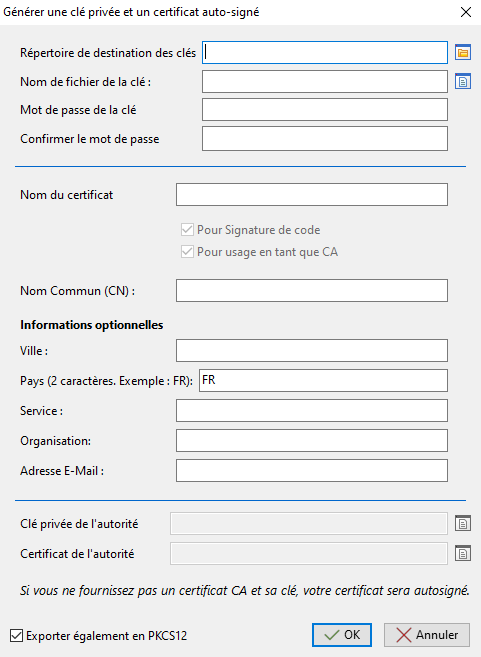
- waptcert.png (19.99 KB) Viewed 18309 times
Re: Setting up client-side certificate authentication
Published: September 1, 2023 - 11:01 AM
by cefinformatique
So I switched to the trial period for the enterprise license, and the fields for specifying the CA are no longer grayed out.
I then regenerated a certificate from my CA and regenerated a WAPT agent, which I reinstalled on the machine where I use the console, but nothing changed.
I'm still getting the 401Authorization Required error.
Re: Setting up client-side certificate authentication
Published: September 4, 2023 - 3:53 PM
by dcardon
Hi Marc,
regarding the Discovery/Enterprise version, yes, it's a WAPT Enterprise feature as mentioned in the documentation.
Regarding the configuration, you need to add the certificate in the second tab, "Advanced," of the "Local WAPT Configuration" window:
* Client SSL certificate path
* Client SSL key path.
Once the WAPT agent is registered, the easiest way is to retrieve the certificate and key generated during registration, located in c:\program files (x86)\wapt\ssl\, copy them somewhere in your Windows user profile, and enter them in the console.
Client certificate authentication will be greatly simplified in the upcoming WAPT 2.4.2 version (Enterprise edition).
Best regards,
Denis