Page 1 of 1
TIS depot package download failed
Published: September 18, 2023 - 10:48 AM
by jorico
Hello everyone,
I'm having trouble downloading the latest version of Webex. I noticed it was tagged "proprietary_restricted", and when I try to download it from the console, I get this error:
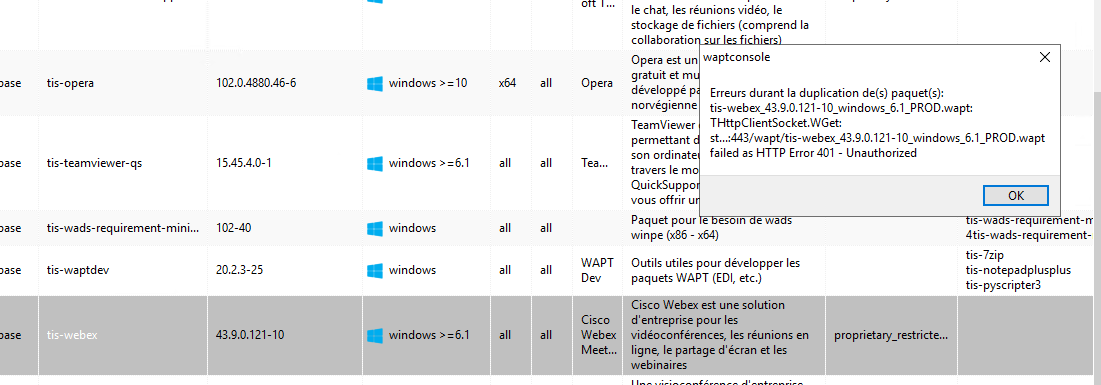
- webex error.png (34.52 KiB) Viewed 12160 times
From the store, I am being asked for a username and password to download it, how can I find out this login information, I have never had this problem before.
Thank you very much for your help.

Re: Unable to download TIS depot package
Published: September 18, 2023 - 2:46 PM
by dcardon
Hi Johan,
some packages are only available for download with a login/password for WAPT Enterprise customers. In particular, the Webex package is Cisco proprietary software that we can't make freely available for download (otherwise Cisco might object).
The easiest solution is to upgrade (at least the admin console) to the latest version; it integrates better with store authentication. This allows you to see which packages are proprietary_restricted (they have a small key on them), and it allows you to register your email address and an authentication token in the console. You can consult the updated documentation here:
https://www.wapt.fr/fr/doc/wapt-console ... repository
Note 1: For logging in with your email address on the store, you must use the one that was initially provided for support.
Note 2: With the implementation of the WAPT Enterprise repository and the work done with our various clients, more than 300 new packages have been integrated into the store.
Hoping this answers your question.
Sincerely,
Denis
Re: Unable to download TIS depot package
Published: September 18, 2023 - 3:08 PM
by flumineau
Hello,
I've also noticed that to download proprietary packages, a license validation is required via a link received by email.
However, these links aren't working. It's like a package search that finds no results. Is there a trick to it, or am I doing something wrong? Or is there a setting I need to adjust in TranquilIT? It seems simple enough at first.
Thank you for your help,
François
Re: Unable to download TIS depot package
Published: September 18, 2023 - 3:45 PM
by dcardon
Hi François,
Indeed, for proprietary software, we really wanted to emphasize that you need a valid license, both for the client (to avoid accidentally downloading the latest version of Oracle Java 8, which is under a rather expensive paid license and incurring the wrath of Oracle's lawyers if you haven't paid) and also for Tranquil IT (so we don't get accused of becoming a new warez site).
For validation, you must be careful to open the link with the same browser you used to authenticate; otherwise, the OAuth token is invalid (okay, it's not very convenient, we'll see how to fix that).
If it doesn't work even though your browser is properly authenticated, then it's a bug.
See you soon,
Denis
Re: Unable to download TIS depot package
Published: September 18, 2023 - 4:06 PM
by flumineau
I am using the same browser. I've tested it with both Edge and Firefox.
If it's a bug, what can I do on my end? Could you please check on your end that everything is working?
Thanks in advance.
Re: Unable to download TIS depot package
Published: September 19, 2023 - 09:07
by t.heroult
A quick personal anecdote: yesterday (the 18th, to be precise) I had to do the same thing to get the Office 365 Enterprise package.
It was a bit of a conundrum, but it worked.
I should mention that I had to set Firefox as my default browser because it doesn't work at all with Opera (I couldn't connect to Tranquil IT's SSO).
Re: Unable to download TIS depot package
Published: September 19, 2023 - 10:02 AM
by flumineau
Hello,
thank you for pointing me in the right direction. Indeed, it works with Firefox by default. So I did some more tests (since I'm primarily an Edge user).
What doesn't work:
Edge by default and Outlook client for reading emails
; Edge by default and reading emails via webmail in Edge;
Edge by default but connected to the WAPT store in Firefox. Copying and pasting the link from Outlook to Firefox.
What works:
Firefox by default and Outlook client for reading emails;
Edge by default but connected to the WAPT store and reading emails in Firefox.
I'll go with this last solution.
Thank you all for your replies.
François