Page 1 of 1
[RESOLVED] WAPT agent service
Published: June 28, 2024 - 10:27
by FlavienL
Good morning,
Following an uninstallation and reinstallation of the agent without restarting the workstation.
The WAPT service for WINDOWS no longer exists in the list of services.
The unit therefore appears disconnected in the console.
Is there any way to reinstall this service?
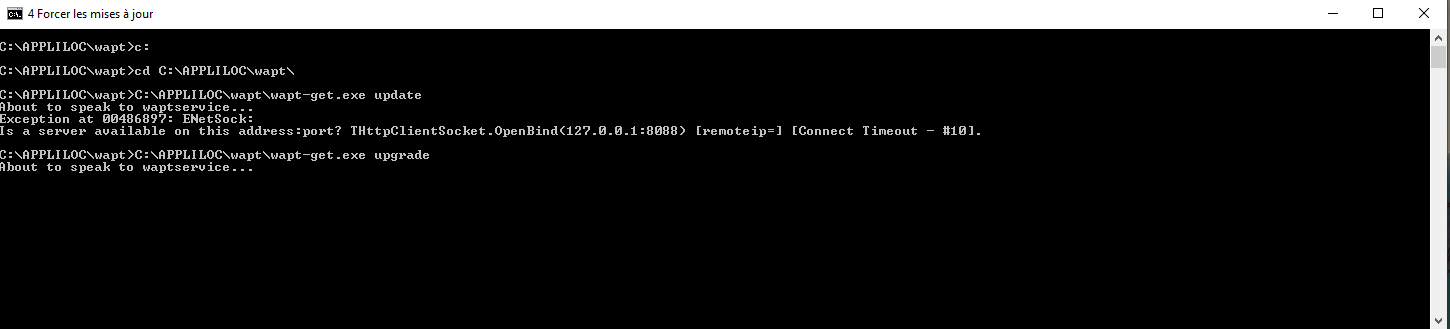
I get this message when I try to update wapt-get.exe:
- Capture.PNG (13.45 KB) Viewed 13418 times
Sincerely,
Flavien
Re: WAPT agent service
Published: July 1, 2024 - 9:42 AM
by dcardon
Hi Flavien,
sometimes Windows has a service in "pending deletion" mode. In this case, you can't delete it, start it, or replace it... You need to find a deterministic way to get out of this state.
Is the machine that's in this state still available so we can take a look at it together?
Regards,
Denis
Re: WAPT agent service
Published: July 1, 2024 - 10:28 AM
by FlavienL
Hello Denis,
Yes, I left it as is, even though I found a way to work around the service interruption by running runwaptservice.bat after launching wapt-get.exe...
This makes the machine appear connected in the console.
What worries me is that we have more and more machines exhibiting this symptom of the agent not responding...
The only solution we've found is to uninstall and reinstall the agent.
We could look into it early this afternoon.
Best regards,
Flavien
Re: WAPT agent service
Published: July 1, 2024 - 12:47 PM
by dcardon
Hi Flavien,
you can call the office this afternoon so we can look into it.
See you soon,
Denis
Re: WAPT agent service
Published: July 1, 2024 - 2:16 PM
by FlavienL
Denis,
I managed to restart the service by re-integrating the registry key: WAPTService.reg
in the HKEY_LOCAL_MACHINE\SYSTEM\CurrentControlSet\Services branch.
After restarting the computer, the service is working as before; this information is useful.
Thank you for your help, which guided me well in my search.
Hoping this will be useful to others.
Flavien