Page 1 of 1
[RESOLVED] Package Import Error
Published: September 19, 2024 - 9:21 PM
by Kavinus
Good morning,
I get the following error every time I try to import a package:
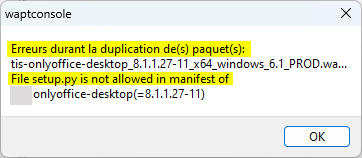
- waptconsole_ZJZ9buUCLf.png (6.94 KB) Viewed 4313 times
Thank you for your help.
Re: Package Import Error
Published: September 20, 2024 - 12:51
by sfonteneau
It appears you have a non-code-signing certificate (
https://www.wapt.fr/fr/doc/wapt-configu ... -with-wapt).
Marking it as Code-Signing defines whether the certificate/key pair will be authorized to sign software packages.
The package you are importing is a software package with a setup.py file, so it is not authorized.
Re: Package Import Error
Published: September 20, 2024 - 9:23 PM
by Kavinus
Thanks Sfontenau,
it was indeed the certificate, but more importantly, it was my mistake.
I missed the "Tag as CA Certificate" step.
Problem solved.
Re: Package Import Error
Published: September 26, 2024 - 11:12 AM
by dcardon
Hello Kevin,
Kavinus wrote: ↑Sep 20, 2024 - 9:23 PM
Thank you Sfontenau,
it was indeed the certificate but above all a mistake on my part.
I missed "Tag as CA Certificate".
Just to clarify, "Tag as Code Signing" is necessary to sign software packages. The "Tag as CA Certitiface" part is there to create a root certificate from which child certificates can then be created. But this isn't necessary in the vast majority of cases.
Sincerely,
Denis