Page 1 of 1
Unable to add an internal server as an external repository
Published: January 23, 2025 - 08:18
by TomTomGo
Good morning,
Since updating a WAPT server from version 2.4 to 2.5.5.15697, I can no longer add this server as an external repository from another server also in version 2.5.5.15697 (this worked fine in 2.4).
Repository configuration:
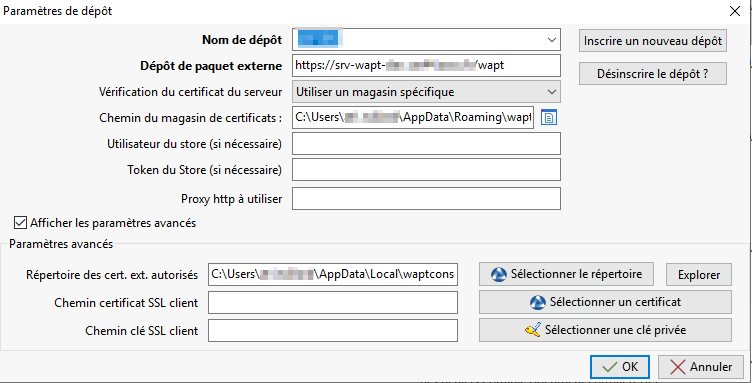
- Repoconf.png (20.99 KB) Viewed 8445 times
If we try to import a package from this repository:
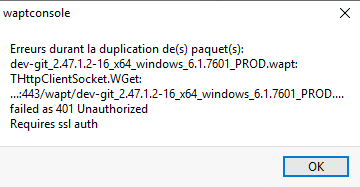
- Repoconf3.png (6 KB) Viewed 8445 times
I therefore assume that this has to do with the activation of SSL client authentication since 2.5, but I don't see how to authenticate the administration console of a server A via adding an external repository to a server B. The agents of the machines attached to their respective servers work correctly at the level of SSL + Kerberos client authentication.
Environment: WAPT Debian 11 server (up-to-date), WAPT 2.5.5.15697 Discovery
Administration machine operating system: Windows Server 2019 (up to date)
Thank you and have a good day
Re: Unable to add an internal server as an external repository
Published: January 23, 2025 - 10:31
by dcardon
Hi Thomas,
you've correctly identified the problem. Currently, client certificate authentication isn't supported in the package import interface. I think the simplest solution is to define a second virtual host on the server without client certificate authentication but with source IP address restrictions, and point the other servers to it.
Normally, there's no need to set up multiple WAPT servers except for very large organizations with delegated access rights. If you have remote sites, the best approach is to set up secondary repositories, but centralize inventory updates on the same server.
Alternatively, in the enterprise version, we have scripts for synchronizing between WAPT servers.
Best regards,
Denis
Re: Unable to add an internal server as an external repository
Published: January 23, 2025 - 10:56 AM
by TomTomGo
Hi Denis,
Yes, that's what I suspected, thanks for the confirmation.
I'll look into the VHOST solution. Otherwise, I found a "dirty" but temporary fix: I retrieved the client certificate and private key from "C:\Program Files (x86)\wapt\private" on server A and copied them to server B. I then pointed them to the repository settings under "Advanced Settings > Client SSL Certificate Path" and "Advanced Settings > Client SSL Key Path".
We actually have a somewhat outdated way of working: a "dev" WAPT server that we use to test packages on a few machines before importing them to the "prod" WAPT server. I'm well aware it's not ideal, and I regularly urge my superiors to switch to an enterprise server with all the extra features that come with it, but oh well... Have
a good day.
Re: Unable to add an internal server as an external repository
Published: January 23, 2025 - 8:20 PM
by vcardon
Good evening TomTomGo,
Of course, we encourage you to continue your efforts to persuade your decision-makers to upgrade to Enterprise. Since you're located in La Chapelle-sur-Erdre, we can come in person to help you encourage them, or vice versa.
In the short term, it seems your needs can be met by the concept of "maturity."
If you search for this term on this forum, you'll find many posts discussing the need to test packages on a small portion of the network before rolling them out more broadly, without needing a second WAPT server.
Re: Unable to add an internal server as an external repository
Published: January 30, 2025 - 09:41
by TomTomGo
Hello Vincent;
Thank you for your message. We are indeed practically neighbors, and we won't hesitate to contact you directly about a company placement.

In the meantime, I'll look into the "maturity" option, which I'd seen but hadn't explored in depth until now...
Have a good day.
Sincerely,
Thomas