Hello Denis,
Thank you for the quick reply.
Looking at the logs, I do indeed have warnings; could this be related to the SSL part?
PS: I replaced the server name with wapt.intserver.net but otherwise everything else is intact.
Code: Select all
2025-02-05 13:40:20,100 [waptcore WaptTaskManager 7160] WARNING Unable to update server status : 400 Client Error: Bad Request for url: https://wapt.intserver.net/update_host
2025-02-05 13:40:20,100 [wapttasks WaptTaskManager 7160] WARNING Host on the server is not known or not known under this computer name (known as None). Trying to register the computer...
2025-02-05 13:40:21,061 [waptcore WaptTaskManager 7160] CRITICAL Error sending registration data: status 401 content {"success":false,"msg":"You have to login with proper credentials","error_code":""}
2025-02-05 13:40:21,061 [wapttasks WaptTaskManager 7160] CRITICAL Unable to update server status: Error sending registration data: status 401 content {"success":false,"msg":"You have to login with proper credentials","error_code":""}
2025-02-05 13:40:59,346 [wapttasks SocketIOClient 7164] INFO Socketio connection params have changed. Socketio needs reconnect
2025-02-05 13:40:59,346 [wapttasks SocketIOClient 7164] INFO Creating socketio client: https://wapt.intserver.net:443 client auth cert: ('C:\\Program Files (x86)\\wapt\\private\\sv22dc-003377.mydom.local.crt', 'C:\\Program Files (x86)\\wapt\\private\\sv22dc-003377.mydom.local.pem') proxies: None verify_cert: False
2025-02-05 13:40:59,346 [wapttasks SocketIOClient 7164] INFO Connecting Socketio to https://wapt.intserver.net:443
2025-02-05 13:40:59,412 [waptws SocketIOClient 7164] WARNING Exception ConnectionError('Connection error'), waiting 60s before retrying
2025-02-05 13:41:59,417 [wapttasks SocketIOClient 7164] INFO Socketio connection params have changed. Socketio needs reconnect
2025-02-05 13:41:59,417 [wapttasks SocketIOClient 7164] INFO Creating socketio client: https://wapt.intserver.net:443 client auth cert: ('C:\\Program Files (x86)\\wapt\\private\\sv22dc-003377.mydom.local.crt', 'C:\\Program Files (x86)\\wapt\\private\\sv22dc-003377.mydom.local.pem') proxies: None verify_cert: False
2025-02-05 13:41:59,417 [wapttasks SocketIOClient 7164] INFO Connecting Socketio to https://wapt.intserver.net:443
2025-02-05 13:41:59,465 [waptws SocketIOClient 7164] WARNING Exception ConnectionError('Connection error'), waiting 60s before retrying
Client ('127.0.0.1', 64074) attempted to speak plain HTTP into a TCP connection configured for TLS-only traffic — trying to send back a plain HTTP error response: (1, '[SSL: HTTP_REQUEST] http request (_ssl.c:1147)')
Client ('127.0.0.1', 64076) attempted to speak plain HTTP into a TCP connection configured for TLS-only traffic — trying to send back a plain HTTP error response: (1, '[SSL: HTTP_REQUEST] http request (_ssl.c:1147)')
Client ('127.0.0.1', 64078) attempted to speak plain HTTP into a TCP connection configured for TLS-only traffic — trying to send back a plain HTTP error response: (1, '[SSL: HTTP_REQUEST] http request (_ssl.c:1147)')
2025-02-05 13:42:59,479 [wapttasks SocketIOClient 7164] INFO Socketio connection params have changed. Socketio needs reconnect
2025-02-05 13:42:59,479 [wapttasks SocketIOClient 7164] INFO Creating socketio client: https://wapt.intserver.net:443 client auth cert: ('C:\\Program Files (x86)\\wapt\\private\\sv22dc-003377.mydom.local.crt', 'C:\\Program Files (x86)\\wapt\\private\\sv22dc-003377.mydom.local.pem') proxies: None verify_cert: False
2025-02-05 13:42:59,479 [wapttasks SocketIOClient 7164] INFO Connecting Socketio to https://wapt.intserver.net:443
2025-02-05 13:42:59,567 [waptws SocketIOClient 7164] WARNING Exception ConnectionError('Connection error'), waiting 60s before retrying
2025-02-05 13:43:59,578 [wapttasks SocketIOClient 7164] INFO Socketio connection params have changed. Socketio needs reconnect
2025-02-05 13:43:59,580 [wapttasks SocketIOClient 7164] INFO Creating socketio client: https://wapt.intserver.net:443 client auth cert: ('C:\\Program Files (x86)\\wapt\\private\\sv22dc-003377.mydom.local.crt', 'C:\\Program Files (x86)\\wapt\\private\\sv22dc-003377.mydom.local.pem') proxies: None verify_cert: False
2025-02-05 13:43:59,580 [wapttasks SocketIOClient 7164] INFO Connecting Socketio to https://wapt.intserver.net:443
2025-02-05 13:43:59,660 [waptws SocketIOClient 7164] WARNING Exception ConnectionError('Connection error'), waiting 60s before retrying
2025-02-05 13:44:22,531 [wapttasks WaptTaskManager 7160] INFO Add task Mise à jour de la liste des paquets disponibles to queue
2025-02-05 13:44:22,544 [wapttasks WaptTaskManager 7160] INFO Running task Mise à jour de la liste des paquets disponibles created by SCHEDULER
Get packages index from [<WaptRepo http://wapt-foch-lille.repo.intserver.net/wapt verify_cert=False client_cert_path=C:\Program Files (x86)\wapt\private\sv22dc-003377.mydom.local.crt>, <WaptHostRepo https://wapt.intserver.net/wapt-host for host_id sv22dc-003377.mydom.local >]
2025-02-05 13:44:24,794 [waptcore WaptTaskManager 7160] WARNING Unable to update server status : 400 Client Error: Bad Request for url: https://wapt.intserver.net/update_host
2025-02-05 13:44:24,794 [wapttasks WaptTaskManager 7160] WARNING Host on the server is not known or not known under this computer name (known as None). Trying to register the computer...
2025-02-05 13:44:25,940 [waptcore WaptTaskManager 7160] CRITICAL Error sending registration data: status 401 content {"success":false,"msg":"You have to login with proper credentials","error_code":""}
2025-02-05 13:44:25,940 [wapttasks WaptTaskManager 7160] CRITICAL Unable to update server status: Error sending registration data: status 401 content {"success":false,"msg":"You have to login with proper credentials","error_code":""}
2025-02-05 13:44:59,665 [wapttasks SocketIOClient 7164] INFO Socketio connection params have changed. Socketio needs reconnect
2025-02-05 13:44:59,665 [wapttasks SocketIOClient 7164] INFO Creating socketio client: https://wapt.intserver.net:443 client auth cert: ('C:\\Program Files (x86)\\wapt\\private\\sv22dc-003377.mydom.local.crt', 'C:\\Program Files (x86)\\wapt\\private\\sv22dc-003377.mydom.local.pem') proxies: None verify_cert: False
2025-02-05 13:44:59,665 [wapttasks SocketIOClient 7164] INFO Connecting Socketio to https://wapt.intserver.net:443
2025-02-05 13:44:59,740 [waptws SocketIOClient 7164] WARNING Exception ConnectionError('Connection error'), waiting 60s before retrying
2025-02-05 13:45:59,747 [wapttasks SocketIOClient 7164] INFO Socketio connection params have changed. Socketio needs reconnect
2025-02-05 13:45:59,747 [wapttasks SocketIOClient 7164] INFO Creating socketio client: https://wapt.intserver.net:443 client auth cert: ('C:\\Program Files (x86)\\wapt\\private\\sv22dc-003377.mydom.local.crt', 'C:\\Program Files (x86)\\wapt\\private\\sv22dc-003377.mydom.local.pem') proxies: None verify_cert: False
2025-02-05 13:45:59,747 [wapttasks SocketIOClient 7164] INFO Connecting Socketio to https://wapt.intserver.net:443
2025-02-05 13:45:59,806 [waptws SocketIOClient 7164] WARNING Exception ConnectionError('Connection error'), waiting 60s before retrying
2025-02-05 13:46:59,811 [wapttasks SocketIOClient 7164] INFO Socketio connection params have changed. Socketio needs reconnect
2025-02-05 13:46:59,811 [wapttasks SocketIOClient 7164] INFO Creating socketio client: https://wapt.intserver.net:443 client auth cert: ('C:\\Program Files (x86)\\wapt\\private\\sv22dc-003377.mydom.local.crt', 'C:\\Program Files (x86)\\wapt\\private\\sv22dc-003377.mydom.local.pem') proxies: None verify_cert: False
2025-02-05 13:46:59,811 [wapttasks SocketIOClient 7164] INFO Connecting Socketio to https://wapt.intserver.net:443
2025-02-05 13:46:59,855 [waptws SocketIOClient 7164] WARNING Exception ConnectionError('Connection error'), waiting 60s before retrying
2025-02-05 13:47:59,858 [wapttasks SocketIOClient 7164] INFO Socketio connection params have changed. Socketio needs reconnect
2025-02-05 13:47:59,858 [wapttasks SocketIOClient 7164] INFO Creating socketio client: https://wapt.intserver.net:443 client auth cert: ('C:\\Program Files (x86)\\wapt\\private\\sv22dc-003377.mydom.local.crt', 'C:\\Program Files (x86)\\wapt\\private\\sv22dc-003377.mydom.local.pem') proxies: None verify_cert: False
2025-02-05 13:47:59,858 [wapttasks SocketIOClient 7164] INFO Connecting Socketio to https://wapt.intserver.net:443
2025-02-05 13:47:59,915 [waptws SocketIOClient 7164] WARNING Exception ConnectionError('Connection error'), waiting 60s before retrying
2025-02-05 13:48:59,925 [wapttasks SocketIOClient 7164] INFO Socketio connection params have changed. Socketio needs reconnect
Initially, I believe I understand that it can't find a host for that name on the server (the server name hasn't changed in the meantime); it's 13 characters long if we don't count the domain name
Either I misunderstood, or he's trying to use HTTP with the server using HTTPS?
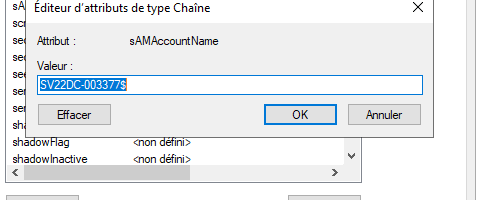
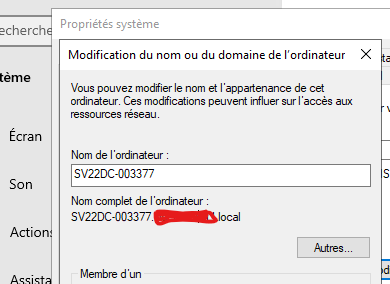
Regarding the name, in this case the samAccountName AD and the local name are the same
Below is the content of the wapt-get.ini file directly on the client
Code: Select all
[global]
use_hostpackages=1
peercache_enable=0
use_kerberos=0
max_gpo_script_wait=180
pre_shutdown_timeout=180
hiberboot_enabled=0
repo_url=https://wapt.intserver.net/wapt
wapt_server=https://wapt.intserver.net
verify_cert=0
use_fqdn_as_uuid=1
allow_remote_reboot=1
allow_remote_shutdown=1
use_repo_rules=True

[default_global]
use_hostpackages=1
peercache_enable=0
use_kerberos=0
max_gpo_script_wait=180
pre_shutdown_timeout=180
hiberboot_enabled=0
repo_url=https://wapt.intserver.net/wapt
wapt_server=https://wapt.intserver.net
verify_cert=0
use_fqdn_as_uuid=1
allow_remote_reboot=1
allow_remote_shutdown=1

[waptwua]
enabled=True
default_allow=True
install_at_shutdown=True
download_scheduling=12h

[default_waptwua]
- wapt3.png (10.12 KB) Viewed 17681 times
- wapt4.png (14.95 KB) Viewed 17681 times

- waptt.png (18.6 KB) Viewed 17681 times
 . Any help would be greatly appreciated.
 . Any help would be greatly appreciated.