Page 1 of 2
Uninstall a package
Published: March 10, 2016 - 10:03
by koky
Good morning,
I have a final year project, and it consists of installing WAPT-server and getting it working in my company's environment.
The problem is that I can't uninstall the packages.
I have a Windows Server 2008 R2 where I installed wapt-server!
I go to a machine where the wapt agent is installed, then in general, I right-click on the package, uninstall a package, then it tells me in the console to-upgrade and missing... I'm attaching a screenshot!
I don't know what to do...
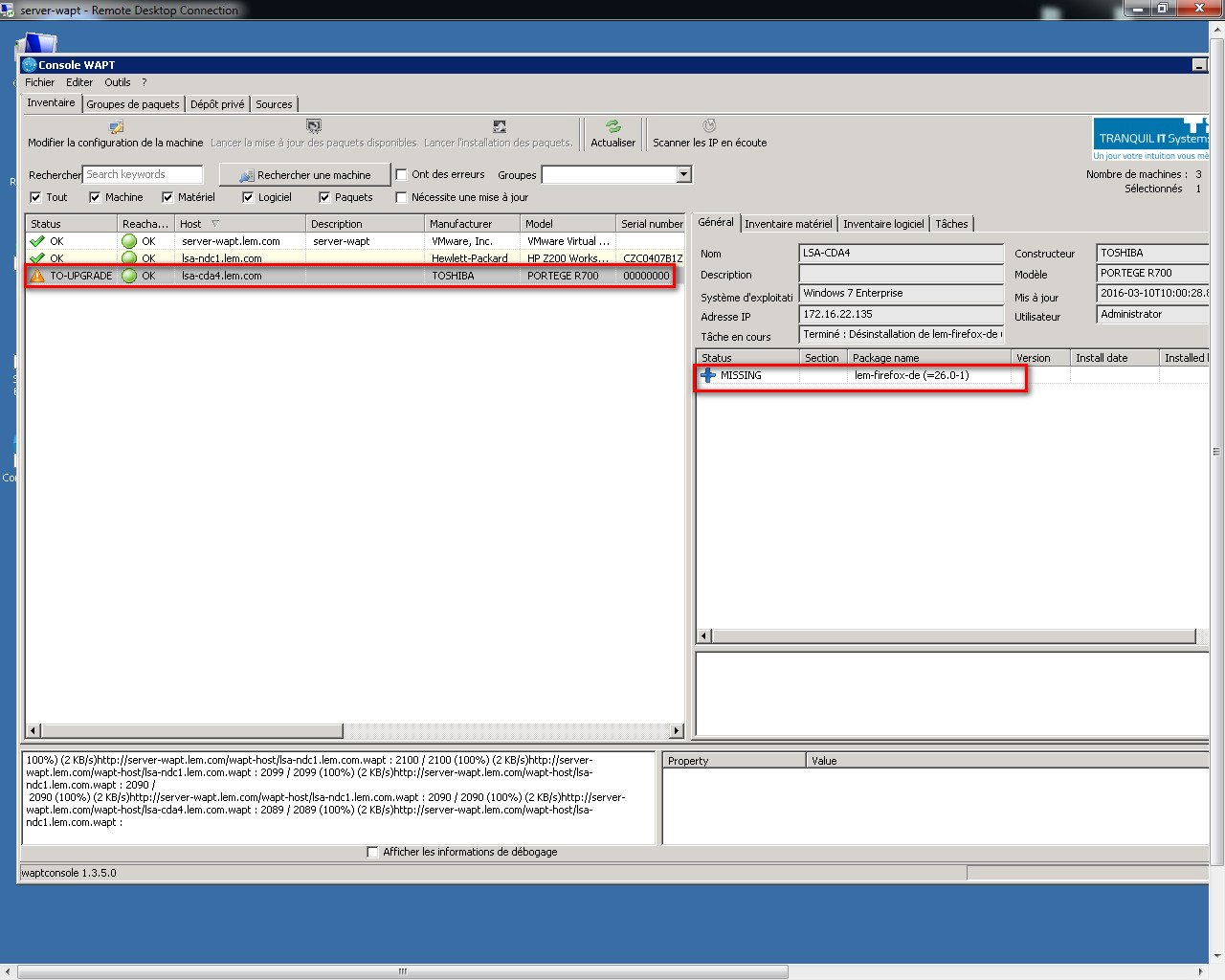
- 2016-03-10_100240.jpg (215.54 KB) Viewed 13858 times
Thank you!
Re: Uninstalling a package
Published: March 10, 2016 - 6:49 PM
by Floflobel
Is the package available on your repo?
http://yourrepo/wapt
Re: Uninstalling a package
Published: March 10, 2016 - 8:11 PM
by koky
What is a repo?
Re: Uninstalling a package
Published: April 7, 2016 - 9:20 AM
by Aurelien
Your "repo" is where your packages are stored.
If you replaced your "Firefox 26" with a newer version, you need to remove that package from the list of packages to install.
I don't know how you do it on your system, but I created deployment groups (grpWin7 or grpWinXP). With each software update, I add it to the group and remove the old version.
I hope my answer is correct; I'm a new WAPT user.
Re: Uninstalling a package
Published: April 7, 2016 - 12:07 PM
by sfonteneau
With each software update, I integrate it into the group and remove the old version.
When you add software to a machine, you are not adding the software version.
You just add: lsa-firefox
The wapt client will always look for the latest version of Firefox in the repository.
So when you duplicate the latest version of Firefox from the tranquil.it repositories, there's no need to modify your groups.
This is useful, however, when the software version is included in the package name. For example, lsa-java7
When a package is uninstalled, if it is still in a group or in the list of software to install on the machine, then the package will try to reinstall itself and will therefore reappear as "missing"
Basically, they ask for uninstallation then they ask for installation --> doesn't make sense.
Simon
Re: Uninstalling a package
Published: May 10, 2016 - 10:48
by TISwapt-tester
Hello,
I'm reviving this thread because I'm facing a similar problem:
I deleted a package (7zip) from the WAPT console, and I also removed it from the packages it was in, but this package is still present in my
http://myrepo/wapt directory.
How can I permanently remove it?
The installation of this package failed (probably due to the package itself), and it keeps trying to install on every machine, which is annoying, especially since I've deleted it everywhere I could see it.
Also, I deleted a package group I had created, and every time I click on "Edit Machine" on the machines that had this group assigned to them, I get this message:
"Warning: The package(s) ["package1"] could not be found and have been ignored."
This is beyond frustrating...
Re: Uninstalling a package
Published: May 10, 2016 - 11:46
by sfonteneau
Hello,
I invite you to read a short overview on package management on a WAPT client:
https://wiki.lesfourmisduweb.org/index. ... 7un_client.
In your case, you either need to fix the 7zip package (understand why it's failing) and then fix and push a new version of the package.
Or you need to "forget" the package on the machine. This will remove the error from the console.
To forget 7zip,
use `wapt-get forget tis-7zip`
or
right-click on the failed package in the machine from the console and then select "Forget Package".
Re: Uninstalling a package
Published: May 10, 2016 - 1:26 PM
by TISwapt-tester
Thanks for your help, I had just figured out how to forget the package.
EDIT: And the `forget` command turns out to be very useful for forgetting a package that is no longer displayed in the console.
Re: Uninstalling a package
Published: May 10, 2016 - 3:46 PM
by TISwapt-tester
However, I don't understand. I've removed the package from everywhere and I've also used the `forget` command, but I still get the message saying that the packages weren't found and are therefore ignored as soon as I click on "edit machine configuration"
How come it's still trying to find those packages??? (one of which is a package group I created and then deleted)
EDIT: I solved the problem by deleting the remote-machine.wapt file located in
Code: Select all
C:\wapt\waptserver\repository\wapt-host\
So that a new hosts file is generated. It therefore appears that this hosts file is not being updated correctly.
Re: Uninstalling a package
Published: September 28, 2017 - 8:59 AM
by Daniel Traversa
Hello,
I'm encountering the same problem. I've noticed that even when it uninstalls cleanly, the following registry key isn't deleted:
HKEY_LOCAL_MACHINE\SOFTWARE\Microsoft\Windows\CurrentVersion\Uninstall\{23170F69-40C1-2702-1604-000001000000}.
As a result, we get this message:
Installing 7-Zip 16.4-8
MSI 7z1604-x64.msi already installed. Skipping msiexec.
Is it possible to delete a registry key with Wapt before installation?
Thank you.