Page 1 of 1
Machine name error
Published: October 22, 2025 - 2:43 PM
by gavit
Good morning,
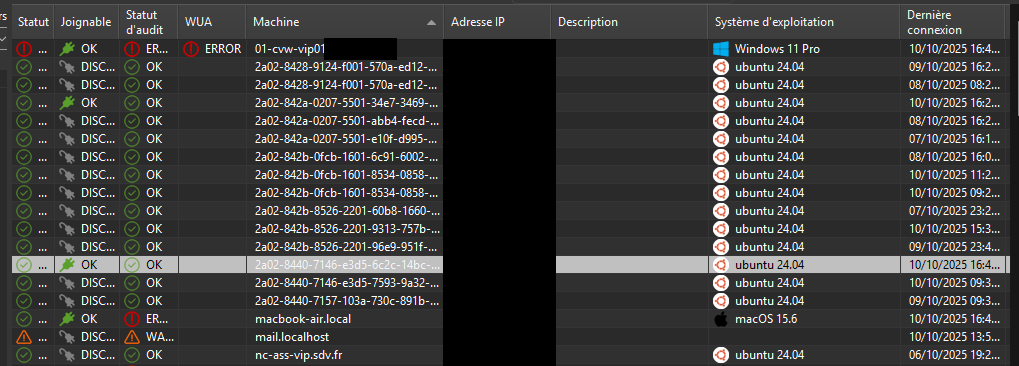
We are currently experiencing an issue with some Ubuntu 24.04 machines appearing twice in the WAPT console.
Our WAPT configuration uses the FQDN as the machine UUID (use_fqdn_as_uuid=1).
However, we observe that some posts initially appear with the correct UUID (corresponding to the machine name), then reappear with a different UUID or name.
- Untitled.png (119.6 KB) Viewed 26041 times
It appears that this behavior varies depending on the network used — for example, when the machines are connected via VPN or on another network.
Do you have any suggestions or recommendations to avoid these duplicates?
Sincerely,
Re: Machine name error
Published: October 22, 2025 - 8:39 PM
by sfonteneau
Hello,
the machine column is actually "computer_fqdn"
which uses the internal Python socket library, specifically the getfqdn function
(https://docs.python.org/3/library/socke ... et.getfqdn).
The function should return an FQDN, but apparently in this case it doesn't.
Wapt also reads the keytab; if /etc/krb5.keytab exists, it extracts the FQDN from the keytab.
So, if the machine is on the domain, there shouldn't be any problem.
In the hardware inventory, what value does "computer_name" return?
If there's a "." in /etc/hostname, it should take the value indicated there. Otherwise, getfqdn tries something else.
Re: Machine name error
Published: October 23, 2025 - 09:23
by gavit
Good morning,
Our Ubuntu users are not on the domain.
Therefore, the file /etc/krb5.keytab does not exist.
The /etc/hostname file does indeed contain the machine name without the "."
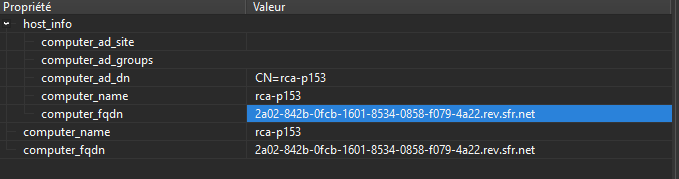
On the WAPT side, the "computer_name" is correct!

- Screenshot 2025-10-23 091322.png (33.72 KB) Viewed 25961 times
- Screenshot 2025-10-23 091021.png (11.47 KB) Viewed 25961 times
Sincerely
Re: Machine name error
Published: October 23, 2025 - 2:27 PM
by sfonteneau
Hmm
. Since there's no period (.) in the hostname and no keytab, the function performs a reverse IP address resolution to find a fully qualified domain name (FQDN). And that's where it responds (apparently the SFR box).
In the code, we should reject the proposed FQDN if it doesn't start with the hostname. This could be a solution to avoid incorrect retrieval. And therefore, no FQDN.
Otherwise, on your end, you should add a period (.) to the hostname so it becomes an FQDN (at least a name like "Hello" mycomputer.local).
Re: Machine name error
Published: October 23, 2025 - 5:23 PM
by gavit
Is there no way to use the computer_name?
Is there no way to use the /etc/hosts file to retrieve the machine name in WAPT?
Yet when we try the command dig -x PC-IP, we don't get the same information as in WAPT.
Why does it work for 95% of PCs and not for 10-15 PCs, even though all the configurations are identical?
Re: Machine name error
Published: October 23, 2025 - 5:49 PM
by sfonteneau
gavit wrote: ↑Oct 23, 2025 - 5:23 PM
Is there no way to use the computer_name?
If there is a "." in the hostname, it should indeed use hostname.
So /etc/hostname has a "." in your case?
Re: Machine name error
Published: October 24, 2025 - 09:22
by gavit
There are no periods (.) in any of our /etc/hostname files on our Ubuntu PCs.
That's why I find it strange that it doesn't affect all PCs.
If I modify the hostname file, do I just need to restart the WAPT service on the PC and run `register` to get the new entry in the WAPT console?
Re: Machine name error
Published: October 24, 2025 - 10:27 AM
by dcardon
Hi Gaëtan,
retrieving a hostname isn't as straightforward as it seems when you consider all the possible scenarios on each operating system, and even more so when you're dealing with multiple operating systems and Linux distributions. In the old days, we mainly relied on socket.getfqdn(), but the problem is that if things aren't configured correctly, you get a reverse DNS lookup, which in the case of reverse IPv6 gives the impression of having a GUID.

We'll look into completely removing the calls to socket.getfqdn().
For now, as you suggested, changing /etc/hostname to a fully qualified domain name (FQDN) should do the trick.
Best regards,
Denis