Page 1 of 1
[RESOLVED] Wapt Console: "Truncated" display
Published: March 18, 2026 - 4:44 PM
by Clafon
Version: 2.6.1.17664
Server OS: Debian 12
OS Machine administration: Windows Server 19
Target OS: Windows 11 25h2
Good morning,
When the WAPT console is launched on a workstation, the display appears "truncated" (there is nothing on the left).
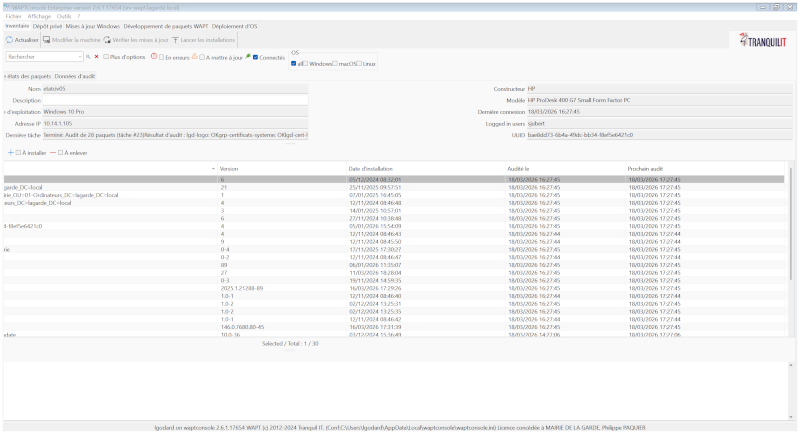
- Wapt_tronqué.png (105.71 KB) Viewed 12812 times
I've cleared the cache, reset the settings to default, and even uninstalled/reinstalled Wapt, but nothing works. Do you have any ideas? Thanks
Re: Wapt Console: "Truncated" display
Published: March 18, 2026 - 5:27 PM
by bkolovljanovic
Good morning,
There is probably too much data being stored in memory (the previous version of wapt did not adapt the display correctly).
With the console closed.
To be checked in
Code: Select all
%appdata%\waptconsole\waptconsole.ini
And look inside for the key
The value might be too high.
Delete the corresponding line entirely (or perhaps reduce it to 600/700). Save the file. And reopen the console.
If the problem persists, even with the console closed, the solution is to delete that file
Code: Select all
%appdata%\waptconsole\waptconsole.ini
and reopen the console. But this will have lost all the layout and other elements stored in memory in terms of display.
Re: Wapt Console: "Truncated" display
Published: March 19, 2026 - 3:57 PM
by Clafon
Hello,
I deleted the file %appdata%\waptconsole\waptconsole.ini and restarted the console. The problem persists.
Re: Wapt Console: "Truncated" display
Published: March 20, 2026 - 09:17
by dcardon
Hi Cédric,
yes, the console layout is saved in this file...
are you opening the console with elevated privileges? If so, you need to delete the correct file in the correct user profile.
Did you close the console before deleting the file (otherwise it will be recreated with the wrong layout upon closing)?
It's the file C:\Users\%USERNAME%\AppData\Roaming\waptconsole\waptconsole.ini that was deleted, not C:\Users\%USERNAME%\AppData\Local\waptconsole\waptconsole.ini?
Regards,
Denis
Re: Wapt Console: "Truncated" display
Published: March 23, 2026 - 3:49 PM
by Clafon
I hadn't deleted the correct .ini file.

Everything works now, thank you.
Re: Wapt Console: "Truncated" display
Published: March 23, 2026 - 6:16 PM
by dcardon
Hi Cédric,
clafon wrote: ↑March 23, 2026 - 3:49 PM
I hadn't deleted the correct .ini file.
This time everything works, thank you
No worries, it happens to the best of us

That said, we're going to try to improve the interface layout reset button. It should still work even in your case...
I'm marking this topic as resolved.
Sincerely,
Denis