Page 1 of 2
WAPTDEPLOY.EXE deployment error via GPO
Published: April 7, 2017 - 5:18 PM
by alxinfo
Good morning,
After following the documentation I created the GPO but the script is encountering a problem with the following error code (see attachment).
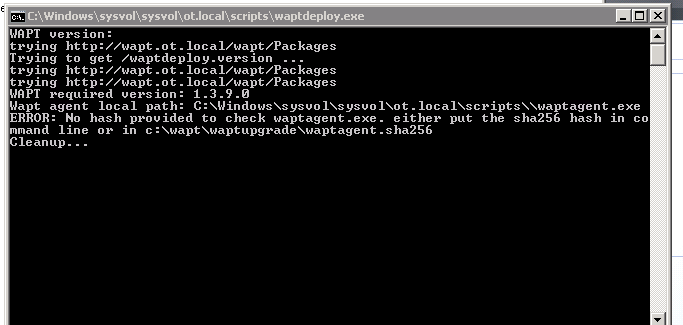
- sha1.PNG (12.22 KB) Viewed 8829 times
Thank you in advance for your help.
Re: WAPTDEPLOY.EXE deployment error via GPO
Published: April 7, 2017 - 5:53 PM
by agauvrit
Good morning,
As stated in the documentation, WAPT Deploy expects a checksum, a hash, to verify the integrity of waptagent.exe which it will have to download and execute.
Therefore, your command line becomes:
Code: Select all
waptdeploy.exe --hash=70d90ca28d89052b0492b76e021c3dda13daedff --minversion=1.3.8 --wait=15
That should work better.
You can test this manually using the command line. Also, is your call to waptdeploy.exe correctly using a network UNC path? (e.g., \\server\scripts\waptdeploy.exe)
The documentation for waptdeploy can be found here:
https://wapt.fr/fr/doc/Installation/wap ... waptdeploy
Good deployment!
Alexander
Re: WAPTDEPLOY.EXE deployment error via GPO
Published: April 9, 2017 - 7:55 PM
by alxinfo
Good evening,
thank you for your quick reply. However, I followed the tutorial in the documentation to the letter. I'll try again tomorrow with your order, we'll see how it goes.
Thanks again and have a good evening.
Re: WAPTDEPLOY.EXE deployment error via GPO
Published: April 10, 2017 - 8:57 AM
by alxinfo
Good morning,
I made the changes indicated, and now I get the following feedback:
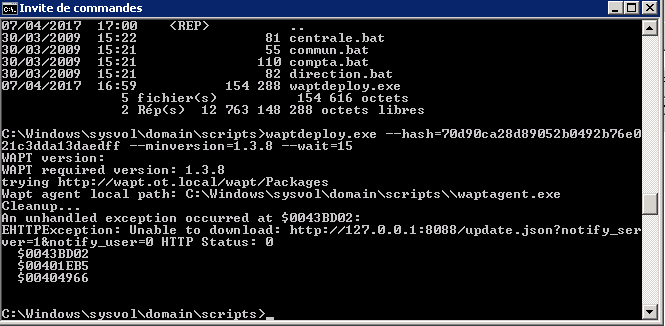
- deploy.PNG (16.73 KB) Viewed 8808 times
Re: WAPTDEPLOY.EXE deployment error via GPO
Published: April 10, 2017 - 9:46 AM
by agauvrit
Just a quick note: the hash is different for each generated agent !
You need to retrieve the hash displayed in your WAPT server's web interface.
That should work much better.
Re: WAPTDEPLOY.EXE deployment error via GPO
Published: April 10, 2017 - 9:52 AM
by alxinfo
Good morning,
I just restarted the hash process as indicated in my documentation (something I did the first time) and here's the result:
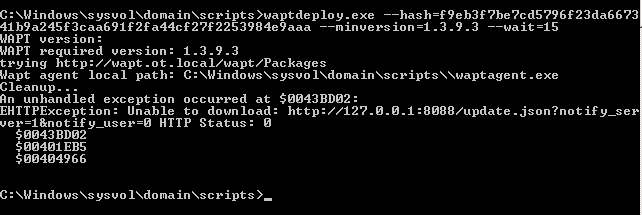
- deploy.PNG (10.09 KB) Viewed 8802 times
For your information, here is the hash I have on my deployment server (it is not the same as the domain controller server, does that change anything?).
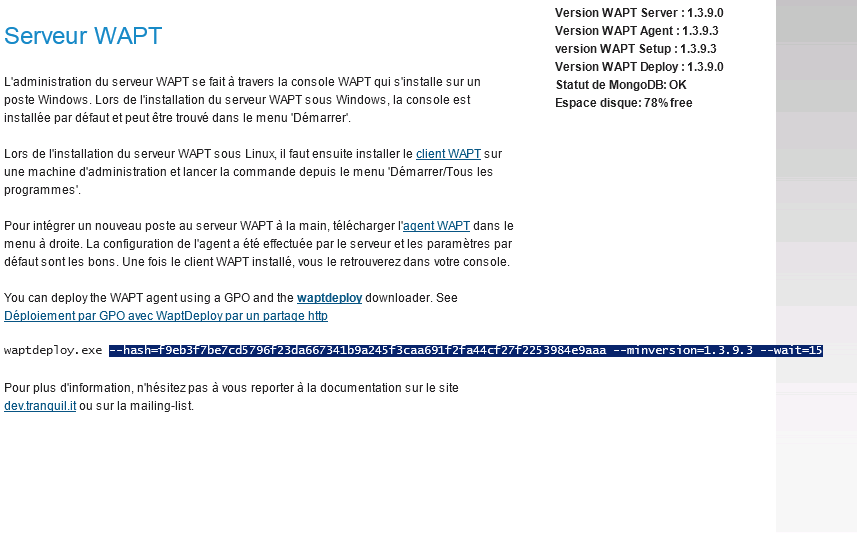
- deploy2.PNG (33.93 KB) Viewed 8802 times
Thank you in advance for your help.
Re: WAPTDEPLOY.EXE deployment error via GPO
Published: April 10, 2017 - 10:30 AM
by agauvrit
Is the WAPT server reachable at the following address:
http://wapt.ot.local/wapt/ ?
waptdeploy.exe simply goes and downloads
waptagent.exe from the wapt server specified in the DNS fields, in this case "
http://wapt.ot.local/wapt/waptagent.exe", then checks with the hash that the file signature matches and launches the silent installation of the agent.
The exception obtained means that no waptagent.exe file is downloaded.
To force the download from the WAPT server's IP address, use the following command:
Code: Select all
waptdeploy.exe --hash=<.....> --minversion=1.3.8 --wait=15 --waptsetupurl="http://ip_serveur/wapt/waptagent.exe"
In addition, waptdeploy.exe is independent of any domain controller/Active Directory, it only serves as a "wrapper" and allows the automatic download of the WAPT agent and launches its installation silently.
PS: In case you need it, the DNS configuration is explained here:
https://www.wapt.fr/fr/doc/Installation ... n_dns.html
We're almost there!
Re: WAPTDEPLOY.EXE deployment error via GPO
Published: April 10, 2017 - 10:39 AM
by alxinfo
So the server absolutely has to be called wapt?
That would explain why. My server is srv-deploy.
I'll try renaming it. I'll keep you posted.
Re: WAPTDEPLOY.EXE deployment error via GPO
Published: April 10, 2017 - 11:26 AM
by alxinfo
Good,
I have access, it works (small firewall error and server name corrected) but I still have another problem....(I'm such a klutz you'll say ^^).
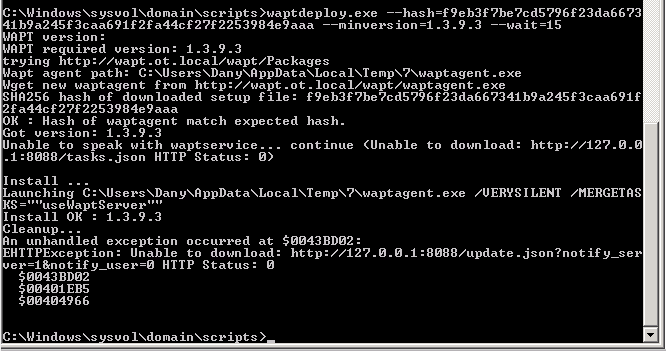
- deploy2.PNG (19.15 KB) Viewed 8793 times
Re: WAPTDEPLOY.EXE deployment error via GPO
Published: April 10, 2017 - 12:16 PM
by alxinfo
Hello again,
I think I've found the problem. I installed it on an IP range like 192.168.21.** and when I use waptdeploy (after changing the workstation's IP address), the configuration that's sent to the PCs on the network is still using the original IP address (192.168.21.**). However, if I manually install the agent using the correct IP address, it works.
Is there a way to change the IP address in the configuration file, or do I need to reinstall the application on the server?
Thanks in advance.