Page 1 of 1
Pb service waptservice "Paused"
Published: July 10, 2017 - 2:24 PM
by XavD
Good morning,
I am new to WAPT and I am facing the following problem.
On my computer network, all my Windows 7 workstations have the WAPTService in "Started" status, but my new workstations running Windows 10 (DELL VOSTRO 3668) have the service in "Paused" status, and when I try to restart it, I get the following error message:
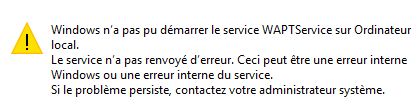
- errorService.jpg (11.19 KB) Viewed 8031 times
On this machine I have the WAPT client 1.3.5, the following tests show:
net start waptservice : service already started
netstat -ano | find ":8088" No response
Therefore, I cannot proceed further with the tests.
On my local machine, the firewall is disabled (because it's behind a global firewall)
I also found a solution in the forum which talks about disabling the TPM in the BIOS, which I did.
My workstation changes from UNREACHBLE status to TO UPDATE but the service is still not started.
In comparison, on a Windows 10 laptop, the service started up properly and I can launch updates.
Thank you in advance for your help.
Re: Problem with waptservice "Paused"
Published: July 10, 2017 - 3:44 PM
by sfonteneau
XavD wrote: ↑Jul 10, 2017 - 2:24 PM
Hello,
I'm new to WAPT and I'm facing the following problem.
On my network, all my Windows 7 machines have the WAPTService in "Started" status, but my new machines, which are running Windows 10 (DELL VOSTRO 3668), have the service in "Paused" status, and when I try to restart it, I get the error message:
errorService.jpg.
On the machine, I have the WAPT client version 1.3.5. The following tests show:
You need to start by updating! Known problem...
XavD wrote: ↑July 10, 2017 - 2:24 PM
net start waptservice : service already started
netstat -ano | find ":8088" : no response
So I can't go any further with the tests.
On my local machine, the firewall is disabled (because it's behind a global firewall).
I also found a solution in the forum that talks about disabling the TPM in the BIOS, which I did.
My machine goes from UNREACHABLE status to TO UPDATE, but the service is still not started.
In comparison, on a Windows 10 laptop, the service is running fine and I can run updates.
Thank you in advance for your help.
Re: Problem with waptservice "Paused"
Published: July 10, 2017 - 4:02 PM
by XavD
Hello and thank you for your reply.
But as mentioned, I'm a beginner, and does the update concern the packages or the WAPT 1.3.5 client?
And when I launch the update via the console by choosing "Launch package installation" or "Launch update of available packages" on the machines, I encounter this problem:
"ERROR aXXXX-XXXX.domain.local XX.XX.XX.XXXXXX ERROR HTTPConnectionPool(host='XX.XXX.XX.XX', port=8088): Max retries exceeded with url: /upgrade.json?uuid=yyyyy-yy-yy-yyy (Caused by NewConnectionError('
Is it possible to get the link to the forum discussion on this known issue so I can take a look?
Thanks in advance
. Regards.
Re: Problem with waptservice "Paused"
Published: July 10, 2017 - 8:59 PM
by sfonteneau
You need to update the entire server and clients.
https://www.wapt.fr/fr/doc/Installation ... index.html
In your case, the waptupgrade package will not work to update the machines where the service does not start. You must therefore refer to waptdeploy:
https://www.wapt.fr/fr/doc/Installation ... waptdeploy
Simon
Re: Problem with waptservice "Paused"
Published: July 11, 2017 - 1:57 PM
by XavD
Hello and thank you for your reply.
Indeed, after a global update and generating a new installer, it works much better!
One question, though (I may not have found the answer in the forum): besides the fact that the paused service indicates an update is needed, where can this information be seen?
In my case, for example, I would have saved time if I had received a message like "waptagent.exe is not up to date, blah blah..."
Thank you again for your help and your future reply.
Re: Problem with waptservice "Paused"
Published: July 11, 2017 - 5:50 PM
by sfonteneau
You can be notified of future WAPT updates via the mailing list and the forum.
The service bug that prevents startup is caused by a Windows 10 update.
See:
viewtopic.php?f=7&t=646