Page 1 of 2
machine group
Published: January 10, 2018 - 10:45 AM
by beemoon
Is there clear documentation for grouping machines by room or profile? I only see instructions for grouping packages.
In the "inventory" tab, I have over 200 machines that I want to group by room.
Re: Machine group
Published: January 10, 2018 - 12:10 PM
by sfonteneau
Hello,
you need to: create an empty group (without packages), give it a name, for example, computer-room-06.
You then need to assign this package to computer room 06.
Now, using the group dropdown list at the top of the console in the inventory section, select the computer-room-06 group.
The console will then filter all the PCs that have the computer-room-06 group as a dependency.
Now, if you want to install the "office-software" group on computer room 06, simply add "office-software" as a dependency to the "computer-room-06" group.
Re: Machine group
Published: January 23, 2018 - 4:12 PM
by beemoon
It works! It
's not obvious to think about creating an empty software package and then sorting within that package... but it works.
So we'll have rooms with the actual software groups (to manage dependencies, etc.).
One wish for future releases: rethink the interface's ergonomics.
Thanks!
Re: Machine group
Published: January 23, 2018 - 5:35 PM
by sfonteneau
Indeed, in version 1.5
business 
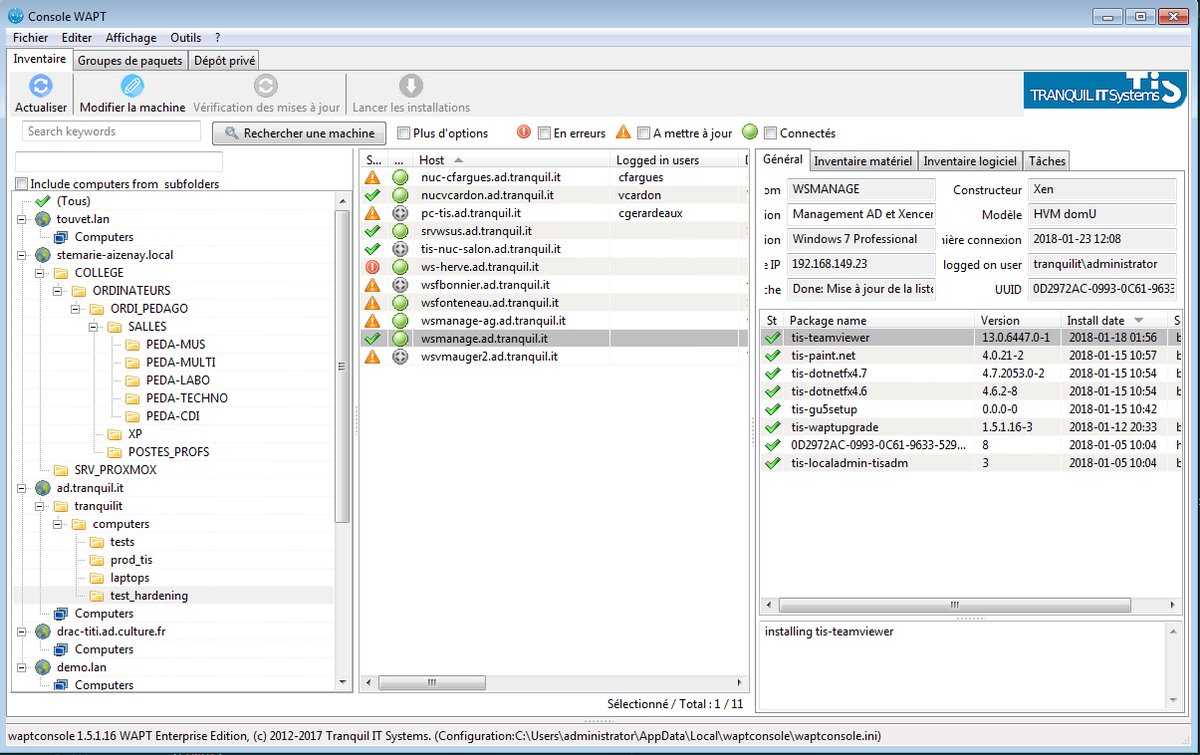
- DUPFl5wW4AE7G6W.jpg (167.21 KB) Viewed 16747 times
Re: Machine group
Published: January 24, 2018 - 8:30 AM
by beemoon
Great !!!
Re: Machine group
Published: January 25, 2018 - 4:36 PM
by empbilly
sfonteneau wrote: ↑Jan 23, 2018 - 5:35 PM
Indeed, in version 1.5
enterprise
DUPFl5wW4AE7G6W.jpg
Only in enterprise version?
Re: Machine group
Published: January 26, 2018 - 09:14
by dcardon
Hello Beemoon,
beemoon wrote: ↑Jan 23, 2018 - 4:12 PM
It works! It's
not obvious to think of creating an empty software package and then sorting within that package... but it works.
So we'll have rooms with the actual software groups (to manage dependencies, etc.)
There's no need to create an empty software package. Simon was referring to a group package (group tab).
Denis
Re: Machine group
Published: January 26, 2018 - 09:17
by dcardon
Hi Empbilly,
empbilly wrote: ↑Jan 25, 2018 - 4:36 PM
sfonteneau wrote: ↑Jan 23, 2018 - 5:35 PM
Indeed, in version 1.5
enterprise
DUPFl5wW4AE7G6W.jpg
Only in enterprise version?
Yes, Active Directory integration features will be part of WAPT Enterprise Edition.
Denis
Re: Machine group
Published: January 26, 2018 - 11:47 AM
by empbilly
dcardon wrote: ↑Jan 26, 2018 - 09:17
Hi Empbilly,
empbilly wrote: ↑Jan 25, 2018 - 4:36 PM
sfonteneau wrote: ↑Jan 23, 2018 - 5:35 PM
Indeed, in version 1.5
enterprise
DUPFl5wW4AE7G6W.jpg
Only in enterprise version?
Yes, Active Directory integration features will be part of WAPT Enterprise Edition.
Denis
Hello Denis,
I asked about creating simple machine division groups. Will this also only be in the enterprise version?
Re: Machine group
Published: January 29, 2018 - 08:31
by beemoon
no I think it is just for new GUI but for the community version it is already available.
1- make an empty software packet group (name this packet as a host group ie Financial Dept)
2- put this packet group to one or several hosts