[RESOLVED] OS Domain Junction Code 1326

Questions about WAPT Server / Requests and help related to the WAPT server
Forum Rules
Community Forum Rules
* English support on www.reddit.com/r/wapt
* French community support is available on this forum
* Please prefix the topic title with [RESOLVED] if it is resolved.
* Please do not edit a topic that is tagged [RESOLVED]. Open a new topic referencing the old one.
* Specify the installed WAPT version, full version, and build number (2.2.1.11957 / 2.2.2.12337 / etc.) as well as the Enterprise/Discovery edition.
* Versions 1.8.2 and earlier are no longer supported. The only questions accepted regarding version 1.8.2 are related to upgrading to a supported version (2.1, 2.2, etc.).
* Specify the server OS (Linux/Windows) and version (Debian Buster/Bullseye - CentOS 7 - Windows Server 2012/2016/2019).
* Specify the OS of the administration/package creation machine and the machine with the problematic agent, if applicable (Windows 7/10/11/Debian 11/etc.).
* Avoid asking multiple questions when opening a topic, otherwise it may be ignored. If there are multiple topics, open separate topics, preferably one after the other and not all at the same time (i.e., do not spam the forum).
* Include code snippets, screenshots, and other images directly in the post. Links to Pastebin, Bitly, and other third-party sites will be systematically removed.
* As with any community forum, support is provided voluntarily by members. If you require commercial support, you can contact Tranquil IT's sales department at 02.40.97.57.55
bruno67
Messages: 21
Registration: August 2, 2018 - 11:39

April 14, 2022 - 3:28 PM

Good morning,

After following the webinar, I tested a Windows 10 Pro deployment and I get this error on both a VM and a PC:
pb-join.png
pb-join.png (50.03 KB) Viewed 7899 times
Nothing under c:\windows\temp\joi-......

I tried creating the computer account in the OU, but it didn't change anything. The PC doesn't go into deployment waiting mode

Any ideas you'd like to suggest?

THANKS
User avatar
dcardon
WAPT Expert
Messages: 1929
Registration: June 18, 2014 - 09:58
Location: Saint Sébastien sur Loire
Contact :

April 15, 2022 - 2:57 PM

Hello bruno67,

error code 1326 indicates an authentication problem. I assume you entered the correct password, so the problem lies elsewhere. In the console, the credentials are used to perform local privilege escalation to run the djoin command. There may be encoding issues during the credentials transfer for privilege escalation:
* What login format did you use? `identifier` and `identifier@mydomain.lan` work, but `MYDOMAIN\identifier` is buggy (to be fixed in a future version)?
* Does the domain have anything unusual (connection to a RODC, trust relationship, etc.)?
* Do you have an unusual special character in your password? (We've already had conversion problems between local machine encodings and UTF-8)

Best regards,

Denis
Denis Cardon - Tranquil IT
Share your experiences on WAPT! Send us your blog and article URLs in the "Your Opinion of the forum, and we'll feature them on the WAPT
bruno67
Messages: 21
Registration: August 2, 2018 - 11:39

April 19, 2022 - 3:50 PM

Good morning,

Watching the webinar, I thought I understood that offline join didn't require entering an account and password in the XML file as long as the computer account existed in Active Directory. I must have misunderstood.

For the password, nothing special.

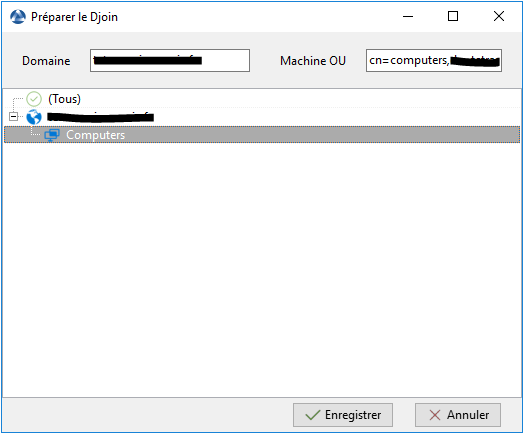
What I find strange is that during DJOIN, when choosing the OU, only one appears: 'test-gpo'
djoin.png
djoin.png (22.27 KB) Viewed 7834 times
while I have dozens of OUs above

I also used this procedure:
https://www.it-connect.fr/comment-deplo ... -wapt-2-2/

without further success

I just deleted the configuration to be applied (Win10-conf) and created a new one offline, and I get this message: "one or more required elements are empty"

Best regards
Bruno
User avatar
dcardon
WAPT Expert
Messages: 1929
Registration: June 18, 2014 - 09:58
Location: Saint Sébastien sur Loire
Contact :

April 20, 2022 - 12:44

Hello bruno67,

The djoin function allows you to avoid putting the password in the unattend.xml file. The djoin is a blob that contains the client machine's join information (i.e., the machine's FQDN and its password in AD; a machine joined via djoin changes its password upon the first contact with AD, normally after the first reboot if on the corporate network).
So either we choose:
  • either an unattend.xml online template and we put the login/password of an account that has the right to make the join,
    * or an unattend.xml offline/djoin template which will contain the djoin blob and which is automatically added to the xml file.
Regarding the display of OUs, it currently relies on OUs already used by workstations integrated into WAPT. We will add an option in the future to retrieve other OUs even if there is no WAPT workstation within them.

Sincerely,

Denis
Denis Cardon - Tranquil IT
Share your experiences on WAPT! Send us your blog and article URLs in the "Your Opinion of the forum, and we'll feature them on the WAPT
bruno67
Messages: 21
Registration: August 2, 2018 - 11:39

April 20, 2022 - 3:00 PM

Not knowing where to begin with the deployment problem, which was failing to start due to random errors (1326, missing data in the configuration file, etc.), I ran a new `apt update` and, as if by magic, my first deployment started
florian777
Messages: 32
Registration: Apr 13, 2022 - 09:53

April 25, 2022 - 9:33 AM

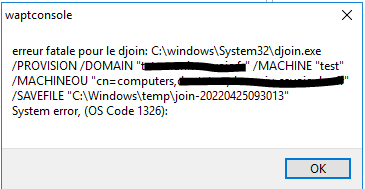
I'm bringing this up again because I'm encountering the same error.
Picture

Picture

Wapt version: 2.2.1.11899 rev 2d82654e
OS: Windows 2016
User avatar
sfonteneau
WAPT Expert
Messages: 2318
Registered: July 10, 2014 - 11:52 PM
Contact :

April 26, 2022 - 10:09 AM

djoin is a Windows executable, so it's Windows that's returning this code.

It would be interesting to run the command directly in a command prompt to see exactly what Windows says.

Another question: is the console being launched with an account that has the rights to create a computer account in Active Directory?

Simon
florian777
Messages: 32
Registration: Apr 13, 2022 - 09:53

April 26, 2022 - 2:32 PM

Here is the command in different "states"

: Console launched with a local administrator account and cmd as a local administrator:
Picture

Console launched with a local administrator account and cmd as a domain administrator:
Picture

Console launched with a domain administrator account and cmd as a domain administrator:
Picture
User avatar
dcardon
WAPT Expert
Messages: 1929
Registration: June 18, 2014 - 09:58
Location: Saint Sébastien sur Loire
Contact :

April 26, 2022 - 6:01 PM

Hello,

for the first one, that's normal; djoin needs an account with domain privileges to create an account.

For the second one, there's clearly already a machine with the same name, so you need to add /reuse, otherwise it won't work.

The same goes for the third one.

Anyway, for some reason, /reuse doesn't seem very reliable in djoin.exe. We'll suggest deleting the entry before recreating it with djoin in the console; I think that will be simpler.

Regards,

Denis
Denis Cardon - Tranquil IT
Share your experiences on WAPT! Send us your blog and article URLs in the "Your Opinion of the forum, and we'll feature them on the WAPT
florian777
Messages: 32
Registration: Apr 13, 2022 - 09:53

April 27, 2022 - 8:13 AM

Hello,

I tried using the /reuse option but it didn't change anything. I tried with a machine name that has never been registered in AD, but I get the same message:
Picture
Locked