

Hello,
our WAPT server is still down... I have the impression that the problems encountered are related to the same causes as this thread: viewtopic.php?t=3354.
Perhaps by trying to resign my packages I did more harm than good...
Motivated by the latest update, I attempted it. Following that, I wanted to reinstall the console as cleanly as possible. So I uninstalled the console from the PC where it was installed and downloaded WAPTSetup. Problem (yet another one...), after running it as administrator and choosing French as the language, I get this error message (see attached).
Do you have any suggestions?
[RESOLVED] Several problems following update 2.2.3 => 2.3
Forum Rules
Community Forum Rules
* English support on www.reddit.com/r/wapt
* French community support is available on this forum
* Please prefix the topic title with [RESOLVED] if it is resolved.
* Please do not edit a topic that is tagged [RESOLVED]. Open a new topic referencing the old one.
* Specify the installed WAPT version, full version, and build number (2.2.1.11957 / 2.2.2.12337 / etc.) as well as the Enterprise/Discovery edition.
* Versions 1.8.2 and earlier are no longer supported. The only questions accepted regarding version 1.8.2 are related to upgrading to a supported version (2.1, 2.2, etc.).
* Specify the server OS (Linux/Windows) and version (Debian Buster/Bullseye - CentOS 7 - Windows Server 2012/2016/2019).
* Specify the OS of the administration/package creation machine and the machine with the problematic agent, if applicable (Windows 7/10/11/Debian 11/etc.).
* Avoid asking multiple questions when opening a topic, otherwise it may be ignored. If there are multiple topics, open separate topics, preferably one after the other and not all at the same time (i.e., do not spam the forum).
* Include code snippets, screenshots, and other images directly in the post. Links to Pastebin, Bitly, and other third-party sites will be systematically removed.
* As with any community forum, support is provided voluntarily by members. If you require commercial support, you can contact Tranquil IT's sales department at 02.40.97.57.55
Community Forum Rules
* English support on www.reddit.com/r/wapt
* French community support is available on this forum
* Please prefix the topic title with [RESOLVED] if it is resolved.
* Please do not edit a topic that is tagged [RESOLVED]. Open a new topic referencing the old one.
* Specify the installed WAPT version, full version, and build number (2.2.1.11957 / 2.2.2.12337 / etc.) as well as the Enterprise/Discovery edition.
* Versions 1.8.2 and earlier are no longer supported. The only questions accepted regarding version 1.8.2 are related to upgrading to a supported version (2.1, 2.2, etc.).
* Specify the server OS (Linux/Windows) and version (Debian Buster/Bullseye - CentOS 7 - Windows Server 2012/2016/2019).
* Specify the OS of the administration/package creation machine and the machine with the problematic agent, if applicable (Windows 7/10/11/Debian 11/etc.).
* Avoid asking multiple questions when opening a topic, otherwise it may be ignored. If there are multiple topics, open separate topics, preferably one after the other and not all at the same time (i.e., do not spam the forum).
* Include code snippets, screenshots, and other images directly in the post. Links to Pastebin, Bitly, and other third-party sites will be systematically removed.
* As with any community forum, support is provided voluntarily by members. If you require commercial support, you can contact Tranquil IT's sales department at 02.40.97.57.55
Good morning,
Here's some news:
After restarting the machine, probably thanks to the GPO that installed the agent, I regained access to the console... But still no luck...
For example, when I want to add a package to a machine, when I click on "Save and apply", I get this error message:
Here's some news:
After restarting the machine, probably thanks to the GPO that installed the agent, I regained access to the console... But still no luck...
For example, when I want to add a package to a machine, when I click on "Save and apply", I get this error message:
- 2023-02-15 08_28_23-Error in application.png (6.61 KiB) Viewed 15277 times
- Installed WAPT version: 2.4.0.14080 Discovery
- Server OS: Debian GNU/Linux 11 (bullseye)
- Administration/package creation machine OS: Windows 10
- Server OS: Debian GNU/Linux 11 (bullseye)
- Administration/package creation machine OS: Windows 10
Hello,
Based on my tests in the context described in this thread: viewtopic.php?t=3369, I'd like to provide some clarification. First, sorry for opening two threads, but I didn't think they would overlap and I didn't want to confuse users reading this thread with problems encountered in a different context...
Anyway! With a fresh install of Windows 10 Pro 22H2, I've managed to regain control of my current WAPT server and deploy new packages on a new host (the host where the console is installed). I'll continue my tests to see how to manage existing packages (which appear correctly in the console but which I can't deploy).
In conclusion, for now, it seems to confirm that the root cause of the problem is the console update. However, uninstalling via unins000.exe isn't enough to fix the problem. We need to find a way to regain control from the original console PC without having to reinstall Windows and without having to manage the console switch and therefore the package signature changes, etc. (if I understand correctly...).
Thanks to anyone who can help.

Based on my tests in the context described in this thread: viewtopic.php?t=3369, I'd like to provide some clarification. First, sorry for opening two threads, but I didn't think they would overlap and I didn't want to confuse users reading this thread with problems encountered in a different context...
Anyway! With a fresh install of Windows 10 Pro 22H2, I've managed to regain control of my current WAPT server and deploy new packages on a new host (the host where the console is installed). I'll continue my tests to see how to manage existing packages (which appear correctly in the console but which I can't deploy).
In conclusion, for now, it seems to confirm that the root cause of the problem is the console update. However, uninstalling via unins000.exe isn't enough to fix the problem. We need to find a way to regain control from the original console PC without having to reinstall Windows and without having to manage the console switch and therefore the package signature changes, etc. (if I understand correctly...).
Thanks to anyone who can help.


- Installed WAPT version: 2.4.0.14080 Discovery
- Server OS: Debian GNU/Linux 11 (bullseye)
- Administration/package creation machine OS: Windows 10
- Server OS: Debian GNU/Linux 11 (bullseye)
- Administration/package creation machine OS: Windows 10
Just to clarify, I still get this window when deploying packages: 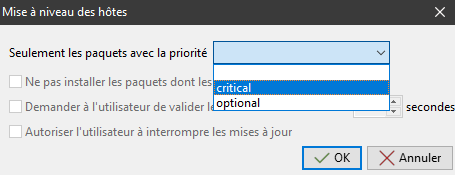 .
.
And so the same questions remain:
This window seems to have changed compared to version 2.2.3 and I can't check or uncheck "Do not install packages whose applications are running".
And so the same questions remain:
This window seems to have changed compared to version 2.2.3 and I can't check or uncheck "Do not install packages whose applications are running".
- Installed WAPT version: 2.4.0.14080 Discovery
- Server OS: Debian GNU/Linux 11 (bullseye)
- Administration/package creation machine OS: Windows 10
- Server OS: Debian GNU/Linux 11 (bullseye)
- Administration/package creation machine OS: Windows 10
I'm trying unsuccessfully to regain control of the machines...
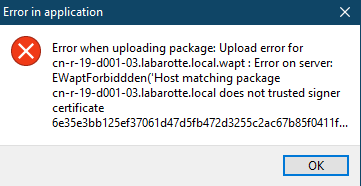
I understand there's a problem with the machine's package signature. However, right-clicking and selecting "Resign machine configuration packages" seems to lead nowhere. And strangely enough, even when I delete the machine, it reappears with its package signed by the previous console and all its other packages. Is there a way to completely remove the machine, even if it means starting from scratch? This would allow me to regain control of my network, even if it means reconfiguring the packages and groups and applying them to the machines.
- I removed a test machine from the console
- I changed the waptdeploy on the domain controller for the GPO (maybe it wasn't necessary?)
- On the test machine, after a gpupdate /force and a reboot, I can see the machine in the console
- However, I still get this error message when I try to add a package to a machine, when I click on "Save and apply":
I understand there's a problem with the machine's package signature. However, right-clicking and selecting "Resign machine configuration packages" seems to lead nowhere. And strangely enough, even when I delete the machine, it reappears with its package signed by the previous console and all its other packages. Is there a way to completely remove the machine, even if it means starting from scratch? This would allow me to regain control of my network, even if it means reconfiguring the packages and groups and applying them to the machines.
- Installed WAPT version: 2.4.0.14080 Discovery
- Server OS: Debian GNU/Linux 11 (bullseye)
- Administration/package creation machine OS: Windows 10
- Server OS: Debian GNU/Linux 11 (bullseye)
- Administration/package creation machine OS: Windows 10
Good morning,
I arrived at the same situation and to try to solve the problem I started all over again from scratch.
I deleted all my machines from the wapt console (except the one I use for admin).
On the workstations, by uninstalling the agents via an innosetup package that I created and deployed with another WAPT solution (except the one I use for admin):
I waited 15 minutes and verified that no machines had registered on the server again. Once confirmed, I removed all the packages I had in my private repository, then removed my machine from the inventory, and subsequently uninstalled the console, agent, and console from that machine.
On my admin machine, I deleted the following directories:
On my server, I uninstalled all the packages tis-wapt*, nginx, postgresql (it's a Debian server and my server only manages wapt)
Deleted directories
Rebooted the server and restarted the installation following the procedure in the documentation.
I used waptsetup from my admin machine, created the agent from the console, and generated a new personal certificate to sign the packages. Even then, I still encountered errors when trying to register my admin machine with the server (an error related to the server certificates). I had to uninstall the waptsetup package and install the waptagent package, which I downloaded from my server's portal, for it to register correctly.
But the story is not over.
Just for fun, I'll look for the tis-7zip package on the WAPT store, download it, sign it with my certificate, and add it to the hosts package list on my test machine. I wait, and bam, it starts working. On the console and server logs, I get the following message:
Not even scared, I close the console and reboot my test machine. The wapt installation window appears, but there's no sign of the 7zip package waiting to be installed. I let it run, log in, and open the console. The machine's status is "To-upgrade." I right-click on it and select "Start installations," answer the various questions, and wait.
Nothing happens, 5 minutes later.
Unfortunately, the more I try to get the wapt-server solution working, the less it works. Is this something I'm doing wrong, or is it related to version 2.3?
I arrived at the same situation and to try to solve the problem I started all over again from scratch.
I deleted all my machines from the wapt console (except the one I use for admin).
On the workstations, by uninstalling the agents via an innosetup package that I created and deployed with another WAPT solution (except the one I use for admin):
Code: Select all
C:\Program Files (x86)\wapt\unins000.exe /VERYSILENT /purge_wapt_dir=1On my admin machine, I deleted the following directories:
Code: Select all
c:\program files (x86)\wapt --> en théorie il est supprimé par l'uninstall mais dans le doute
c:\Users\MonUser\AppData\Local\wapt*
c:\Users\MonUser\AppData\Roaming\wapt*
c:\Users\MonUser\private --> les certif en rapport avec wapt
Code: Select all
apt remove tis-* nginx* postgesql* --purgeCode: Select all
/opt/wapt
/var/www/wapt*
I used waptsetup from my admin machine, created the agent from the console, and generated a new personal certificate to sign the packages. Even then, I still encountered errors when trying to register my admin machine with the server (an error related to the server certificates). I had to uninstall the waptsetup package and install the waptagent package, which I downloaded from my server's portal, for it to register correctly.
But the story is not over.
Just for fun, I'll look for the tis-7zip package on the WAPT store, download it, sign it with my certificate, and add it to the hosts package list on my test machine. I wait, and bam, it starts working. On the console and server logs, I get the following message:
Code: Select all
Impossible de récupérer l'action. Error on server:
EWaptTimeoutWaitingForResult('Timeout, client did not send result within 15.0 s')Nothing happens, 5 minutes later.
- wapt-1.png (59.92 KB) Viewed 15214 times
Hello flipflip,
I think this is related to version 2.3 because I'm encountering the same problems on a production WAPT server running CentOS 7, freshly updated from 2.2.3 to 2.3.
I hope someone can help us or at least suggest an alternative solution.
Personally, I'm ready to start almost from scratch if necessary: reinstalling the server (on Debian, while I'm at it), reinstalling the console (preferably without having to reinstall Windows), and rebuilding the packages (I could manage to do that with previous backups). However, if I could avoid a manual operation on my 200 workstations, that would be ideal .
.
I think this is related to version 2.3 because I'm encountering the same problems on a production WAPT server running CentOS 7, freshly updated from 2.2.3 to 2.3.
I hope someone can help us or at least suggest an alternative solution.
Personally, I'm ready to start almost from scratch if necessary: reinstalling the server (on Debian, while I'm at it), reinstalling the console (preferably without having to reinstall Windows), and rebuilding the packages (I could manage to do that with previous backups). However, if I could avoid a manual operation on my 200 workstations, that would be ideal
 .
.- Installed WAPT version: 2.4.0.14080 Discovery
- Server OS: Debian GNU/Linux 11 (bullseye)
- Administration/package creation machine OS: Windows 10
- Server OS: Debian GNU/Linux 11 (bullseye)
- Administration/package creation machine OS: Windows 10
Hello,
Luckily I have a smaller park but even there it's counterproductive to do it by hand.
I use Kaspersky antivirus with an agent deployed on each machine, and from the administration console I can push packages that I create myself. To create the packages, I use Inno Setup with Inno Studio as the graphical interface.
Uninstallation script code:
You just have to push it with this command
The agent will be uninstalled from the PC.
To reinstall it, I use the method with waptdeploy.
Luckily I have a smaller park but even there it's counterproductive to do it by hand.
I use Kaspersky antivirus with an agent deployed on each machine, and from the administration console I can push packages that I create myself. To create the packages, I use Inno Setup with Inno Studio as the graphical interface.
Uninstallation script code:
Code: Select all
[Setup]
; NOTE: The value of AppId uniquely identifies this application.
; Do not use the same AppId value in installers for other applications.
; (To generate a new GUID, click Tools | Generate GUID inside the IDE.)
AppId={{D14C5390-A66D-4FEF-8D31-A2BE8D0178FF}
AppName=Uninstall Wapt
AppVersion=1
;AppVerName=Uninstall Wapt 1
AppPublisher=-- A changer --
CreateAppDir=no
OutputDir=C:\InnoSetup\Out
OutputBaseFilename=uninstall_wapt
Compression=lzma
SolidCompression=yes
DisableReadyPage=True
DisableReadyMemo=True
DisableFinishedPage=True
UsePreviousSetupType=False
UsePreviousTasks=False
UsePreviousLanguage=False
AlwaysShowComponentsList=False
ShowComponentSizes=False
RestartIfNeededByRun=False
AllowCancelDuringInstall=False
ShowLanguageDialog=no
DisableProgramGroupPage=yes
CloseApplications=no
RestartApplications=False
Uninstallable=no

[Languages]
Name: "french"; MessagesFile: "compiler:Languages\French.isl"

[Run]
Filename: "C:\Program Files (x86)\wapt\unins000.exe"; Parameters: "/VERYSILENT /purge_wapt_dir=1"; WorkingDir: "{tmp}"; Flags: shellexec runhidden runminimizedCode: Select all
uninstall_wapt.exe /VERYSILENTTo reinstall it, I use the method with waptdeploy.
Your tests are indeed very informative. I was planning to try uninstalling the agents manually (at least in a testing phase) to experiment with this solution. But your results don't encourage me to pursue that if they aren't conclusive in the end. So I think I'll wait for another idea. I don't really see how to find another solution at the moment  .
.
 .
.- Installed WAPT version: 2.4.0.14080 Discovery
- Server OS: Debian GNU/Linux 11 (bullseye)
- Administration/package creation machine OS: Windows 10
- Server OS: Debian GNU/Linux 11 (bullseye)
- Administration/package creation machine OS: Windows 10
