Flash installation error

Questions about WAPT Packaging / Requests and help regarding Wapt packages.
Forum Rules
Community Forum Rules
* English support on www.reddit.com/r/wapt
* French community support is available on this forum
* Please prefix the topic title with [RESOLVED] if it is resolved.
* Please do not edit a topic that is tagged [RESOLVED]. Open a new topic referencing the old one.
* Specify the installed WAPT version, full version, and build number (2.2.1.11957 / 2.2.2.12337 / etc.) as well as the Enterprise/Discovery edition.
* Versions 1.8.2 and earlier are no longer supported. The only questions accepted regarding version 1.8.2 are related to upgrading to a supported version (2.1, 2.2, etc.).
* Specify the server OS (Linux/Windows) and version (Debian Buster/Bullseye - CentOS 7 - Windows Server 2012/2016/2019).
* Specify the OS of the administration/package creation machine and the machine with the problematic agent, if applicable (Windows 7/10/11/Debian 11/etc.).
* Avoid asking multiple questions when opening a topic, otherwise it may be ignored. If there are multiple topics, open separate topics, preferably one after the other and not all at the same time (i.e., do not spam the forum).
* Include code snippets, screenshots, and other images directly in the post. Links to Pastebin, Bitly, and other third-party sites will be systematically removed.
* As with any community forum, support is provided voluntarily by members. If you require commercial support, you can contact Tranquil IT's sales department at 02.40.97.57.55
Omahaddict
Messages: 15
Registration: Apr 20, 2016 - 3:15 p.m.

February 9, 2017 - 2:15 PM

I just tried it as you suggested.

Here's the error message I got when I tried installing the MSI.
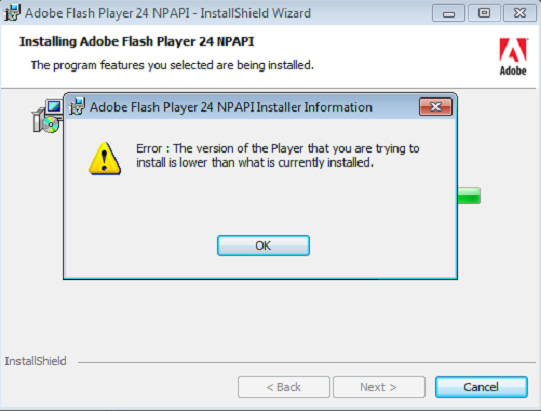
Picture

After digging a little deeper, it seems to be a bug caused by the MSI update of Flash, while previous versions were installed via the web installer (which is the case on some machines...).
Flash provides a tool for uninstalling it, `flash_player_uninstaller`, which can be run silently with the `-uninstall` option.

What do you recommend for cleaning up my system?
I thought about creating a package with the uninstall tool that would be a dependency of the Flash Player package so that it runs first, and then incrementing the Flash Player package so that it redeploys correctly on all machines. What do you think?

User avatar
sfonteneau
WAPT Expert
Messages: 2318
Registered: July 10, 2014 - 11:52 PM
Contact :

February 9, 2017 - 4:33 PM

I tried at one point to include flash_player_uninstaller in the package. But that didn't solve the problems. A cleanup should be included at the beginning of the package
cdeze
Messages: 31
Registration: Nov 29, 2016 - 09:39

June 19, 2017 - 3:50 PM

I'm encountering this problem too, have you found a solution?
installation of Java (JRE)
Checking old java 8...
Installation JRE 32bits
2017-06-19 15:53:06,095 WARNING error for 32797920
2017-06-19 15:53:06,141 WARNING error for 32844144
2017-06-19 15:53:07,842 WARNING ('msiexec /norestart /q /i "jre1.8.0_111.msi" ',) command returns code 1603
2017-06-19 15:53:07,842 CRITICAL Fatal error in install script: EWaptSetupException: Fatal error: MSI jre1.8.0_111.msi has been installed but the uninstall key {26A24AE4-039D-4CA4-87B4-2F32180111F0} can not be found:
Traceback (most recent call last):
File "c:\wapt\common.py", line 3379, in install_wapt
exitstatus = setup.install()
File "c:\windows\temp\wapt_qqu7m\setup.py", line 54, in install
install_msi_if_needed('jre1.8.0_111.msi',killbefore=['firefox.exe','chrome.exe','iexplore.exe','jushed.exe'])
File "c:\wapt\setuphelpers.py", line 3434, in install_msi_if_needed
error('MSI %s has been installed but the uninstall key %s can not be found' % (msi,key))
File "c:\wapt\setuphelpers.py", line 3593, in error
raise EWaptSetupException(u'Fatal error: %s' % reason)
EWaptSetupException: Fatal error: MSI jre1.8.0_111.msi has been installed but the uninstall key {26A24AE4-039D-4CA4-87B4-2F32180111F0} can not be found

2017-06-19 15:53:08,434 CRITICAL Package dsi-java8 not installed due to errors: EWaptSetupException: Fatal error: MSI jre1.8.0_111.msi has been installed but the uninstall key {26A24AE4-039D-4CA4-87B4-2F32180111F0} can not be found
installing WAPT packages dsi-java8
Installing dsi-java8

Results:

=== install packages ===
dsi-java8 | dsi-java8 (8.111-23)

=== errors packages ===
dsi-java8 | dsi-java8 (8.111-23)
cdeze
Messages: 31
Registration: Nov 29, 2016 - 09:39

June 19, 2017 - 4:57 PM

Okay, sorry about this message, version 8.0.131 seems to work better...
Locked
