[RESOLVED] Windows 10 WAPT Deployment

Questions about WAPT Server / Requests and help related to the WAPT server
Forum Rules
Community Forum Rules
* English support on www.reddit.com/r/wapt
* French community support is available on this forum
* Please prefix the topic title with [RESOLVED] if it is resolved.
* Please do not edit a topic that is tagged [RESOLVED]. Open a new topic referencing the old one.
* Specify the installed WAPT version, full version, and build number (2.2.1.11957 / 2.2.2.12337 / etc.) as well as the Enterprise/Discovery edition.
* Versions 1.8.2 and earlier are no longer supported. The only questions accepted regarding version 1.8.2 are related to upgrading to a supported version (2.1, 2.2, etc.).
* Specify the server OS (Linux/Windows) and version (Debian Buster/Bullseye - CentOS 7 - Windows Server 2012/2016/2019).
* Specify the OS of the administration/package creation machine and the machine with the problematic agent, if applicable (Windows 7/10/11/Debian 11/etc.).
* Avoid asking multiple questions when opening a topic, otherwise it may be ignored. If there are multiple topics, open separate topics, preferably one after the other and not all at the same time (i.e., do not spam the forum).
* Include code snippets, screenshots, and other images directly in the post. Links to Pastebin, Bitly, and other third-party sites will be systematically removed.
* As with any community forum, support is provided voluntarily by members. If you require commercial support, you can contact Tranquil IT's sales department at 02.40.97.57.55
florian777
Messages: 32
Registration: Apr 13, 2022 - 09:53

April 19, 2022 - 4:01 PM

Hello,

I'm currently trying to deploy Windows 10 using the WAPT redeployment solution. So far, I've managed to send the various files:
- baseipxe / get_host_ipxe / runinstall_uefi.pxe / boot.sdi and boot.wim,
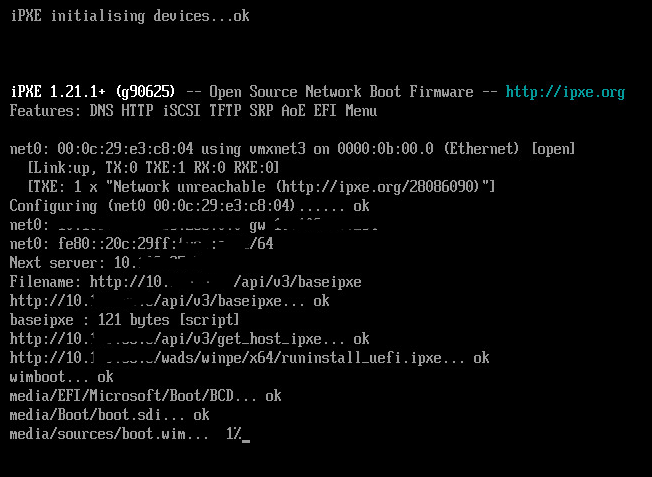
Picture

but as soon as the Windows installation starts, this window opens for about 5 minutes:

Picture

then it closes and I'm stuck on this second window:
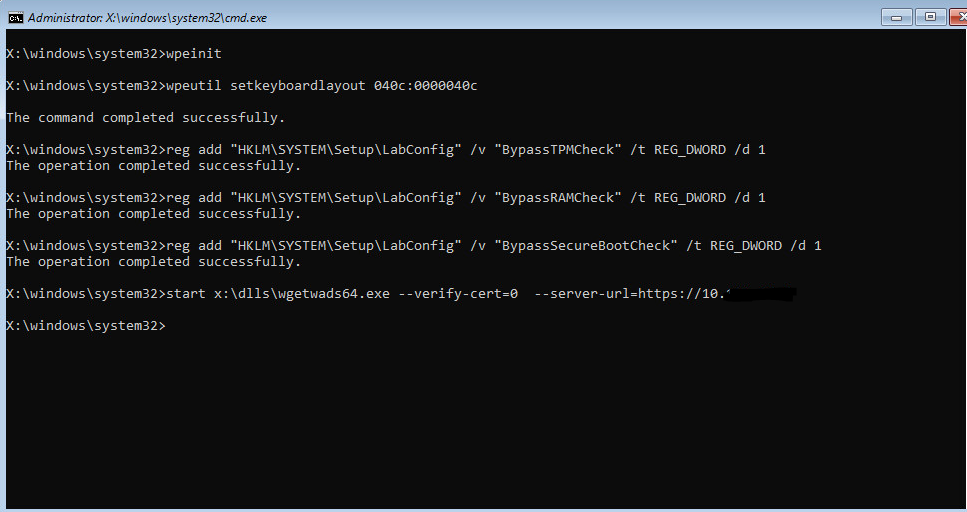
Picture

so if anyone has a solution, I'd be very grateful.
User avatar
dcardon
WAPT Expert
Messages: 1932
Registration: June 18, 2014 - 09:58
Location: Saint Sébastien sur Loire
Contact :

April 20, 2022 - 2:08 PM

Hello florian777,

what version of WAPT are you using? What OS/server version?

This is a problem that has been reported to us and occurs when the network takes too long to connect in WinPE. A fix was included in the latest version, wapt-2.2.1.11899-2d82654e.
Note: you must run postconf.sh after installation (nginx configuration as well).

Regards,

Denis
Denis Cardon - Tranquil IT
Share your experiences on WAPT! Send us your blog and article URLs in the "Your Opinion of the forum, and we'll feature them on the WAPT
florian777
Messages: 32
Registration: Apr 13, 2022 - 09:53

April 20, 2022 - 4:10 PM

Hello,

here is the WAPT version. Unfortunately, the problem seems to persist with "register host (ipxe)".
However, by using "register host (winpe64)", I managed to perform two deployments, but I had to restart about ten times to succeed.

WAPT version: 2.2.1.11899 rev 2d82654e
Server: Windows 2016

Thank you.
florian777
Messages: 32
Registration: Apr 13, 2022 - 09:53

April 21, 2022 - 3:19 PM

Also, something to add: 90% of the time during IPXE initialization (downloading boot.wim files, etc.), the IP address the machine receives is the one specified in my DHCP reservation. However, as soon as it enters the Windows environment, I get an APIPA address, which means the client can no longer connect to the WAPT server
chris2b
Messages: 19
Registration: July 1, 2021 - 10:09 AM

April 21, 2022 - 3:40 PM

Hello, following up on this post, I have a problem.
I followed the webinar and the documentation.
Here is the information:
WAPT Server version: 2.2.1
WAPT Agent version: 2.0.0.9428
WAPT Setup Version: N/A
WAPT Deploy version: 2.2.1.11899
Base status: OK (2.2.5.1)
On a Windows 2019 server.

Wapt console on Windows 10 (also tested on Windows 11)

I configured DHCP and TFTP, but when I start the client machine, it boots into a loop on the ipxe.efi file
Untitled 1.jpg
Untitled 1.jpg (140.59 KB) Viewed 11250 times
I don't know what to do, I never get the menu, I'm stuck at this step.
I have 37 machines arriving on May 9th, it would be very useful for me to be able to deploy them with the software packages.
florian777
Messages: 32
Registration: Apr 13, 2022 - 09:53

April 21, 2022 - 4:00 PM

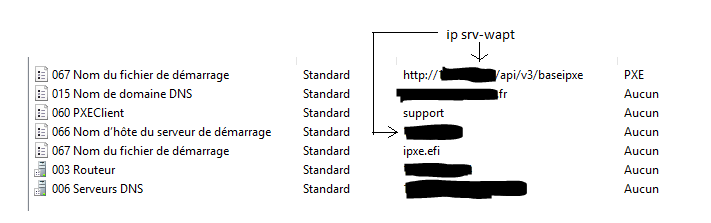
Regarding DHCP, do you have roughly this configuration?
Picture
chris2b
Messages: 19
Registration: July 1, 2021 - 10:09 AM

April 21, 2022 - 4:06 PM

Yes
Untitled 2.jpg
Untitled 2.jpg (40.04 KB) Viewed 11238 times
chris2b
Messages: 19
Registration: July 1, 2021 - 10:09 AM

April 21, 2022 - 4:57 PM

Good morning,
I redid everything from the beginning and it's good, I get the menu, I select register ipxe.
I then go to my Wapt console to launch the deployment and it tells me to prepare the join; when I click yes I get
Untitled 3.jpg
Untitled 3.jpg (23.51 KB) Viewed 11231 times
I'll do some research...
florian777
Messages: 32
Registration: Apr 13, 2022 - 09:53

April 22, 2022 - 9:46 AM

Did you also experience the problem of the IP configuration changing when you go through the Windows installation process?
User avatar
dcardon
WAPT Expert
Messages: 1932
Registration: June 18, 2014 - 09:58
Location: Saint Sébastien sur Loire
Contact :

April 22, 2022 - 12:39

Hi Floriant,

do you see the requests arriving on your DHCP server when WinPE starts?

Is your test machine a laptop with a USB-C dock? We've had cases where the laptop's MAC address is used during PXE boot, and then the laptop's MAC address is used in WinPE.

Regards,

Denis
Denis Cardon - Tranquil IT
Share your experiences on WAPT! Send us your blog and article URLs in the "Your Opinion of the forum, and we'll feature them on the WAPT
Locked