Using remote assistance

Share your tips or issues concerning the WAPT Console or WAPT Agent here
Forum Rules
Community Forum Rules
* English support on www.reddit.com/r/wapt
* French community support is available on this forum
* Please prefix the topic title with [RESOLVED] if it is resolved.
* Please do not edit a topic that is tagged [RESOLVED]. Open a new topic referencing the old one.
* Specify the installed WAPT version, full version, and build number (2.2.1.11957 / 2.2.2.12337 / etc.) as well as the Enterprise/Discovery edition.
* Versions 1.8.2 and earlier are no longer supported. The only questions accepted regarding version 1.8.2 are related to upgrading to a supported version (2.1, 2.2, etc.).
* Specify the server OS (Linux/Windows) and version (Debian Buster/Bullseye - CentOS 7 - Windows Server 2012/2016/2019).
* Specify the OS of the administration/package creation machine and the machine with the problematic agent, if applicable (Windows 7/10/11/Debian 11/etc.).
* Avoid asking multiple questions when opening a topic, otherwise it may be ignored. If there are multiple topics, open separate topics, preferably one after the other and not all at the same time (i.e., do not spam the forum).
* Include code snippets, screenshots, and other images directly in the post. Links to Pastebin, Bitly, and other third-party sites will be systematically removed.
* As with any community forum, support is provided voluntarily by members. If you require commercial support, you can contact Tranquil IT's sales department at 02.40.97.57.55
Locked
PierreC
Messages: 6
Registration: August 2, 2018 - 4:09 PM

October 3, 2018 - 2:07 PM

Hello,
I've been a WAPT user for three months, and I'm having trouble using remote assistance via the console. I'm very interested in this feature, but I haven't seen any prerequisites.
When I try to take control of a computer using the remote assistance function, I get the following error: [Error message

Picture

here]. What are the prerequisites for using this feature on computers? I've tried enabling services in the security policies and adding exceptions in the firewall, but I haven't been able to get any further than this screenshot.
My network is 80% up-to-date Windows 10, if that helps.
User avatar
dcardon
WAPT Expert
Messages: 1929
Registration: June 18, 2014 - 09:58
Location: Saint Sébastien sur Loire
Contact :

October 4, 2018 - 10:07

Hello PierreC,
PierreC wrote: Oct 3, 2018 - 2:07 PM I've been a WAPT user for 3 months, and I'm having trouble using remote assistance via the console. I'm very interested in this feature, but I haven't seen any prerequisites for its use.
When I try to take control of a computer using the remote assistance function, I get the following error:
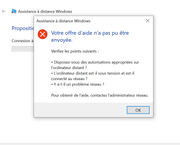
Picture

What are the prerequisites for using this feature on computers? I've tried a bit by enabling the services in the security policies or adding exceptions in the firewall, but I haven't been able to get beyond this screenshot.
My network is 80% up-to-date Windows 10, if that helps.
The mechanics behind this menu are based on Microsoft Windows Remote Assistance (MSRA [1]). We integrated it for one of our clients, following their specifications and usage guidelines, but we don't use it ourselves. There's configuration required on both the Windows and Active Directory domain sides for it to work, and I don't have the documentation to do so. The command line launched by this menu is:

Code: Select all

msra /offerRA <adresse_ip_du_poste>
If this line works in a cmd.exe file, the menu will function. We'll make the display of this menu optional to avoid confusing system administrators.

If you have the VNC service enabled and listening on the workstations (not ideal), and you have TightVNC installed on your machine, you can also use this option; a menu item will be displayed in the same location. If you have TeamViewer Enterprise, you can take a look at the following thread where a user integrated a TeamViewer menu into their WaptConsole by recompiling it [2].

The remote access functionality fully integrated into WAPT (i.e., without dependency on tools or configuration external to WAPT) will be available in WAPT Enterprise in the future.

Sincerely,

Denis

[1] https://technet.microsoft.com/en-us/lib...56868.aspx
[2] viewtopic.php?f=9&t=463&hilit=teamviewer
Denis Cardon - Tranquil IT
Share your experiences on WAPT! Send us your blog and article URLs in the "Your Opinion of the forum, and we'll feature them on the WAPT
PierreC
Messages: 6
Registration: August 2, 2018 - 4:09 PM

October 5, 2018 - 10:03

Thanks for the feedback.
I followed this tutorial http://www.rigolet.fr/articles.php?article_id=18 and it seems good.
I just need to fine-tune it a bit to check the UAC issues via the security office, which shouldn't be necessary.
Locked
