
Thanks for the reply.
Regarding the installation of version 1.3.5, do I install it over the existing version or do I need to uninstall everything? It would be more convenient for me to install it over the existing version because I tried installing it directly and encountered problems.
Thanks for your invaluable help,
Knpc.
How did you deploy your agent?
Forum Rules
Community Forum Rules
* English support on www.reddit.com/r/wapt
* French community support is available on this forum
* Please prefix the topic title with [RESOLVED] if it is resolved.
* Please do not edit a topic that is tagged [RESOLVED]. Open a new topic referencing the old one.
* Specify the installed WAPT version, full version, and build number (2.2.1.11957 / 2.2.2.12337 / etc.) as well as the Enterprise/Discovery edition.
* Versions 1.8.2 and earlier are no longer supported. The only questions accepted regarding version 1.8.2 are related to upgrading to a supported version (2.1, 2.2, etc.).
* Specify the server OS (Linux/Windows) and version (Debian Buster/Bullseye - CentOS 7 - Windows Server 2012/2016/2019).
* Specify the OS of the administration/package creation machine and the machine with the problematic agent, if applicable (Windows 7/10/11/Debian 11/etc.).
* Avoid asking multiple questions when opening a topic, otherwise it may be ignored. If there are multiple topics, open separate topics, preferably one after the other and not all at the same time (i.e., do not spam the forum).
* Include code snippets, screenshots, and other images directly in the post. Links to Pastebin, Bitly, and other third-party sites will be systematically removed.
* As with any community forum, support is provided voluntarily by members. If you require commercial support, you can contact Tranquil IT's sales department at 02.40.97.57.55
Community Forum Rules
* English support on www.reddit.com/r/wapt
* French community support is available on this forum
* Please prefix the topic title with [RESOLVED] if it is resolved.
* Please do not edit a topic that is tagged [RESOLVED]. Open a new topic referencing the old one.
* Specify the installed WAPT version, full version, and build number (2.2.1.11957 / 2.2.2.12337 / etc.) as well as the Enterprise/Discovery edition.
* Versions 1.8.2 and earlier are no longer supported. The only questions accepted regarding version 1.8.2 are related to upgrading to a supported version (2.1, 2.2, etc.).
* Specify the server OS (Linux/Windows) and version (Debian Buster/Bullseye - CentOS 7 - Windows Server 2012/2016/2019).
* Specify the OS of the administration/package creation machine and the machine with the problematic agent, if applicable (Windows 7/10/11/Debian 11/etc.).
* Avoid asking multiple questions when opening a topic, otherwise it may be ignored. If there are multiple topics, open separate topics, preferably one after the other and not all at the same time (i.e., do not spam the forum).
* Include code snippets, screenshots, and other images directly in the post. Links to Pastebin, Bitly, and other third-party sites will be systematically removed.
* As with any community forum, support is provided voluntarily by members. If you require commercial support, you can contact Tranquil IT's sales department at 02.40.97.57.55
-
sfonteneau

- WAPT Expert
- Messages: 2380
- Registered: July 10, 2014 - 11:52 PM
- Contact :
Hello
, yes indeed.
You will find instructions on how to update your Wapt server here (Windows version):
https://dev.tranquil.it/scenari/guide_u ... ndows.html
Simon Fonteneau
, yes indeed.
You will find instructions on how to update your Wapt server here (Windows version):
https://dev.tranquil.it/scenari/guide_u ... ndows.html
Simon Fonteneau
Hi,
It now works manually, except that you MUST write the hash entirely in lowercase
I'm starting on the GPO and will get back to you with the result.
Thank you all so much for your help
However, I still get the message at address 127.0.0.1
It now works manually, except that you MUST write the hash entirely in lowercase
I'm starting on the GPO and will get back to you with the result.
Thank you all so much for your help
However, I still get the message at address 127.0.0.1
- waptdeploy.JPG (59.89 KB) Viewed 19059 times
Good morning,
I'm also tearing my hair out trying to install the agent via GPO.
For now I'm testing the command locally, I have:
- Copy waptagent to the root of c:wapt
- retrieved the hash and entered it in the following command:
In the wapt/waptserver/repository/wapt folder, I have:
- waptagent (created via the tools menu)
- waptdeploy
- waptdeploy.version
The contents of waptdeploy.version:
The contents of my order:

The .exe file does not appear to be placed in the temporary file, and therefore the HTTP request does not work.
I'm also tearing my hair out trying to install the agent via GPO.
For now I'm testing the command locally, I have:
- Copy waptagent to the root of c:wapt
- retrieved the hash and entered it in the following command:
In the wapt/waptserver/repository/wapt folder, I have:
- waptagent (created via the tools menu)
- waptdeploy
- waptdeploy.version
The contents of waptdeploy.version:
Code: Select all
1.3.5
https://serveurwapt/wapt/waptserver/repository/wapt/waptsetup-tis.exeCode: Select all
\\serveurwapt\wapt\waptserver\repository\wapt\waptdeploy.exe --hash=f4ac7e3d64887a3ac74d1dc2effa147c87b853d8a4225adde45c694540750a4 --wait=15 --minversion=1.3.5 --waptsetupurl=http://serveurwapt/wapt/waptserver/repository/wapt/waptagent.exe --repo_url=http://serveurwapt/wapt/waptserver/repository/wapt
The .exe file does not appear to be placed in the temporary file, and therefore the HTTP request does not work.
Last edited by a.grisard on Apr 12, 2016 - 10:53, edited 1 time.
I finally managed to deploy my agent locally using a command.
Unfortunately, my GPO isn't working. I set the following parameters (the GPO is correctly deployed to the machine):
Script name: \\serveurad\netlogon\wapt\waptdeploy.exe
Parameters: --hash=be973fac01600641d33239cb45f7863a542f4bb9a0e7d99eed00b6dfedc005f2 --wait=15 --minversion=1.3.5 --repo_url=http://serveurwapt/wapt/
Does anyone have any idea what the problem might be?
Unfortunately, my GPO isn't working. I set the following parameters (the GPO is correctly deployed to the machine):
Script name: \\serveurad\netlogon\wapt\waptdeploy.exe
Parameters: --hash=be973fac01600641d33239cb45f7863a542f4bb9a0e7d99eed00b6dfedc005f2 --wait=15 --minversion=1.3.5 --repo_url=http://serveurwapt/wapt/
Does anyone have any idea what the problem might be?
Last edited by a.grisard on 05 Apr 2016 - 11:33, edited 1 time.
-
SamDaPiRatE
- Messages: 3
- Registration: Apr 27, 2016 - 1:48 p.m.
Hello,
I'm also trying to deploy WaptAgent via GPO, and I'm having trouble...
I think my GPO is correct
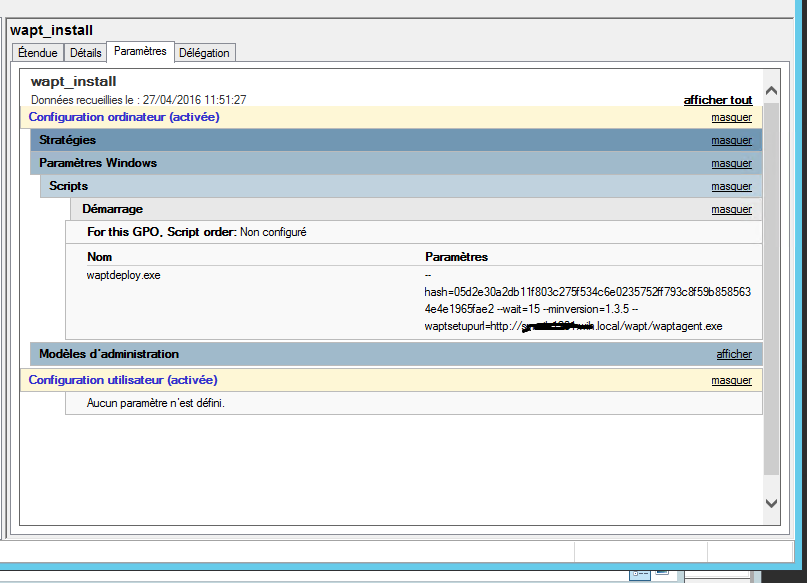
. However, I'm unsure where to place waptdeploy.exe.
I put it in this path: \\MYDOMAIN.local\netlogon\waptdeploy.exe.
Where do you place this waptdeploy.exe file?
Thanks
I'm also trying to deploy WaptAgent via GPO, and I'm having trouble...
I think my GPO is correct
. However, I'm unsure where to place waptdeploy.exe.
I put it in this path: \\MYDOMAIN.local\netlogon\waptdeploy.exe.
Where do you place this waptdeploy.exe file?
Thanks
- Attachments
-
- gpo wapt
- wapt.png (25.78 KB) Viewed 19021 times
-
sfonteneau
- WAPT Expert
- Messages: 2380
- Registered: July 10, 2014 - 11:52 PM
- Contact :
Have you tried running the command manually?
-
SamDaPiRatE
- Messages: 3
- Registration: Apr 27, 2016 - 1:48 p.m.
I tried launching the following command via DOS:
\\domain.local\netlogon\waptdeploy.exe --hash=05d2e30a2db11f803c275f534c6e0235752ff793c8f59b8585634e4e1965fae2 --wait=15 --minversion=1.3.5 --waptsetupurl=http://server.domain.local/wapt/waptagent.exe
It launches successfully, and the agent is installed correctly.
\\domain.local\netlogon\waptdeploy.exe --hash=05d2e30a2db11f803c275f534c6e0235752ff793c8f59b8585634e4e1965fae2 --wait=15 --minversion=1.3.5 --waptsetupurl=http://server.domain.local/wapt/waptagent.exe
It launches successfully, and the agent is installed correctly.
-
sfonteneau
- WAPT Expert
- Messages: 2380
- Registered: July 10, 2014 - 11:52 PM
- Contact :
First of all, run gpupdate /force and then reboot to verify that the startup script gpo has been enabled.
Otherwise:
Have you tried enabling this GPO?
"Always wait for the network to start up and connect"
The settings:
Computer Configuration\Administrative Templates\System\Logon\ Always wait for the network at computer startup and logon
Then, on the client machine, run the following command:
Then restart the
Simon
Otherwise:
Have you tried enabling this GPO?
"Always wait for the network to start up and connect"
The settings:
Computer Configuration\Administrative Templates\System\Logon\ Always wait for the network at computer startup and logon
Then, on the client machine, run the following command:
Code: Select all
gpupdate /force Then restart the
Simon
