Error: Update package (1603)

Questions about WAPT Packaging / Requests and help regarding Wapt packages.
Forum Rules
Community Forum Rules
* English support on www.reddit.com/r/wapt
* French community support is available on this forum
* Please prefix the topic title with [RESOLVED] if it is resolved.
* Please do not edit a topic that is tagged [RESOLVED]. Open a new topic referencing the old one.
* Specify the installed WAPT version, full version, and build number (2.2.1.11957 / 2.2.2.12337 / etc.) as well as the Enterprise/Discovery edition.
* Versions 1.8.2 and earlier are no longer supported. The only questions accepted regarding version 1.8.2 are related to upgrading to a supported version (2.1, 2.2, etc.).
* Specify the server OS (Linux/Windows) and version (Debian Buster/Bullseye - CentOS 7 - Windows Server 2012/2016/2019).
* Specify the OS of the administration/package creation machine and the machine with the problematic agent, if applicable (Windows 7/10/11/Debian 11/etc.).
* Avoid asking multiple questions when opening a topic, otherwise it may be ignored. If there are multiple topics, open separate topics, preferably one after the other and not all at the same time (i.e., do not spam the forum).
* Include code snippets, screenshots, and other images directly in the post. Links to Pastebin, Bitly, and other third-party sites will be systematically removed.
* As with any community forum, support is provided voluntarily by members. If you require commercial support, you can contact Tranquil IT's sales department at 02.40.97.57.55
Marceld
Messages: 28
Registration: March 22, 2023 - 1:19 PM

July 28, 2025 - 10:41

Hello everyone,

For the past few weeks I have been getting more and more posts with error 1603 (via WAPT).

If I look at the workstation logs, I get the following error:
Product: Google Chrome -- Error 1714. The older version of Google Chrome cannot be removed. Contact your technical support group. System Error 1612.
If I try to uninstall the software manually, I get the following message:
errorWAPT.png
errorWAPT.png (39.88 KB) Viewed 15572 times

I'm seeing this problem with various applications (Chrome, Edge...).

What could have caused the deletion of the source files? How can this be corrected without searching through the WAPT history to find the correct version of the source file?

PS: I did use the "Computer Management -> Launch CleanMGR on the machine via WAPT" option, but I did it on the entire fleet without any problems.

Thank you in advance for your help
User avatar
dcardon
WAPT Expert
Messages: 1929
Registration: June 18, 2014 - 09:58
Location: Saint Sébastien sur Loire
Contact :

July 28, 2025 - 11:02

Hello Marceld,

this error is related to the deletion of content in the C:\Windows\Installer directory, which contains the MSI files necessary for uninstallation. Wapt doesn't delete anything there (nor does Microsoft's cleanmgr user). There are other tools for cleaning PCs that tend to delete files a little too quickly.

To correct the problem, you can reinstall the same version that was already installed, and that should replace the correct files in C:\Windows\Installer (but it must be exactly the same version).

Regards,

Denis
Denis Cardon - Tranquil IT
Share your experiences on WAPT! Send us your blog and article URLs in the "Your Opinion of the forum, and we'll feature them on the WAPT
Marceld
Messages: 28
Registration: March 22, 2023 - 1:19 PM

July 28, 2025 - 11:26

Good morning,

Yes, I suspected as much. But how is it that this only happens on a few computers?

We do not have any other cleaning tools on our site. Even if the user had attempted a cleanup, they would not have administrator rights.

I just tested it, and it's impossible to reinstall the same package. It still asks me for the source, though

Result observed with Chrome or Edge:

tvnviewer_y154A9y5Mk.png
tvnviewer_y154A9y5Mk.png (128.3 KB) Viewed 15564 times
Marceld
Messages: 28
Registration: March 22, 2023 - 1:19 PM

July 28, 2025 - 11:55

Delete this comment
Last edited by marceld on August 13, 2025 - 3:25 PM, edited 1 time.
ddcorazon
Messages: 37
Registration: May 30, 2023 - 11:53 p.m.

August 7, 2025 - 10:30 PM

Hello,

I'm experiencing the exact same problem on several computers across my network. It's the same with Chrome, Edge, and now Remote Desktop Manager, even though I've already performed Wapt upgrades that were working perfectly until today.

And it's also redirecting to a folder: C:\windows\temp\wapt_XXXX.
Since uninstalling via Windows didn't work, I used IObit Uninstaller and, once uninstalled, reinstalled it via Wapt. I did this on one machine (mine), but I'm not sure I have the patience to do it manually on several machines.

If anyone has any other suggestions, I'd appreciate it.
Attachments
Screenshot 2025-08-07 214635.png
Screenshot 2025-08-07 214635.png (17.22 KB) Viewed 15193 times
ddcorazon
Messages: 37
Registration: May 30, 2023 - 11:53 p.m.

August 8, 2025 - 00:04

Quick tip

I just had a problem with VirtualBox; I couldn't upgrade. So, I uninstalled it using IObit Uninstaller.

I tried installing it manually and it didn't work.

So yeah, you have to go into the registry editor and delete all the keys related to the software in question.

Another piece of information: when you authorize updates from the Edge interface (Wapt disables them by default, apparently) via the key
HKEY_LOCAL_MACHINE\SOFTWARE\WOW6432Node\Policies\Microsoft\EdgeUpdate\UpdateDefault, it needs to be set to 1

Updating directly from Edge and Chrome works
Before
Screenshot 2025-08-07 235406.png
Screenshot 2025-08-07 235406.png (72.29 KB) Viewed 15186 times
After
Screenshot 2025-08-07 235406.png
Screenshot 2025-08-07 235406.png (72.29 KB) Viewed 15186 times
Otherwise, I think that if the software icon appears white in the control panel, the upgrade from wapt is impossible

And when it crashes and fails to install, it accumulates uninstalled versions
Screenshot 2025-08-20 004412.png
Screenshot 2025-08-20 004412.png (39.77 KB) Viewed 14415 times
Attachments
Screenshot 2025-08-08 001845.png
Screenshot 2025-08-08 001845.png (52.27 KB) Viewed 15184 times
Last edited by ddcorazon on August 20, 2025 - 00:44, edited 1 time.
User avatar
sfonteneau
WAPT Expert
Messages: 2318
Registered: July 10, 2014 - 11:52 PM
Contact :

August 8, 2025 - 10:12

Hi Augustin,

your case is strange, especially if it's happening with multiple programs.

It seems something is deleting files in "C:\Windows\Installer", which is breaking uninstallations and upgrades.

I once had a client on the phone who wanted to free up space on his network of machines. He deleted all the files in "C:\Windows\Installer" to "make room."

He crashed his entire network that way; all the MSI installations were corrupted... (don't touch the C:\Windows\Installer folder under any circumstances).

Simon
ddcorazon
Messages: 37
Registration: May 30, 2023 - 11:53 p.m.

August 8, 2025 - 5:25 PM

Hi Simon,

I'll take a closer look.

Since my machine is affected, I can confirm that I haven't touched the Windows installer (I can't confirm this for the others, especially since some of our clients are administrators).

The only thing we might have in common with my clients is Microsoft's Defender for Business EDR; we'll see if it ever deletes anything in it. Quite strange, I must admit. I'll have to figure out how to resolve this for the other clients, and it's going to be very time-consuming manually; I must have about twenty affected workstations. (It's not so bad, except they're not all on the same site :) .)

Have a good rest of the day.
Marceld
Messages: 28
Registration: March 22, 2023 - 1:19 PM

August 13, 2025 - 3:22 PM

Yes, we're also losing application icons.

I'm using the official Microsoft tool (a deprecated tool, but I can't find the option integrated into Windows 11) called "MicrosoftProgram_Install_and_Uninstall.meta".

It doesn't work with all applications (Adobe, for example), but it does work.
I tried automating the application's launch, but it seems to be no longer supported.

I'm also (almost) certain I haven't touched that folder. But what I've noticed is that other files (dated before the problem started) are present in that folder. So I really don't think there was any intentional deletion.

I still have about 5 to 8 machines affected (out of about 15 in total).

PS: We don't have the same EDR internally (Fortinet).
ddcorazon
Messages: 37
Registration: May 30, 2023 - 11:53 p.m.

August 20, 2025 - 00:30

Hello,

Regarding my problem, it's become widespread since the latest versions, affecting more than half of my network, so I really need to look into it. In any case, I can confirm the deletions aren't intentional. I've run an audit on the installer folder. I'll see what that reveals.

Regarding the problem we're having, I've put together a package that might help; it works in, let's say, 8 or 9 out of 10 cases😅.

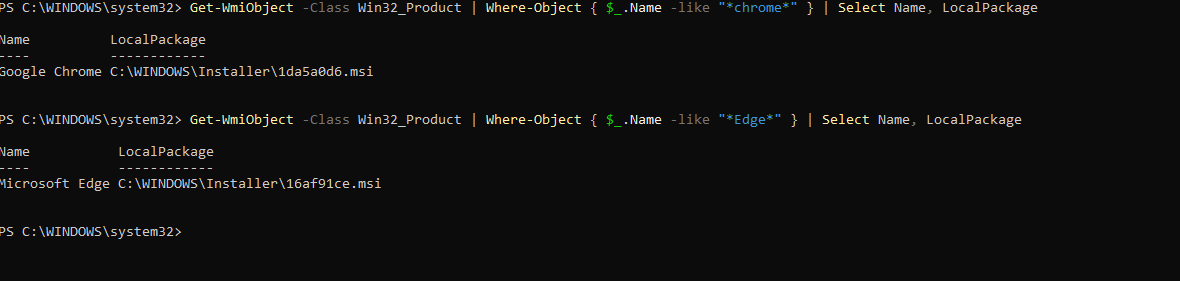
The principle is simple: retrieve the name that the MSI file that Edge or Chrome is supposed to look for in C:\Windows\installer using the command

Code: Select all

Get-WmiObject -Class Win32_Product | Where-Object { $_.Name -like "*Edge*" } | Select Name, LocalPackage
Screenshot 2025-08-20 001140.png
Screenshot 2025-08-20 001140.png (22.48 KB) Viewed 14418 times
and then grab the version of Chrome/Edge that I'm going to use.

Next, you need to get all the "older" versions of Chrome and Edge Enterprise. Edge is fairly easy to find on the Microsoft catalog, but Chrome, apparently the official website says you can't download older versions. I managed to find a few versions on www.filepuma.com (PS: I do not guarantee reliability)
If the versions aren't too old, you can find them on the Wapt store, download them to your PC and copy the .msi file

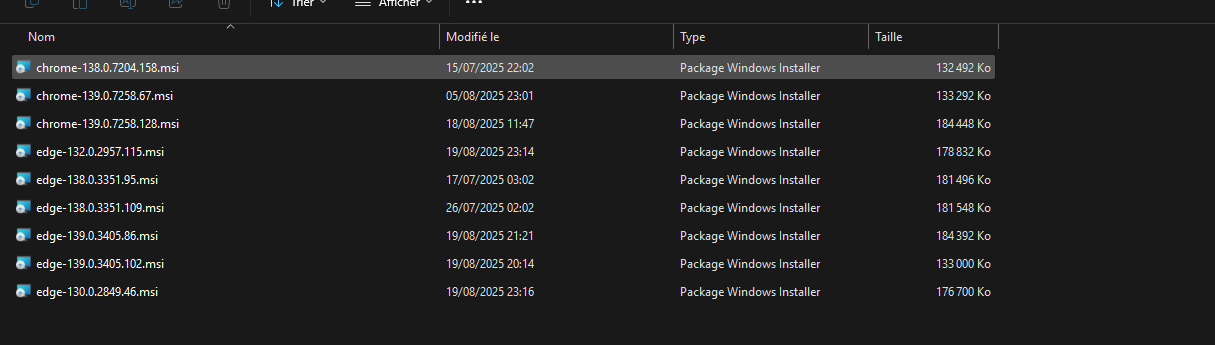
So basically, at the root of my package I have an .msi folder where I'll put my different MSI files, naming them with their version numbers
Screenshot 2025-08-20 000126.png
Screenshot 2025-08-20 000126.png (39.81 KB) Viewed 14418 times
Once that's done, I send everything to my Wapt server and install it on a PC.

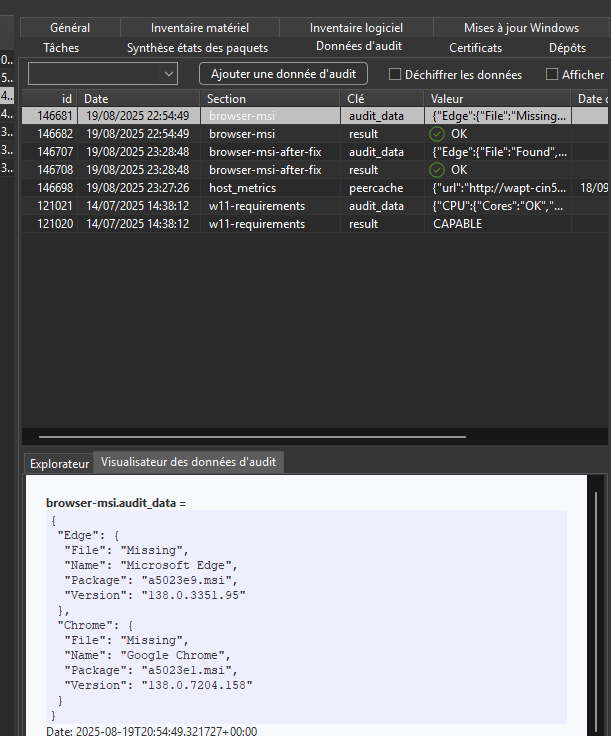
It will then launch the installer, which will copy the MSI files to a folder on the machine within WAPT (they will be deleted afterward). Then, during the package audit (there are two), it performs an initial audit to check the versions and then the names of the MSI files, which should be located in C:\Windows\Installer. The result will mark the file as missing or found, depending on whether it was located or not. The result is shown in the browser-msi audit log
Screenshot 2025-08-20 000759.png
Screenshot 2025-08-20 000759.png (45.33 KB) Viewed 14418 times
(File: status of the file, whether it is found or not in the installer folder)
Name: the name of the software
Package: the name of the MSI file it is supposed to look for in the installer folder
Version: the currently installed version)
If it cannot find the file, it will copy the msi from the wapt folder to c:\windows\installer, naming it according to the name I retrieved earlier with the Get-WmiObject command (name retrieved in the audit under "Package")
Once that's done, it performs another audit, and if the files were copied correctly, it marks them as found. The result of the second audit is located under browser-msi-after-fix

(The rest is in the next message since I can only post 3 screenshots.)
Last edited by ddcorazon on August 20, 2025 - 00:48, edited 1 time.
Answer

