Good morning,
I'm back with a few more ideas, even if I don't have a solution (and I wouldn't find one anyway ^^)
So, the postconf problem which crashes in "segfault" does indeed occur from the first 2.6.1.
I tried launching postconf.py with each Python environment (well, I'm not a developer... I'll probably say some stupid things, but anyway)
Code: Select all
/opt/wapt/bin/python3.10
/opt/wapt/bin/python3.9
/opt/wapt/bin/python*oopsjesaisplusdsl*
but I got the same memory error when I tested it.
In short, I installed the latest version 2.6.0 (wapt-2.6.0.17392-0ac7bf48)
Code: Select all
cd /tmp

wget https://wapt.tranquil.it/wapt/releases/wapt-2.6.0.17392-0ac7bf48/tis-waptsetup-windows-2.6.0.17392-0ac7bf48-debian-10-amd64.deb
wget https://wapt.tranquil.it/wapt/releases/wapt-2.6.0.17392-0ac7bf48/tis-waptserver-2.6.0.17392-0ac7bf48-arm64.deb

apt install ./tis-waptserver-2.6.0.17392-0ac7bf48-arm64.deb ./tis-waptsetup-windows-2.6.0.17392-0ac7bf48-debian-10-amd64.deb
I then executed the
Code: Select all
/opt/wapt/waptserver/scritp/postconf.sh -s
who was able to get started.
However, there was already an issue in this version at the end of the postconf that I had already managed to work around/resolve before.
It was quite explicit:
Code: Select all
Output:Traceback (most recent call last):
  File "/opt/wapt/wapt-scanpackages.py", line 140, in <module>
    main()
  File "/opt/wapt/wapt-scanpackages.py", line 101, in main
    res2 = len(update_packages_table(conf, wapt_path))
  File "/opt/wapt/wapt-scanpackages.py", line 46, in update_packages_table
    load_db_config(conf, conf.get('db_schema'))
  File "/opt/wapt/waptserver/model.py", line 105, in load_db_config
    with wapt_db:
  File "/opt/wapt/lib/python3.9/site-packages/peewee.py", line 481, in inner
    return getattr(self.obj, method)(*args, **kwargs)
  File "/opt/wapt/lib/python3.9/site-packages/peewee.py", line 3231, in __enter__
    self.connect()
  File "/opt/wapt/lib/python3.9/site-packages/playhouse/pool.py", line 133, in connect
    ret = super(PooledDatabase, self).connect(reuse_if_open)
  File "/opt/wapt/lib/python3.9/site-packages/peewee.py", line 3263, in connect
    self._state.set_connection(self._connect())
  File "/opt/wapt/lib/python3.9/site-packages/playhouse/pool.py", line 83, in inner
    return fn(self, *args, **kwargs)
  File "/opt/wapt/lib/python3.9/site-packages/playhouse/pool.py", line 177, in _connect
    conn = super(PooledDatabase, self)._connect()
  File "/opt/wapt/lib/python3.9/site-packages/playhouse/postgres_ext.py", line 476, in _connect
    conn = super(PostgresqlExtDatabase, self)._connect()
  File "/opt/wapt/lib/python3.9/site-packages/peewee.py", line 3991, in _connect
    raise ImproperlyConfigured('Postgres driver not installed!')
peewee.ImproperlyConfigured: Postgres driver not installed!
From what I understand, the postgres driver was missing in the python3.9 environment (psycopg2), so I did the following:
So afterwards, after doing some research, it turned out to be "psycopg2-binary" and not "psycopg2"... (apparently to avoid possible "compilation dependency" problems...?)
Code: Select all
/opt/wapt/bin/python3.9 -m pip install psycopg2-binary
and I restarted the post-conference meeting which was able to finish.
This time I didn't wait and I redid the procedure to restore the database (which finished correctly, I had already restored everything else the first time).
I restarted a postconf (necessary? I think that's the first thing that postconf does, edit/update the database or... I don't really know).
and (after waptsetup -> install -> open console) upon restarting the console, a small relief:
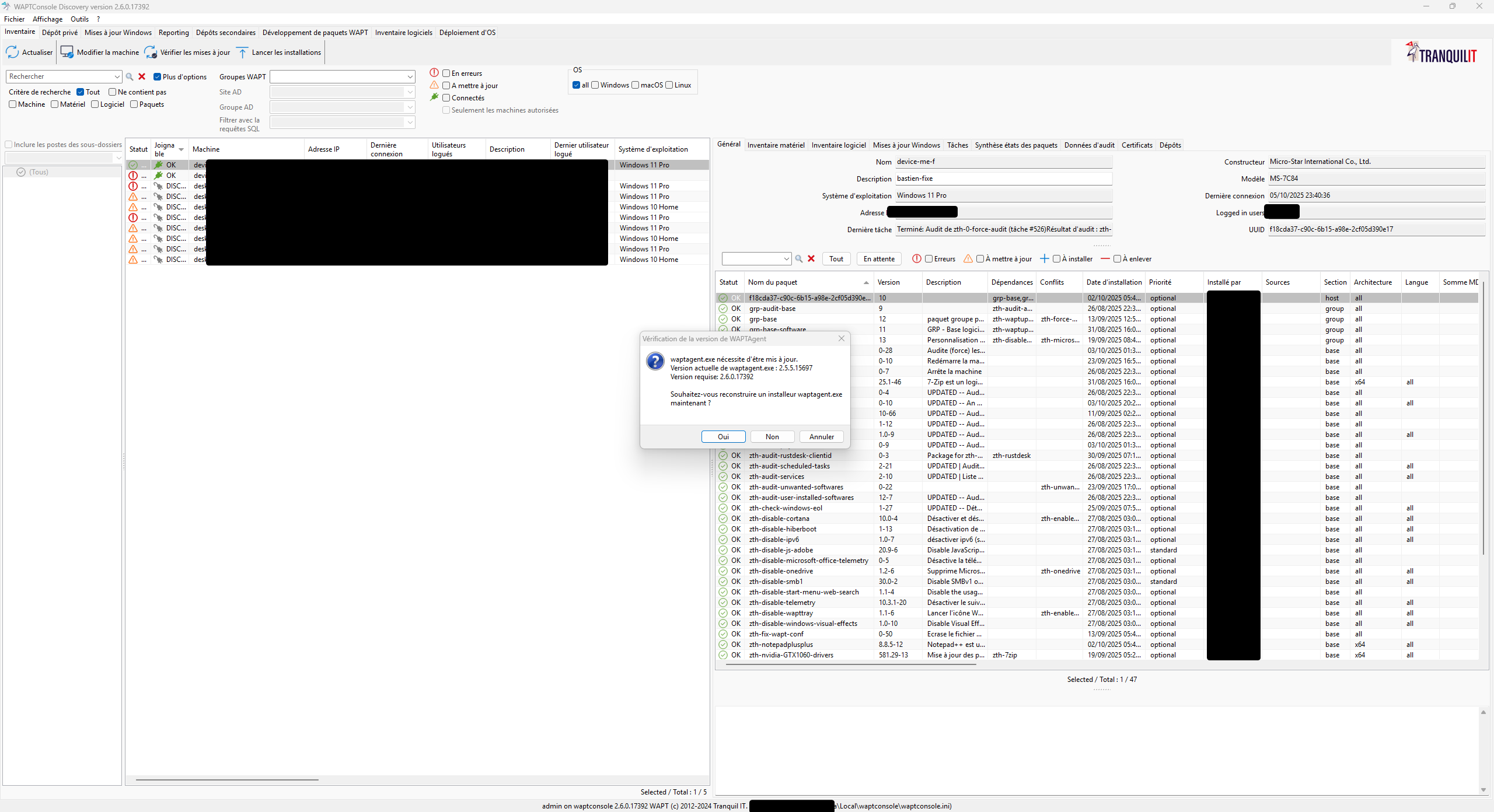
- 251006_00h06m16s_1759701976.png (235.73 KB) Viewed 29533 times
However, apart from my admin position, all agents are on 2.6.1 (so n+1) but everything seems to be working (inventory / update / install / waptexit / etc)
I did regenerate an agent in version 2.6.0.17392, but then I wondered what the best course of action would be:
- Overwrite agent 2.6.1 with version 2.6.0.17392 using a force install?
I'm going to stay on 2.6.0.17392, if I go back to 2.6.1, I don't think the postconf will work.
Commander.


 I'll have to "decipher" it a bit ^^